
Loading article…
.svg/500px-Mac_Pro_(logo).svg.png) | |
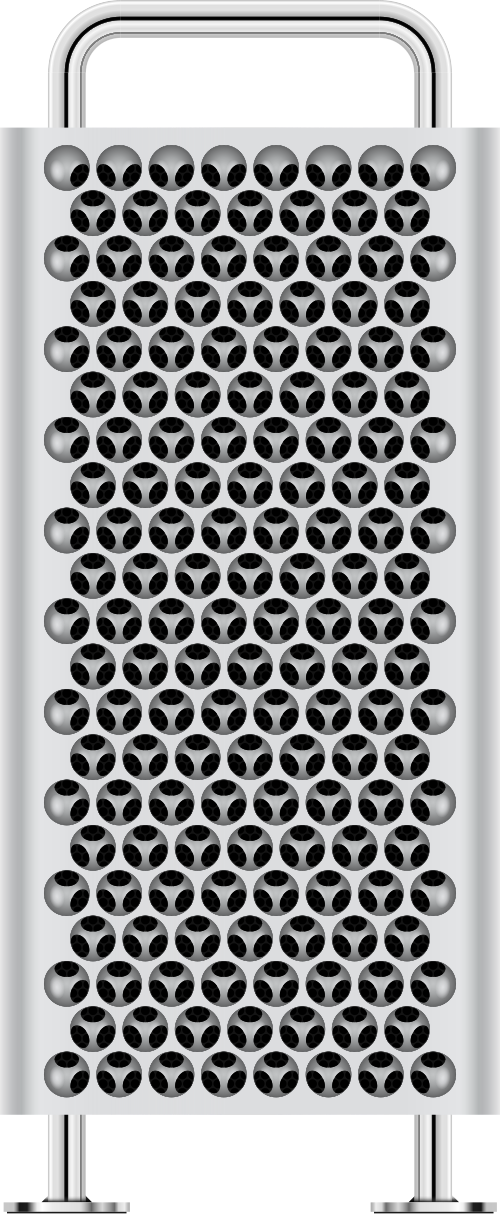 2023「チーズグレーター」Mac Pro | |
| 開発者 | アップル社 |
|---|---|
| タイプ | |
| 発売日 |
|
| オペレーティング·システム | macOS |
| システムオンチップ | Apple M2 Ultra (現行) |
| CPU | インテルXeon (2006–2023) |
| 前任者 | Power Mac G5、Xserve |
| 関連している | iMac、Mac Mini、Mac Studio、iMac Pro |
| Webサイト | apple.com/mac-pro |
Mac Pro は、Apple 社が 2006 年から製造しているプロフェッショナル向けのワークステーションおよびサーバーのシリーズです。いくつかのパフォーマンス ベンチマークによると、Mac Pro は Apple 社が提供する最も強力なコンピューターです。現在のMacラインナップにある 4 つのデスクトップ コンピューターの 1 つで、 Mac Mini、iMac、Mac Studioより上位に位置します。
2006年8月に発表されたMac Proは、Power MacラインのIntelベースの後継機で、2つのデュアルコアXeon Woodcrest プロセッサと、 Power Mac G5から引き継いだ長方形のタワーケースを備えていた。2007年4月4日にはデュアルクアッドコアXeon Clovertownモデルに更新され、2008年1月8日にはデュアルクアッドコアXeon Harpertownモデルに更新された。[1] 2010年改訂版と2012年改訂版には、 Nehalem-EP / Westmere-EPアーキテクチャのIntel Xeonプロセッサが搭載されていた。
2013年12月、Appleは新しい円筒形のMac Pro(俗に「ゴミ箱Mac Pro」[2]と呼ばれた)をリリースした。Appleによれば、第1世代の2倍の総合性能を持ちながら、体積は8分の1以下だったという。[3]最大12コアのXeon E5プロセッサ、デュアルAMD FirePro DシリーズGPU、PCIeベースのフラッシュストレージ、HDMIポートを備えていたが、 PCIe拡張スロットはなかった。Thunderbolt 2ポートにより、有線接続が更新され、6台のThunderboltディスプレイがサポートされた。当初のレビューは概ね好評だったが、いくつか注意点もあった。円筒形デザインの制限により、Appleは円筒形のMac Proをより強力なハードウェアでアップグレードすることができなかった。
2019年モデルのMac Proは、第1世代モデルを彷彿とさせるタワー型フォームファクタに戻りましたが、より大きな空冷穴と新しい開閉機構を備えています。最大28コアのXeon-Wプロセッサ、8つのPCIeスロット、AMD Radeon Pro Vega GPUを搭載し、ほとんどのデータポートをUSB-CとThunderbolt 3に置き換えています。
2023年型Mac Proは2019年型のデザインを引き継ぎ、Apple M2 Ultraチップをベースにしている。Appleシリコンチップを搭載した初のモデルとなる。このモデルの導入により、2020年6月に初めて発表され、同年11月に開始されたMacのIntelプロセッサからAppleプロセッサへの移行が完了した。
タワー(2006年~2012年)

Appleは、2003年のPowerPCベースのPower Mac G5マシンに代わるIntelベースのマシンが、2006年8月7日のApple Worldwide Developers Conference (WWDC)でMac Proが正式に発表される以前から期待されていたと述べた。 [4] 2005年6月、Appleは開発者移行キットをリリースした。これは、Power Mac G5ケースに収められたIntel Pentium 4ベースのプロトタイプMacで、開発者が一時的に利用できるものだった。 [5] iMac 、Mac Mini、MacBook、MacBook Proは2006年1月からIntelベースのアーキテクチャに移行しており、Power Mac G5は、Appleが1994年以来使用してきたPowerPCプロセッサアーキテクチャをベースにした唯一のMacラインナップとなった。Appleは、ラインナップの他のマシンから「Power」という用語を削除し、ハイエンドのラップトップ製品に「Pro」を使い始めた。そのため、「Mac Pro」という名前は、マシンが発表される前から広く使用されていた。[6] Mac ProはオペレーティングシステムがUnixベースであるため、Unixワークステーション市場に属している。 [7]ハイエンド技術市場は伝統的にAppleの得意分野ではないが、同社は一般的なデスクトップマシンをはるかに超えるストレージとメモリを必要とする高精細ビデオの非線形デジタル編集のリーダーとしての地位を確立している。さらに、これらのアプリケーションで使用されるコーデックは一般にプロセッサ集約型でスレッド化が高度に進んでおり、AppleのProResホワイトペーパーではプロセッサコアの追加に伴ってほぼ直線的に拡張されると説明されている。この市場をターゲットにしたAppleの以前のマシンであるPower Mac G5は、最大2つのデュアルコアプロセッサ(「クアッドコア」として販売)を搭載しているが、新しい設計のようなストレージ拡張機能はない。[6]
Mac Proのオリジナルのマーケティング資料では、一般的に2.66GHzのデュアルコアプロセッサを2基搭載したミドルレンジモデルについて言及されていた。以前、Appleは価格を説明する際にベースモデルを「~から」または「~から」という言葉で紹介していたが、オンラインの米国Apple Storeでは、ミッドレンジモデルの価格である「Mac Pro 2499ドル」と記載していた。システムは2299ドルで構成することができ、以前のベースモデルのデュアルコアG5の1999ドルとかなり同等だが、処理能力はかなり高い。改訂後、Mac Proのデフォルト構成には、2.66GHzのクアッドコアXeon 3500が1基、または2.26GHzのクアッドコアXeon 5500が2基含まれている。[8]前身のPower Mac G5と同様に、2013年以前のMac Proは、グラフィックアダプタやその他の拡張カード用の標準拡張スロットを備えたAppleの唯一のデスクトップであった。
2012年のWWDCカンファレンスの後、AppleはMac Proラインの段階的アップグレードを行った後、批判を浴びた。このラインはデフォルトのメモリが増え、プロセッサ速度も向上したが、新しいXeon E5シリーズではなく、Intelの古いWestmere-EPプロセッサが使われていた。[9]また、このラインにはSATA III、USB 3、Thunderboltなどの当時の最新技術が欠けていた。Thunderboltは当時他のすべてのMacintoshに追加されていた。AppleのCEOティム・クックからの電子メールは、2013年にラインのより大幅なアップデートを約束した。[10]
アップルは、安全規制の改正によりプロ用Macが規制に準拠しなくなったため、2013年3月1日にヨーロッパで第1世代Mac Proの出荷を停止した。注文の最終日は2013年2月18日であった。[11]第1世代Mac Proは、2013年10月22日のメディアイベントで再設計された円筒形のMac Proが発表された後、アップルのオンラインストアから削除された。
システムアーキテクチャ
Apple の開発者ノートによると、システム アーキテクチャはノース ブリッジとサウス ブリッジの設計に基づいています。ノース ブリッジには、プロセッサごとに 1 つずつ、合計 2 つのフロントサイド バス (FSB)接続があります。ノース ブリッジは、通常グラフィック カードに接続される 1 つの x16 PCI Express (PCIe) リンクも駆動します。ノース ブリッジは、エンタープライズ サウス ブリッジ インターフェイス (ESI) と PCIe リンクを使用してサウス ブリッジに接続します。サウス ブリッジは、SATA、USB、ネットワークなど、システム内の他のすべての接続を処理します。[12]
CPU
すべての初代タワー型Mac Proシステムは、1つまたは2つの中央処理装置(CPU)で利用できました。2012年の時点で、2、4、6、8、または12コアのモデルが販売されていました。たとえば、8コア標準構成のMac Pro 2010は、2.4GHzの4コアIntel Xeon E5620 CPUを2つ使用します が、[8] [13] 2.93GHzの6コアIntel Xeon X5670 CPUを2つ構成することもできます。 [14] 2006~2008年モデルはLGA 771ソケットを使用し、2009年初頭以降のモデルはLGA 1366ソケットを使用します。つまり、どちらも取り外して、互換性のある64ビットIntel Xeon CPUに交換できます。[15] 64ビットEFIファームウェアはMacPro3,1まで導入されませんでした。それ以前のモデルは、64ビットXeonプロセッサを搭載しているにもかかわらず、32ビットとしてしか動作できませんが、これはシステムのEFI側にのみ適用されます。Macは他のすべてをBIOS互換モードで起動し、オペレーティングシステムは完全な64ビットサポートを利用できます。新しいLGA 1366ソケットは、独立したシステムバスの代わりにCPUに統合されたIntelのQuickPath Interconnect (QPI)を使用します。つまり、「バス」周波数はCPUチップセットに相対的であり、CPUのアップグレードはコンピューターの既存のアーキテクチャによってボトルネックになりません。
メモリ
オリジナルのMac Proのメインメモリは667MHz DDR2 ECC FB-DIMMを使用しています 。 2008 年 初頭のモデルは800MHz ECC DDR2 FB-DIMMを使用し、2009年以降のMac Proは標準モデルで1066MHz DDR3 ECC DIMM 、 2.66GHz以上のCPUで構成されたシステムでは1333MHz DDR3 ECC DIMMを使用しています。 [16]オリジナルモデルと2008年モデルでは、これらのモジュールは2枚のライザーカードに1つずつ、ペアでインストールされています。カードにはそれぞれ4つのDIMMスロットがあり、合計32GB ( 1GB = 10243B )のメモリ(8×4GB )をインストールできます。[17]特に、FB-DIMMアーキテクチャのため、Mac ProにRAMを増設するとメモリ帯域幅が向上しますが、メモリレイテンシも増加する可能性があります。[18] FB-DIMMを1枚だけ取り付けた場合、ピーク帯域幅は8000MB /秒(1MB = 10002B )ですが、2つのバスに1枚ずつ、計2枚のFB-DIMMを取り付けることで16000MB/秒まで増加します。これはAppleのデフォルト構成です。電気的にはFB-DIMMは標準ですが、2009年以前のMac Proモデルでは、Appleはメモリモジュールに通常よりも大きなヒートシンクを指定しています。通常サイズのFB-DIMMヒートシンクを備えたサードパーティのRAMを使用したユーザーから問題が報告されています。[19](以下の注を参照)。2009年以降のMac Proコンピュータでは、ヒートシンク付きのメモリモジュールは必要ありません。
ハードドライブ
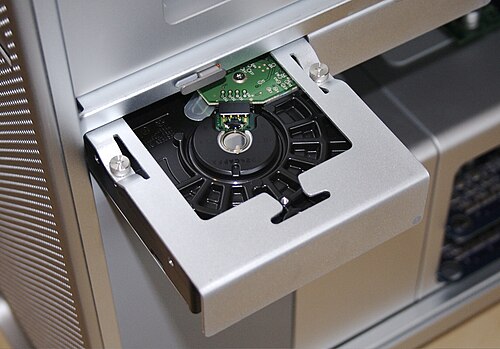
Mac Pro には、4 つの内部「ベイ」に 4 つの内部 3.5 インチSATA-300 ハードドライブを搭載できるスペースがありました。ハードドライブは、個別のトレイ (「スレッド」とも呼ばれる) にキャプティブ ネジで取り付けられていました。各マシンには、4 つのドライブ トレイのセットが付属していました。システムにハードドライブを追加する場合、対応するドライブ スロットに挿入するだけでドライブがシステムに接続されるため、ケーブルを接続する必要はありませんでした。システム背面のケース ロックにより、ディスク トレイが所定の位置にロックされました。Mac Pro は、4 つのハードドライブ ベイで、SSD からハードドライブ スレッド アダプタ (2010 年中期モデル以降) を介してシリアル ATA ソリッド ステート ドライブ( SSD )もサポートしていました。また、それ以前のモデルでは、サードパーティ ソリューション (未使用のPCIeスロットに差し込むアダプタ/ブラケットなど) によってサポートされていました。さまざまな 2.5 インチ SSD ドライブの容量と構成がオプションで用意されていました。Mac Pro には、オプションのハードウェアRAIDカードも用意されていました。[20] SASコントローラ カードまたはSAS RAIDコントローラカードにより、SASドライブをシステムのSATAポートに直接接続できます。2つの光学ドライブベイが提供され、それぞれに対応するSATAポートとUltra ATA/100ポートがありました。Mac Proには1つのPATAポートがあり、光学ドライブベイで2つのPATAデバイスをサポートできました。合計6つのSATAポートがあり、4つはシステムのドライブベイに接続され、2つは接続されていませんでした。追加のSATAポートは、市販の延長ケーブルを使用して内部光学ドライブを接続するか、eSATAバルクヘッドコネクタを使用してeSATAポートを提供することで使用できます。 [21]ただし、2つの追加のSATAポートはサポートされておらず、Boot Campでは無効になっています。
拡張カード
2008 年モデルには、PCI Express (PCIe) 2.0 拡張スロットが 2 つと PCI Express 1.1 スロットが 2 つあり、合計で最大 300 Wの電力を供給できます。最初のスロットは幅が 2 倍で、メインのビデオ カードを保持することを目的としており、その横に通常のカードの幅の空き領域が配置され、最近のカードでよく使用される大型クーラー用のスペースが確保されています。ほとんどのマシンでは、1 つのスロットがクーラーによってブロックされます。通常、カードをケースに固定するために使用される小さなネジの代わりに、Mac Pro では、1 つの「バー」がカードを所定の位置に保持します。この「バー」自体は、ツールなしで手で緩めることができ、ケースから落ちることのない 2 つの「固定」つまみネジによって所定の位置に保持されます。
2006年8月に発表された初代Mac Proでは、PCIeスロットを個別に設定して、必要なデバイスにさらに帯域幅を与えることができ、合計40の「レーン」、つまり合計13 GB/sのスループットを実現した。Mac OS Xでは、Mac ProはSLIやATI CrossFireをサポートしていなかったため、[22]最新の「ハイエンドゲーミング」ビデオカード製品を使用する能力が制限されていた。しかし、 SLIとCrossFireの互換性は主にソフトウェアの機能であるため、 Windows XPではCrossFireとSLIの両方のインストールで成功したという報告もある。
PCIe スロットの帯域幅割り当ては、2006 年 8 月の Mac Pro でのみ、Mac OS X に付属する拡張スロット ユーティリティを使用して設定できます。2008 年初頭以降の Mac Pro では、添付の表のように PCIe スロットがハードワイヤード接続されていました。
外部接続
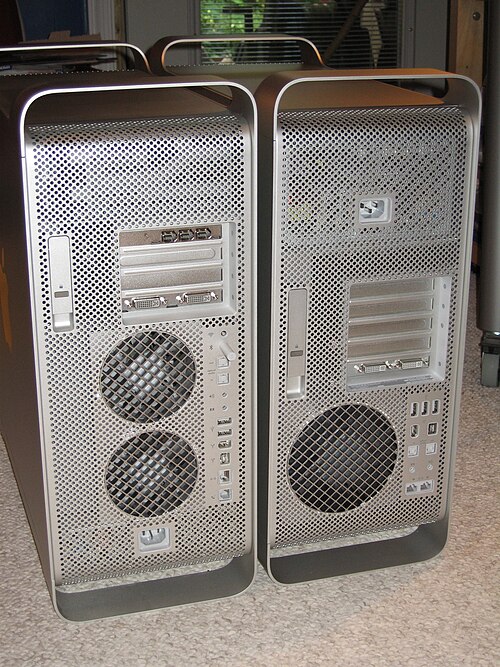
外部接続用として、Mac Pro には 5 つのUSB 2.0ポート、2 つのFireWire 400 ポートと 2 つのFireWire 800 ポート(2006 年後半から 2008 年初頭まで)、4 つの FireWire 800 ポート (2009 年初頭から 2012 年中頃まで) が含まれていました。ネットワークは、 2 つの内蔵ギガビット Ethernetポートでサポートされていました。802.11 a /b/g/n Wi-Fiサポート ( AirPort Extreme ) には、2006 年中頃、2008 年初頭、2009 年初頭のモデルではオプションのモジュールが必要でしたが、2010 年モデル以降では Wi-Fi が標準でした。Bluetoothも 2006 年中頃のモデルではオプションのモジュールが必要でしたが、2008 年初頭以降のモデルでは標準でした。ディスプレイは、 1 枚または (オプションで) 複数のPCIeグラフィック カードでサポートされていました。最近のカードには、2 つのMini DisplayPortコネクタと 1 つのデュアルリンクDigital Visual Interface (DVI) ポートがあり、カード上のグラフィック メモリのさまざまな構成が利用可能でした。サウンド入出力用のデジタル ( TOSlink光) オーディオおよびアナログ 3.5 mm ステレオミニ ジャックが含まれており、後者はケースの前面と背面の両方で使用できるようになりました。他の Mac コンピュータとは異なり、Mac Pro には赤外線受信機が含まれていませんでした ( Apple Remote を使用するために必要)。Mac OS X Leopardでは、Mac Pro (および他の Mac) でCommand (⌘)- Escapeキーストロークを使用してFront Rowにアクセスできました。
場合
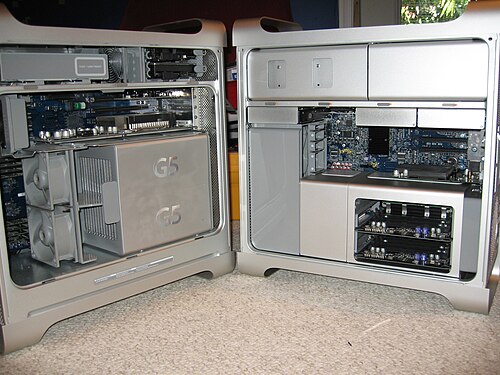
2006 年から 2012 年にかけて、Mac Pro のアルミニウム ケースの外観は、光学ドライブ ベイが追加され、前面と背面の両方にI/O ポートが新しく配置され、背面の排気口が 1 つ減った点を除けば、Power Mac G5 の外観と非常によく似ていました。
ケースは背面のレバーを1つ操作するだけで開くことができ、これによりマシンの2つの側面のうちの1つとドライブベイのロックが解除された。サイドパネルを取り外した状態でも、メモリ、PCIeカード、ドライブの拡張スロットすべてにアクセスでき、取り付けに工具は不要だった。[23] Mac ProのXeonプロセッサは、以前の2コアG5よりも発熱量が大幅に少ないため、内部の冷却装置のサイズが大幅に縮小された。
これにより、内部を再配置してケース上部のスペースを増やし、内部ドライブベイの数を倍増させることができました。また、Power Mac G5 の冷却システムの一部として使用されていた大きな透明プラスチック製のエアデフレクターをなくすことができました。発熱が少ないということは、通常動作中に冷却のためにケースから出る空気も少ないということでもあります。Mac Pro は通常動作中は非常に静かで、はるかに騒々しい Power Mac G5 よりも静かでした。[24]また、一般的な音圧レベル計を使用して測定するのは困難でした。[25]ケースの前面には、表面全体に小さな穴があいているため、Macintosh 愛好家は第 1 世代を「チーズおろし器」Mac Pro と呼んでいます。[26]
オペレーティングシステム
Mac Proには、AppleのOpen Firmware(および当時の業界全体で使用されていたBIOS )の後継となるEFI 1.1が搭載されています。[27]
AppleのBoot CampはBIOSの下位互換性を提供し、デュアルブートやトリプルブート構成を可能にしている。これらのオペレーティングシステムはIntel x86ベースのAppleコンピュータにインストール可能である: [28]
- Mac OS X 10.4.7以降
- Microsoft Windows XP、Vista、Windows 7 32 ビットおよび64 ビット(ハードウェア ドライバーは Boot Camp に含まれています)
- Linux x86、Solaris、BSDなどのその他のx86オペレーティングシステム
これは、CPUによって提供されるx86 Intelアーキテクチャと、 AppleがEFIの上に提供したBIOSエミュレーションの存在によって可能になりました。 [28] Windows以外の追加のオペレーティングシステムのインストールは、 Appleによって直接サポートされていません。[28] AppleのBoot CampドライバーはWindows専用ですが、サードパーティのドライバーを使用することで、他のOSとの完全またはほぼ完全な互換性を実現できることがよくあります。[28]
仕様
Appleによれば、これらのモデルはすべて廃止されているとのことだ。[a] [29]
受付
Ars Technicaは2006年版Mac Proをレビューし、堅実な「マルチプラットフォームデバイス」と呼び、10点満点中9点と評価した。[44] CNETはデザインと価値を賞賛したが、他のシステムほどの柔軟性は提供していないと考えた。彼らは10点満点中8点と評価した。[45]
オーディオ録音技術誌「 Sound on Sound 」は、ミュージシャンやオーディオエンジニアにとって「素晴らしいマシン」だと考えていた。 [46] Mac技術に特化したオンライン建築設計雑誌「Architosh」は、ソフトウェアの互換性に関するいくつかの問題とFB-DIMMメモリの高価格を除けば、5点満点を付けていただろう。 [47]
シリンダー(2013)

アップルのマーケティング担当上級副社長フィル・シラーは、 2013年ワールドワイド・デベロッパーズ・カンファレンスの基調講演で、完全に再設計されたMac Proの「プレビュー」を行った。ビデオでは、全面的に見直された筐体デザインが明らかにされた。中央の放熱コアの周囲に、磨き上げられた反射アルミニウムの円筒が組み込まれ、1つのファンによって通気され、ケースの下からコアを通り、ケースの上部から空気が取り込まれる。仕上げは黒のみだが、プロダクトレッドで赤仕上げのユニットが1台生産された。[48]アップルは、円筒形のMac Proは前モデルの2倍の性能を実現していると述べている。[3]このモデルは、アップルのサプライヤーであるフレックストロニクスが、テキサス州オースティンで高度に自動化されたラインで組み立てた。[49]発売の6か月前に発表されたことは、通常は市場に出す準備が整った時点で製品を発表するアップルにとっては異例のことである。[50] 2013年12月19日に発売された。
円筒形のサーマルコアはハードウェアのトレンドの変化に適応できず、Mac Proは3年以上アップデートが行われなかったため、2017年4月にAppleは珍しく製品の失敗を認め、設計を取り巻く問題を詳しく説明し、完全に再設計されたMac Proを約束した。円筒形のMac Proのデザインは賛否両論あり、ゴミ箱、[b] 炊飯器、R2-D2、ダース・ベイダーのヘルメットと比較された。[52] [53] 2018年9月18日、Mac ProはMacintosh Plusの生産寿命記録を更新し、Plusは1,734日間変更なしで販売された。2019年12月10日、変更なしで販売された記録的な2,182日間の後、生産中止となった。[54]
ハードウェア
再設計されたMac Proは、直前のモデルの8分の1以下の容積を占め、高さは9.9インチ(25 cm)、薄さは6.6インチ(17 cm)、重さは11ポンド(5.0 kg)です。1つの中央処理装置(CPU)(最大12コアのXeon E5 CPU )、4つの1866 MHz DDR3スロット、デュアルAMD FirePro DシリーズGPU(それぞれ6 GB VRAMのD700まで)、およびPCIeベースのフラッシュストレージをサポートします。ユニットの802.11ac WiFiネットワークインターフェイス、音楽転送、キーボード、マウス、タブレット、スピーカー、セキュリティ、カメラ、プリンターなどの近距離ワイヤレス機能を容易にするBluetooth 4.0用の3× MIMOアンテナシステムがあります。システムは、6台のApple Thunderboltディスプレイ、または3台の4K解像度のコンピューターモニターを同時にサポートできます。[55]
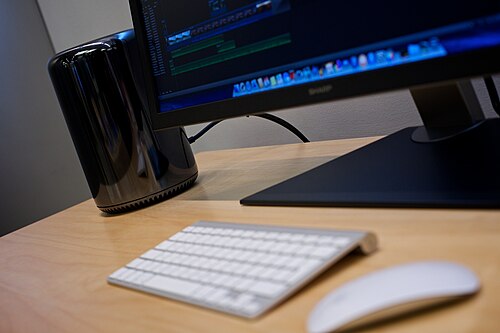
円筒形の Mac Pro は、ポートの構成が再設計されています。HDMI 1.4ポート、デュアルギガビット Ethernetポート、6 つのThunderbolt 2ポート、4 つのUSB 3ポート、オーディオ出力用のデジタル Mini-TOSlink 光 /アナログ3.5 mm ステレオミニジャックの組み合わせがあります。ヘッドフォン ミニジャックもあります (この 2 つは、サウンド システム環境設定パネルの [出力] タブで個別に選択できます)。オーディオを入力するための専用ポートはありません。システムには、低忠実度の内蔵モノラル スピーカーがあります。Thunderbolt 2 ポートは、最大 36 台の Thunderbolt デバイス (ポートあたり 6 台) をサポートし、最大 3 台の4K ディスプレイを同時にサポートできます。この設計では、7 つのディスプレイ出力 (HDMI と 6 つの Thunderbolt) をサポートするために 2 つの GPU が必要です。ユニットが移動を感知すると、I/O パネルが点灯し、ユーザーがポートを見やすくなります。以前のモデルとは異なり、FireWire 800ポート、専用のデジタルオーディオ入出力ポート、SuperDrive 、DVIポート、交換可能なストレージドライブ用の3.5インチドライブベイ、または変更可能な内部PCIeスロットはありません。代わりに、内部PCIeカード用のエンクロージャを含む高速外部周辺機器を接続するための6つのThunderbolt 2ポートがあります。 [55]
Apple's website mentions only RAM[56] and flash storage[57] as user-serviceable, though third party tear-downs show nearly all components can be removed and replaced. However, special tools only available from Apple are necessary for proper dismantling and reassembly.[58] Apple has also specified mandatory and recommended tightening torque values for nearly every screw, with the most important being those securing the GPUs and CPU riser card to the thermal core.[59] According to Apple, not tightening screws to the mandatory torque values may result in damage or malfunction.[60] A lock switch on the aluminum housing allows for easy access to the internals, as well as fitting a security lock with its own cable, and components are secured with Torx screws. The flash storage and GPUs use proprietary connectors and are specially sized to fit into the enclosure.[61] The CPU is not soldered to the riser card and can be replaced with another LGA 2011 socket processor, including processor options not offered by Apple.[62] The type of RAM modules that Apple supplies with the late-2013 Mac Pro in the default configuration are ECC unbuffered (UDIMM) on the up to 8 GB modules (shown on each module as PC3-14900E). Apple offers as an optional upgrade 16 GB modules are ECC registered (RDIMM) modules (shown on each module as PC3-14900R). The higher-capacity 32 GB modules that some third-party vendors offer are also RDIMM. The UDIMM and RDIMM module types cannot be mixed. Apple publishes recommended configurations to use.[63][64]
Operating systems
Apple's Boot Camp provides BIOS backwards compatibility, allowing dual and triple boot configurations. These operating systems are installable on Intel x64-based Apple computers:
- OS X Mavericks through macOS Monterey
- Windows 7, 8, 8.1 and 10 64-bit (hardware drivers are included in Boot Camp)
- Linux via Linux installers (Boot Camp does not provide Linux support in the same way it does with Windows)
Specifications
Reception
Reception of the new design was mixed, initially receiving positive reviews, but more negative in the long term, due to Apple's failure to upgrade the hardware specs. The performance had been widely lauded, especially handling video tasks on the dual GPU units, with some reviewers noting the ability to apply dozens of filters to realtime 4K resolution video in Final Cut Pro X.[70] Drive performance, connected via PCIe, was also widely mentioned as a strong point. Technical reviewers praised the OpenCL API under which the machine's powerful twin GPUs and its multi-core CPU can be treated as a single pool of computing power. However, in late 2013 through early 2014, some reviewers had noted the lack of internal expandability, second CPU, serviceability, and questioned the then-limited offerings via Thunderbolt 2 ports.[71][72] By 2016, reviewers started to agree that the Mac Pro was now lacking in functionality and power, it having not been updated since 2013, and it was past time for Apple to update it.[73] Apple later revealed in 2017 that the thermal core design had limited the ability to upgrade the Mac Pro's GPUs and that a new design was under development, to be released sometime after 2017.[74]
Problems
On February 5, 2016, Apple identified problems with FirePro D500 and D700 GPUs manufactured between February 8, 2015 and April 11, 2015. Issues included "distorted video, no video, system instability, freezing, restarts, shut downs, or may prevent system start up."[75] Customers who owned a Mac Pro exhibiting those issues could take their affected machine to Apple or an authorized service provider to have both GPUs replaced for free. The repair program ended on May 30, 2018. Customers who owned Mac Pros with FirePro D300 GPUs also complained about problems, but those GPUs were not included in the repair program until July 2018.[76] Customers with FirePro GPUs not manufactured between those dates have complained of issues including overheating and thermal throttling.[77] It is believed Apple has not enabled a satisfactory cooling fan profile in order to properly remove heat from the system. Users have had to resort to using third-party apps to manually increase the fan speed to prevent the GPUs from overheating.[78]
Lattice tower or rack (2019)


In April 2018, Apple confirmed that a redesigned Mac Pro would be released in 2019 to replace the 2013 model.[79] Apple announced this new Mac Pro on June 3, 2019 at the World Wide Developers Conference.[80][81] It returns to a tower design similar to the Power Mac G5 in 2003 and the first-generation model in 2006. The design also includes a new thermal architecture with three impeller fans, which promises to prevent the computer from having to throttle the processor so that it can always run at its peak performance level. The RAM is expandable to 1.5 TB using twelve 128 GB DIMMs. It can be configured with up to two AMD Radeon Pro GPUs, based on RDNA architecture, which come in a custom MPX module, which are fanless and use the chassis's cooling system. Apple's Afterburner card is a custom add-on, which adds hardware acceleration for ProRes codecs. Similar to the second generation, the cover can be removed to access the internals, which features eight PCIe 3.0 slots for expansion, making this the first Mac with six or more expansion slots since the Power Macintosh 9600 in 1997.[82] It can also be purchased with wheels and in a rack mount configuration. Feet and wheels are not stated by Apple to be user-replaceable and require sending the machine to an Apple Store or authorized service provider, though teardowns show the feet are simply screwed on.[83][84] It was announced alongside the Pro Display XDR, a 6K display with the same finish and lattice pattern.
The 2019 Mac Pro is capable of lights-out management.[85] It is also the first Macintosh computer to feature 10 Gigabit Ethernet ports equipped as standard in all configurations.
After initial reports that the Mac Pro would be assembled in China, Apple confirmed in September 2019 it would be assembled in Austin, Texas, at the same facility as the previous-generation Mac Pro, making it the sole Apple product assembled in the United States. The production was the subject of a tariff dispute with US President Donald Trump in late 2019.[86][87] Trump toured the Mac Pro assembly line in November 2019.[88]
Radeon Pro W5700X and W5500X graphics cards were added as options in April and July 2020, respectively. In August 2021, options for RDNA 2–based Radeon Pro cards (W6800X, W6800X Duo and W6900X) were added. In March 2022, Apple upgraded the base model configuration with the Radeon Pro W5500X and 512 GB SSD, replacing the Radeon Pro 580X graphics and 256 GB SSD previously offered.[89]
The 2019 Mac Pro was discontinued in June 2023 following the announcement of the Apple silicon Mac Pro. The 2019 Mac Pro was the last Intel-based Mac sold by Apple.[90]
Design
.jpg/500px-President_Trump_Tours_the_Apple_Manufacturing_Plant_(49100681517).jpg)
The 2019 Mac Pro returns to a tower form factor and features a prominent lattice pattern on its front and rear. The lattice design was purportedly originally developed by Jony Ive for the Power Mac G4 Cube in 2000.[91] It comes bundled with a new Magic Keyboard with black keys in a silver chassis, and a black Magic Mouse 2 or Magic Trackpad 2 with a silver underside.
Reception
Initial reviews were generally positive. The only pre-release review models of the Mac Pro and Pro Display XDR were provided to YouTube tech vloggers Justine Ezarik, Marques Brownlee, and Jonathan Morrison, rather than reviewers from traditional news outlets.[92]
iFixit gave it a repairability score of 9/10, noting that every part of the machine is user-replaceable. The SSD can also be replaced via Apple official parts, but require an Apple Configurator restore to re-pair it with the T2 chip.[84][93]
Specifications
Apple silicon (2023)
On June 5, 2023, Apple announced a Mac Pro based on the Apple M2 Ultra chip, the first model with an Apple silicon chip. Externally, the M2 Ultra Mac Pro uses the same chassis as the 2019 Intel model. Internally, it features a redesigned Apple silicon logic board that includes six internal PCIe 4.0 slots for expansion. It does not support discrete GPUs over PCIe.[99][100] The internal SSD is upgradeable, but the GPU and memory are not.[101][102] According to Bloomberg's Mark Gurman, Apple developed a chip for the Mac Pro combining two M2 Ultra chips into one package but cancelled it because of cost and manufacturing concerns.[103]
Reception
The Verge's review of the Mac Pro praised its performance, saying it "vastly outperforms Intel models from 2019," but criticized the inability to upgrade memory and the lack of support for graphics cards. It also criticized the Mac Pro's $3,000 (+75%) price premium over a similarly configured Mac Studio with the same performance, with the Mac Pro's only advantage being the addition of PCIe slots and better cooling.[104]
YouTuber Marques Brownlee headlined, "Why Does the M2 Mac Pro Exist?", and found the Mac Pro and Mac Studio performed almost identically in testing despite the Mac Pro's much larger cooling system.[105]
Specifications
Supported operating systems
- ^ The 2023 Mac Pro uses an Apple silicon chip instead of an Intel processor, and cannot boot into Windows, though it can run it through virtualization.
- ^ Windows XP can only be installed on Macs with Boot Camp 3 or earlier. This includes Mac OS X 10.6 or earlier and copies of Mac OS X 10.7 that have not been updated to Boot Camp 4.
- ^ a b Windows Vista can only be installed on Macs with Boot Camp 3 or earlier. This includes Mac OS X 10.6 or earlier and copies of Mac OS X 10.7 that have not been updated to Boot Camp 4.
- ^ The 32-bit version of Windows 7 can only be installed on Macs with Boot Camp 3.1 to 6.0. This includes OS X 10.11 and earlier.
- ^ The 64-bit version of Windows 7 can only be installed on Macs with Boot Camp 3.1 or later, running macOS High Sierra or earlier. Later versions of macOS no longer support Windows 7.
- ^ Windows 8 can only be installed on Macs with Boot Camp 5.0 to 6.0. This includes OS X 10.11 and earlier.
- ^ a b c d Only 64-bit versions of Windows are supported for Windows 8 and later.
- ^ Windows 8.1 can only be installed on Macs with Boot Camp 5.1 or later, running macOS High Sierra or earlier. Later versions of macOS no longer support Windows 8.1.
- ^ Windows 10 can only be installed on Macs with Boot Camp 6.0 or later. It is the only supported version of Windows on macOS Mojave and later.
- ^ Windows 11 can be installed on Macs with Rufus to bypass the TPM 2.0 requirements.
Mac Pro Server
On November 5, 2010, Apple introduced the Mac Pro Server, which officially replaced the Xserve line of Apple servers as of January 31, 2011. The Mac Pro Server includes an unlimited[8] Mac OS X Server license and an Intel Xeon 2.8 GHz quad-core processor, with 8 GB of DDR3 RAM.[114] In mid-2012, the Mac Pro Server was upgraded to an Intel Xeon 3.2 GHz quad-core processor. The Mac Pro Server was discontinued on October 22, 2013, with the introduction of the cylindrical Mac Pro. However, the OS X Server software package can be purchased from the Mac App Store.[115] The redesigned Mac Pro released on December 10, 2019 has a rack-mount version, available in the same configurations as the standard Mac Pro for a $500 premium.[116] The rack-mounted Mac Pro comes with mounting rails to mount it in a server rack, and fits in a 5 Rack Unit (or "U") space.[117] The Apple silicon Mac Pro also comes in a rack version.[118]
See also
Explanatory notes
- ^ Apple products that have been discontinued for 7 years and no longer receive hardware support nor spare parts
- ^ The "trash can" nicknamed was later adopted by some Apple employees, who called the computer "the failed trash can".[51]
- ^ The 2012 model did not originally ship with 10.6, but does support booting with it by way of being an upgraded 2010 model.
References
- ^ "Apple adds 8-core option to Mac Pro". MacNN. April 4, 2007. Archived from the original on April 10, 2007. Retrieved April 4, 2007.
- ^ Charlton, Hartley (December 19, 2022). "The 'Trashcan' Mac Pro: Remembering One of Apple's Most Controversial Designs Nine Years Later". MacRumors. Retrieved June 7, 2023.
- ^ a b "At long last! Apple announces new Mac Pro with cylindrical design". June 10, 2013. Archived from the original on June 13, 2013. Retrieved June 10, 2013.
- ^ Smith, Kevin (June 9, 2012). "The Best Products Apple Has Ever Announced At Its Annual Summer Developers Conference". Business Insider Australia. Archived from the original on March 25, 2021. Retrieved January 22, 2020.
- ^ ""This Is Not a Product": The Apple Developer Transition Kit". January 16, 2019. Archived from the original on November 10, 2020. Retrieved June 25, 2020.
- ^ a b Bangeman, Eric (July 16, 2006). "Peering inside the aluminum ball: Woodcrest, Conroe, and the 'pro' Macs". Arstechnica. Archived from the original on January 12, 2010. Retrieved January 10, 2010.
- ^ "The Unix System — History and Timeline". Unix.org. January 29, 2003. Archived from the original on April 8, 2011. Retrieved January 16, 2010.
- ^ a b c "Mac Pro page at Apple's online store". Apple Inc. Archived from the original on December 19, 2011. Retrieved December 19, 2011.
- ^ Chris Foresman, "Mac Pro gets minor update with standard 12-core option, no Xeon E5" Archived May 27, 2016, at the Wayback Machine, ArsTechnica, June 11, 2012
- ^ Jordan Kahn, "Andy Hertzfield: The only thing that's still high-end about Mac Pro is the bloated price" Archived October 29, 2013, at the Wayback Machine, 9to5 Mac, June 11, 2012
- ^ Haslam, Karen (January 13, 2013). "Apple confirms it will cease shipping Mac Pro in Europe on 1 March". MacWorld. Archived from the original on February 3, 2013.
- ^ "Mac Pro Developer Note". Archived from the original on November 16, 2023. Retrieved November 16, 2023.
- ^ "Intel Xeon Processor E5620 (12 MB Cache, 2.40 GHz, 5.86 GT/s Intel QPI)". Intel. Archived from the original on July 4, 2011. Retrieved June 10, 2013.
- ^ "Intel Xeon Processor X5670 (12M Cache, 2.93 GHz, 6.40 GT/s Intel QPI)". Intel. Archived from the original on July 4, 2011. Retrieved June 10, 2013.
- ^ "Mac Pro CPU Compatibility List". MacRumors Forums. Archived from the original on October 9, 2018. Retrieved October 8, 2018.
- ^ "Mac Pro – Technical Specifications". Apple. Archived from the original on May 27, 2013. Retrieved June 10, 2013.
- ^ "Computer memory upgrades for Apple Mac Pro (4-core) Desktop/PC from Crucial.com". Crucial.com. Archived from the original on February 11, 2009. Retrieved January 10, 2010.
- ^ "Understanding FB-DIMMs". AnandTech. Archived from the original on September 2, 2007. Retrieved May 5, 2007.
- ^ "Mac Pro Memory Issues". Ars Technica. August 11, 2006. Archived from the original on December 4, 2008. Retrieved June 14, 2017.
- ^ "Apple Introduces New Mac Pro" (Press release). Apple Inc. March 3, 2009. Archived from the original on October 10, 2017. Retrieved January 10, 2010.
- ^ "NewerTech eSATA Extender Cable". Newertech.com. January 8, 2008. Archived from the original on January 15, 2010. Retrieved January 10, 2010.
- ^ "Does the Mac Pro support standard PC video cards? Does it support SLI or Crossfire?". EveryMac. Archived from the original on February 5, 2010. Retrieved February 6, 2010.
- ^ "Разбираем Apple Mac Pro". Archived from the original on April 19, 2018. Retrieved April 18, 2018.
- ^ "PowerMac G5 review". Macworld. Archived from the original on November 14, 2007. Retrieved November 10, 2007.
- ^ "Bare Feats' rob-ART Morgan says". Bare Feats'. Archived from the original on December 4, 2008. Retrieved May 3, 2007.
- ^ Cunningham, Andrew (May 1, 2017). "Modern "Hackintoshes" show that Apple should probably just build a Mac tower". Ars Technica. Condé Nast. Archived from the original on January 9, 2018. Retrieved January 9, 2018.
- ^ "Overview". uefi.org. Archived from the original on June 10, 2008. Retrieved February 6, 2010.
- ^ a b c d "Triple Boot via BootCamp". Wiki.onmac.net. Archived from the original on February 12, 2012. Retrieved January 10, 2010.
- ^ "Obtaining service for your Apple product after an expired warranty". support.apple.com. March 20, 2023. Retrieved March 23, 2023.
- ^ Mac Pro – Technical Specifications, Apple Inc., archived from the original on February 17, 2015, retrieved March 3, 2009
- ^ Mac Pro (Early 2008) – Technical Specifications, Apple Inc., archived from the original on February 18, 2015, retrieved March 3, 2009
- ^ Mac Pro (Early 2009) – Technical Specifications, Apple Inc., archived from the original on February 17, 2015, retrieved March 3, 2009
- ^ Mac Pro (Mid 2010) – Technical Specifications, Apple Inc., archived from the original on August 19, 2010, retrieved July 27, 2010
- ^ Mac Pro (Mid 2012) – Technical Specifications, Apple Inc., archived from the original on February 17, 2015, retrieved July 28, 2012
- ^ "Apple Unveils New Mac Pro Featuring Quad 64-bit Xeon Processors". Apple. August 7, 2006. Archived from the original on January 15, 2021. Retrieved December 4, 2017.
- ^ "Apple Introduces New Mac Pro". Apple. January 8, 2008. Archived from the original on December 5, 2017. Retrieved December 4, 2017.
- ^ "Apple Introduces New Mac Pro". Apple. March 3, 2009. Archived from the original on December 5, 2017. Retrieved December 4, 2017.
- ^ "Apple Unveils New Mac Pro With Up to 12 Processing Cores". Apple. July 27, 2010. Archived from the original on December 5, 2017. Retrieved December 4, 2017.
- ^ "ARM CHAIR ANALYSIS: Mac Pro versus Quad G5".
- ^ a b c "Amfeltec x16 PCIe with 4 SSDs: 5900+ MB/s". MacRumors Forums. November 9, 2015. Archived from the original on February 3, 2019. Retrieved April 29, 2019.
- ^ Wireless-N functionality requires installing the wireless-N enabler software included with the AirPort Extreme Wireless-N Router or sold as a download on the Apple online store, or by upgrading to OS X 10.5 "Leopard" or later.
- ^ "How to Install PCI Express Card (Mac Pro Models): EveryMac.com". everymac.com. Retrieved June 7, 2023.
- ^ Apple introduces macOS Mojave Archived June 5, 2018, at the Wayback Machine. Apple.
- ^ "Mac Pro review, 9 out of 10". Ars Technica. August 11, 2006. Archived from the original on March 12, 2017. Retrieved June 14, 2017.
- ^ Brown, Rich. "Apple Mac Pro Dual-Core Xeon 5150 2.66 GHz review". CNET. Archived from the original on December 19, 2019. Retrieved January 22, 2020.
- ^ Wherry, Mark. "Apple Mac Pro". www.soundonsound.com. Archived from the original on May 12, 2021. Retrieved January 22, 2020.
- ^ Danaher, Tim (November 6, 2006). "Architosh: Feature Product Review: Apple Mac Pro". www.architosh.com. Archived from the original on August 8, 2020. Retrieved January 22, 2020.
- ^ Product (RED) Mac Pro auction brings in $977,000; gold EarPods sold for $461,000 Archived July 15, 2019, at the Wayback MachineAppleInsider. 23 November 2013.
- ^ Cheng, Roger. "A US-made Mac Pro is a token gesture – CNET". CNET. CBS Interactive Inc. Archived from the original on November 2, 2020. Retrieved November 7, 2014.
- ^ "Engadget gets a glimpse of the new Mac Pro". Engadget. June 11, 2013. Archived from the original on November 3, 2019. Retrieved November 3, 2019.
- ^ Mickle, Tripp (May 3, 2022). After Steve: How Apple Became a Trillion-Dollar Company and Lost Its Soul. HarperCollins. p. 163. ISBN 978-0-06-300983-7.
- ^ "Apple admits the Mac Pro was a mess". The Verge. April 4, 2017. Archived from the original on October 7, 2021. Retrieved December 13, 2017.
- ^ "The Japanese Garbage Can That Inspired Apple's New Mac Pro [Humor] – Cult of Mac". June 13, 2013. Archived from the original on April 6, 2018. Retrieved April 18, 2018.
- ^ "MacRumors Buyer's Guide: Know When to Buy iPhone, Mac, iPad". buyersguide.macrumors.com. Archived from the original on May 5, 2022. Retrieved December 11, 2019.
- ^ a b "Mac Pro — Tech Specs". Apple.com. Cupertino, California: Apple, Inc. Archived from the original on September 13, 2014. Retrieved September 14, 2014.
- ^ "Mac Pro (Late 2013): Installing or replacing memory". Apple Support. Apple. October 17, 2019. Archived from the original on June 9, 2020. Retrieved June 9, 2020.
- ^ "Mac Pro (Late 2013): Removing and installing flash storage". Apple Support. Apple. October 17, 2019. Archived from the original on June 9, 2020. Retrieved June 9, 2020.
- ^ TP1074: Mac Pro (Late 2013): General Take Apart Information. Apple.
- ^ Mac Pro (Late 2013): Screw Chart. Apple.
- ^ TP1074: Mac Pro (Late 2013): General Take Apart Information. Apple.
- ^ "iFixit Mac Pro Late 2013 Teardown" Archived January 4, 2014, at the Wayback Machine, iFixit
- ^ "OWC Confirms Mac Pro 2013 Processor Upgradeable" Archived January 6, 2014, at the Wayback Machine, Other World Computing, January 3, 2014
- ^ "Mac Pro (Late 2013) – Memory specifications – Apple Support". Apple. December 23, 2013. Archived from the original on February 4, 2023. Retrieved November 7, 2014.
- ^ "Mac Pro (Late 2013) – Installing or replacing memory – Apple Support". Apple. September 4, 2014. Archived from the original on February 4, 2023. Retrieved November 7, 2014.
- ^ Technical specifications of Mac Pro (Late 2013) – Technical Specifications from Apple's knowledge base and from EveryMac.com. Retrieved March 16, 2023.
- ^ Patel, Nilay (June 13, 2013), 'Can't innovate anymore, my ass': Apple's bravado clouds the company's real challenges, archived from the original on April 19, 2022, retrieved April 19, 2022
- ^ "All New Mac Pro Available Starting Tomorrow". Apple. December 18, 2013. Archived from the original on December 5, 2017. Retrieved December 4, 2017.
- ^ "New Mac Pro 2013 Teardown". Other World Computing Blog. December 27, 2013. Archived from the original on April 10, 2019. Retrieved April 10, 2019.
- ^ "Transcend Releases DDR3 RDIMM Modules to Maximize Mac Pro Memory up to 128 GB". Archived from the original on April 19, 2018. Retrieved April 18, 2018.
- ^ Wiggins, Peter. "The first 24 hours with Apple's new Mac Pro and Final Cut Pro 10.1". Archived from the original on June 2, 2018. Retrieved April 18, 2018.
- ^ Dan Ackerman, "Apple's radically remained Mac Pro is a powerhouse performer" Archived January 27, 2014, at the Wayback Machine, cnet, December 20, 2013
- ^ Jonathan Bray, "Mac Pro (late 2013) review" Archived January 24, 2014, at the Wayback Machine, PC Pro UK, January 24, 2014
- ^ Byford, Sam. "The Mac Pro hasn't been updated in 1,000 days". The Verge. Archived from the original on February 22, 2017. Retrieved February 21, 2017.
- ^ Smith, Ryan (April 4, 2017). "Apple to Redesign Mac Pro, Comments that GPU Cooling was a Roadblock". Anandtech. Archived from the original on April 4, 2017. Retrieved April 4, 2017.
- ^ "Apple Launches Repair Program for Late 2013 Mac Pro Video Issues". MacRumors. February 5, 2016. Archived from the original on June 9, 2020. Retrieved June 9, 2020.
- ^ "2013 Mac Pro Freezes Continue – Owners Have Little Recourse – Apple is Helpless". the Mac Observer. June 1, 2016. Archived from the original on June 9, 2020. Retrieved June 9, 2020.
- ^ "Mac Pro GPU Dual AMD FirePro D700 with Premiere". Adobe Support Community. Adobe. December 20, 2013. Archived from the original on June 9, 2020. Retrieved June 9, 2020.
- ^ "Mac Pro with D500 and D700 overheating on exports". Reduser. Landmine Media, LLC. Archived from the original on June 9, 2020. Retrieved June 9, 2020.
- ^ "Apple's 2019 Mac Pro will be shaped by workflows". techcrunch.com. April 5, 2018. Archived from the original on April 5, 2018. Retrieved April 5, 2018.
- ^ "Apple unveils powerful, all-new Mac Pro and groundbreaking Pro Display XDR" (Press release). Apple Inc. June 3, 2019. Archived from the original on June 6, 2019. Retrieved June 6, 2019.
- ^ "Mac Pro". Archived from the original on May 19, 2022. Retrieved August 19, 2014.
- ^ a b "Mac Pro – Technical Specifications". Apple Inc. Archived from the original on January 21, 2021. Retrieved June 6, 2019.
- ^ "You'll need Apple's help to install wheels on your new Mac Pro". iMore. December 11, 2019. Archived from the original on December 14, 2019. Retrieved December 13, 2019.
- ^ a b "Mac Pro 2019 Teardown". iFixit. December 17, 2019. Archived from the original on March 30, 2021. Retrieved December 17, 2019.
- ^ "Lights Out Management MDM payload settings for Apple devices". Apple Support (in Japanese). Archived from the original on November 7, 2021. Retrieved November 7, 2021.
- ^ Kubota, Tripp Mickle and Yoko (June 28, 2019). "Apple Moves Mac Pro Production to China". Wall Street Journal. Archived from the original on November 22, 2019. Retrieved November 23, 2019.
- ^ Kastrenakes, Jacob (September 23, 2019). "Apple will make its new Mac Pro in the US". The Verge. Archived from the original on November 23, 2019. Retrieved November 23, 2019.
- ^ "Mac Pro in retail packaging spotted at Austin factory [u]". AppleInsider. November 20, 2019. Archived from the original on November 23, 2019. Retrieved November 23, 2019.
- ^ "Mac Pro Now Starts With 512 GB of Storage and Radeon Pro W5500X Graphics". MacRumors. March 9, 2022. Archived from the original on March 9, 2022. Retrieved March 9, 2022.
- ^ Kamps, Haje Jan (June 5, 2023). "Apple surprise-launches new Mac Pro with Apple Silicon". TechCrunch. Retrieved June 5, 2023.
- ^ Potuck, Michael (June 18, 2019). "Hands-on photos explore G4 Cube and the likely origin of the Mac Pro lattice design". 9to5Mac. Archived from the original on February 4, 2023. Retrieved November 2, 2019.
- ^ "Why YouTubers MKBHD and iJustine Got the First Sneak Peek at the New Mac Pro". Fortune. Archived from the original on December 13, 2019. Retrieved December 13, 2019.
- ^ "Install or replace SSD modules in your Mac Pro (2019)". Apple Support. June 23, 2020. Archived from the original on February 4, 2023. Retrieved May 19, 2022.
- ^ "Apple introduces 16-inch MacBook Pro, the world's best pro notebook". Apple Newsroom. Archived from the original on November 13, 2019. Retrieved November 13, 2019.
- ^ Mayo, Benjamin (October 30, 2019). "The new Mac Pro gets FCC approval ahead of launch". 9to5Mac. Archived from the original on November 1, 2019. Retrieved November 1, 2019.
- ^ Owen, Malcolm (December 9, 2019). "Apple gets FCC approval for Mac Pro tower, and rack-mount version". AppleInsider. Archived from the original on December 15, 2019. Retrieved December 15, 2019.
- ^ Apple's new Mac Pro internal components – answers and lingering questions Archived November 7, 2020, at the Wayback Machine. Apple Insider. 4 June 2019.
- ^ "Install PCIe cards in your Mac Pro (2019)". Apple Support. January 18, 2022. Retrieved June 7, 2023.
- ^ "Apple Silicon Mac Pro does not support PCI-E video cards". AppleInsider. June 5, 2023. Retrieved June 6, 2023.
- ^ "Apple unveils new Mac Studio and brings Apple silicon to Mac Pro". Apple Newsroom. Retrieved June 5, 2023.
- ^ "New Mac Pro Features Upgradeable SSD, Apple Selling 2TB, 4TB, and 8TB SSD Kits". MacRumors. June 5, 2023. Retrieved June 7, 2023.
- ^ Athow, Desire (June 12, 2023). "Here's why the 2023 Mac Pro doesn't have a discrete GPU". TechRadar. Retrieved June 24, 2023.
- ^ "Apple Scales Back High-End Mac Pro Plans, Weighs Production Move to Asia". Bloomberg.com. December 18, 2022. Retrieved June 7, 2023.
- ^ Chin, Monica (June 27, 2023). "Which professionals is the Mac Pro for? We couldn't find them". The Verge. Retrieved July 1, 2023.
- ^ Why Does the M2 Mac Pro Exist?, June 28, 2023, retrieved July 2, 2023
- ^ "Mac Pro (2023) – Technical Specifications". support.apple.com. Retrieved August 3, 2024.
{{cite web}}: CS1 maint: url-status (link) - ^ "Product Environmental Report Mac Pro (2023)" (PDF). Apple. June 5, 2023. Retrieved August 3, 2024.
{{cite web}}: CS1 maint: url-status (link) - ^ a b c d e f "System requirements to install Windows on your Mac via Boot Camp". March 10, 2015. Archived from the original on March 12, 2015. Retrieved August 21, 2020.
- ^ a b Keizer, Gregg (August 2, 2011). "OS X Lion requires Windows 7 for Boot Camp". Computerworld. Retrieved March 26, 2024.
- ^ Hu, Jonathan (August 12, 2015). "Apple Released Boot Camp 6.1 with Windows 10 Support". nextofwindows. Archived from the original on August 9, 2020. Retrieved August 21, 2020.
- ^ a b c d "System requirements to install Windows using Boot Camp for macOS". Apple Support. December 6, 2018. Archived from the original on March 12, 2015. Retrieved August 21, 2020.
- ^ "Use Windows 8.1 on your Mac with Boot Camp". Apple Support. September 24, 2018. Archived from the original on September 6, 2017. Retrieved August 21, 2020.
- ^ a b "Install Windows 10 on your Mac with Boot Camp Assistant". Apple Support. June 16, 2020. Archived from the original on August 21, 2020. Retrieved August 21, 2020.
- ^ Robinson, Blake (November 5, 2010). "Apple Announces Mac Pro Server". Mashable. Archived from the original on July 1, 2013. Retrieved June 28, 2013.
- ^ "OS X Server". Archived from the original on November 25, 2014. Retrieved January 10, 2014.
- ^ Gartenberg, Chaim (January 14, 2020). "Apple's rack-mounted Mac Pro variant is now available to order". www.theverge.com. Vox Media. Archived from the original on February 15, 2020. Retrieved March 8, 2020.
- ^ Bazoge, Mickaël (January 14, 2020). "Le Mac Pro format rack est disponible à partir de 7 199 €". MacGeneration (in French). Retrieved October 17, 2023.
- ^ Axon, Samuel (June 5, 2023). "This is the new Apple Silicon Mac Pro". Ars Technica. Retrieved October 17, 2023.
External links

Wikimedia Commons has media related to Mac Pro.
- Mac Pro – official site