
Loading article…
 | |||
| 生産履歴 | |||
|---|---|---|---|
| デザイナー | |||
| メーカー | 様々な | ||
| 生産 | 2011年2月24日以降[1] | ||
| 廃止 | |||
| 一般仕様 | |||
| 長さ | |||
| 幅 | 7.4 mm プラグ (8.3 mm レセプタクル) | ||
| 身長 | 4.5 mm プラグ (5.4 mm レセプタクル) | ||
| ホットプラグ可能 | はい | ||
| デイジーチェーン |
| ||
| 外部の | はい | ||
| オーディオ信号 | DisplayPortプロトコルまたは USB ベースの外部オーディオ カード 経由。HDMI コンバーター経由のオーディオをサポートします。 | ||
| ビデオ信号 | DisplayPortプロトコル経由 | ||
| ピン |
| ||
| コネクタ |
| ||
| 電気 | |||
| 最大電圧 | 18 V(バスパワー) | ||
| 最大電流 | 550mA ( 最大9.9W) | ||
| データ | |||
| データ信号 | はい | ||
| ビットレート |
| ||
| プロトコル |
| ||
| ピン配置 | |||
| ピン1 | グランド | 地面 | |
| ピン2 | HPD | ホットプラグ検出 | |
| ピン3 | HS0TX(P) | 高速送信 0 (正) | |
| ピン4 | HS0RX(P) | 高速受信 0 (正) | |
| ピン5 | HS0TX(N) | 高速送信 0 (負) | |
| ピン6 | HS0RX(N) | 高速受信 0 (負) | |
| ピン7 | グランド | 地面 | |
| ピン8 | グランド | 地面 | |
| ピン9 | LSR2P TX | 低速送信 | |
| ピン10 | グランド | グラウンド(予約) | |
| ピン11 | LSP2R RX | 低速受信 | |
| ピン12 | グランド | グラウンド(予約) | |
| ピン13 | グランド | 地面 | |
| ピン14 | グランド | 地面 | |
| ピン15 | HS1TX(P) | 高速送信1(正) | |
| ピン16 | HS1RX(P) | 高速受信 1 (正) | |
| ピン17 | HS1TX(北) | 高速送信1(負) | |
| ピン18 | HS1RX(N) | 高速受信1(負) | |
| ピン19 | グランド | 地面 | |
| ピン20 | DPWR | 力 | |
| これは、コネクタの両側、つまりソース側とシンク側のピン配置です。このケーブルは実際にはクロスオーバー ケーブルです。受信レーンおよび送信レーンをすべて入れ替えます。たとえば、ソースの HS1TX(P) はシンクの HS1RX(P) に接続されます。 | |||
Thunderboltは、外部周辺機器をコンピュータに接続するためのハードウェアインターフェースのブランド名です。IntelがAppleと共同で開発しました。[7] [8]当初はLight Peakという名前で販売され、2011年2月24日にエンドユーザー製品の一部として初めて販売されました。 [1]
Thunderboltは、 PCI Express(PCIe)とDisplayPort(DP)を2つのシリアル信号に組み合わせ、 [9] [10]さらに1本のケーブルでDC電源を供給します。さまざまなトポロジーにより、1つのコネクタで最大6台の周辺機器をサポートできます。Thunderbolt 1と2はMini DisplayPort (MDP)と同じコネクタを使用しますが、Thunderbolt 3、4、5はUSB-Cコネクタを使用し、USBデバイスをサポートします。
説明

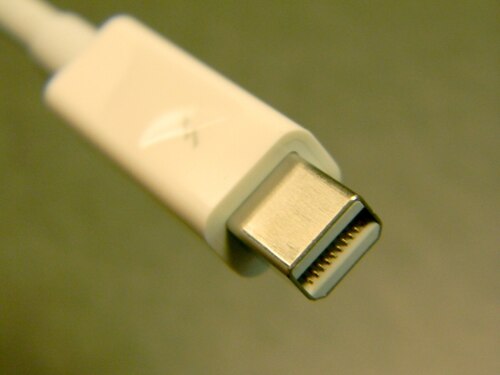


Intel は、2 ポート タイプと 1 ポート タイプの 2 種類の Thunderbolt コントローラーを提供しています。周辺機器とコンピューターの両方にコントローラーが必要です。
Thunderbolt コントローラは、接続された PCIe および DisplayPort デバイスからの 1 つまたは複数の個別のデータ レーンを多重化し、2 つのデュプレックス Thunderbolt レーンを介して送信し、次にそれらを逆多重化して、もう一方の端の PCIe および DisplayPort デバイスが使用できるようにします。 [2] 1 つの Thunderbolt ポートは、ハブまたはデイジー チェーンを介して最大 6 台の Thunderbolt デバイスをサポートします。ホストの DP ソースの数だけ、Thunderboltモニターを使用できます。[11]
単一の Mini DisplayPort モニターまたは他のあらゆる種類のデバイスを直接接続することも、チェーンの最後に接続することもできます。Thunderbolt は DP-1.1a 互換デバイスと相互運用できます。DP 互換デバイスに接続すると、Thunderbolt ポートは 4 レーンの出力データでネイティブ DisplayPort 信号を提供できます。速度は Thunderbolt レーンあたり最大 5.4 Gbit/s です。Thunderbolt デバイスに接続すると、レーンあたりのデータ速度は 10 Gbit/s になり、4 つの Thunderbolt レーンは 2 つのデュプレックス レーンとして構成され、各レーンは 10 Gbit/s で 1 つの入力レーンと 1 つの出力レーンで構成されます。[2]
Thunderboltは、DisplayPortデータとPCIe接続にアクセスできるPCIeグラフィックカード、またはMacBook Airなどのオンボードビデオを搭載したコンピュータのマザーボードに実装できます。[11] [12] [13]
このインターフェースはもともと、インテルのパートナーとインテルのシリコンフォトニクス研究所で開発されたコンポーネントとフレキシブル光ファイバーケーブルを使用して、光物理層でのみ動作することを目的としていました。当初はLight Peak [14]という名前で販売され、2011年以降はSilicon Photonics Link [15]として販売されました。しかし、従来の銅線配線で、必要な10 Gbit/s/チャネルを低コストで提供できることが発見されました。
この銅ベースのLight Peakコンセプトは、AppleとIntelによって共同開発された。AppleはThunderboltを商標として登録したが、後にその商標をIntelに譲渡し、Intelが優先的な知的財産権を保持した。[16] Thunderboltは、Appleが開発したMini DisplayPortと同じコネクタを使用して、 2011年のMacBook Proで商業的に導入された。一部のMacBook Air、MacBook Pro、Mac mini、iMacモデルでは、Thunderbolt経由のデュアル4Kディスプレイをサポートしていないため、Thunderbolt 4プロトコルがThunderbolt 3にダウングレードされている。[要出典]
住友電気工業は2013年1月に日本で最長30m(100フィート)の光サンダーボルトケーブルの販売を開始し、[17]コーニング社は2013年9月下旬に米国で最長60m(200フィート)の光ケーブルの販売を開始しました。 [18]
歴史
導入
インテルは2009年のインテル開発者フォーラム(IDF)でLight Peakを発表し、プロトタイプのMac Proロジックボードを使用して、2つの1080pビデオストリームとLANおよびストレージデバイスを、 USB端子を改造した1本の30メートルの光ケーブルで実行しました。[19]このシステムはプロトタイプのPCI Expressカードで駆動され、2つの光バスが4つのポートに電力を供給しました。[20]インテルの光I/Oプログラムオフィスの責任者であるジェイソン・ジラーは、顕微鏡でこの技術の内部コンポーネントを示し、オシロスコープでデータを送信する様子を示しました。[21]この技術は、プラスチック光ケーブルで初期速度が10 Gbit/sで、最終速度が100 Gbit/sになると説明されました。[22]インテルはショーで、Light Peakを搭載したシステムは2010年に登場し始めると述べ、 Light Peakに接続されたHDカメラ、ラップトップ、ドッキングステーション、HDモニターを示すYouTubeビデオを投稿しました。[23]
2010年5月4日、ブリュッセルでインテルはライトピークコネクタを搭載したラップトップのデモを行い、この技術がこのようなデバイスに収まるほど小型化されたことを示した。また、ラップトップから2つのHDビデオストリームを同時に接続して送信し、ソフトウェア/ファームウェアスタックとプロトコルの少なくとも一部が機能していることを示した。同じデモで、インテルの関係者はハードウェアの製造は2010年末頃に開始されると予想していると述べた。[24]
2010年9月、メーカーによる初期の商用プロトタイプがIntel Developer Forum 2010でデモされました。 [25]
銅線と光ファイバー
Thunderboltはもともと光学技術として考案されましたが、Intelはコストを削減し、接続されたデバイスに最大10ワットの電力を供給するために電気接続に切り替えました。[26]
2009年、インテルの役員は、同社が「光ファイバーを銅線で束ねて、Light Peak を PC に接続されたデバイスに電力を供給するために使用できるように取り組んでいる」と述べた。[27] 2010年、インテルは、当初の意図は「USB 3.0の電気接続を可能にし 、USB 3.0 または 4.0 DC 電源にピギーバックする単一のコネクタ技術を持つ」ことだったと述べた。[28] Light Peak は、消費者向けの光技術で大きな進歩を目指しており、その時点で「[コネクタの定格] は他の PC 接続と同等かそれ以上の 7,000 回の挿入が可能で、ケーブルは複数の結び目で結ばれており、断線せず損失も許容範囲内である」こと、「2 人で同時に引っ張っても光ファイバーが断線しない」ことを達成していた。彼らは「Light Peak ケーブルは HDMI よりも高価ではない」と予測した。[29]
2011年1月、インテルのデイビッド・パールマッターはComputerworldに対し、初期のThunderboltの実装は銅線をベースにすると語った。[28]「銅線は非常に良い出来で、我々が考えていたよりも驚くほど良い出来でした」と彼は語った。[30]銅線の主な利点は電力を運ぶ能力である。最終的なThunderbolt規格では、すべてのポートで10W DCが指定されている。以下の比較セクションを参照。
インテルと業界パートナーは、光サンダーボルトハードウェアとケーブルの開発を続けています。[31]光ファイバーケーブルは「数十メートル」の長さになりますが、少なくとも当初は電力は供給されません。[12] [32] [33]コーニングのバージョンには、赤外線信号を最大 190 メートル (600 フィート) まで伝送するための 4 本の 80/125 μm VSDN (超短距離ネットワーク) ファイバーが含まれています。[34]電気信号から光信号への変換はケーブル自体に組み込まれているため、現在の MDP コネクタは前方互換性があります。インテルは最終的に、PC に組み込まれた純粋な光トランシーバーアセンブリを望んでいます。[33]
最初の光サンダーボルトケーブルは、2013年1月に住友電気工業によって導入されました。 [35]長さは10m(30フィート)、20m(70フィート)、30m(100フィート)で利用できます。ただし、これらのケーブルはほぼ日本でのみ販売されており、価格は銅製のサンダーボルトケーブルの20~30倍です。
ドイツの企業DeLockも2013年に10m(30フィート)、20m(70フィート)、30m(100フィート)の長さの光サンダーボルトケーブルを発売したが、価格は住友のものと同様で、ドイツでのみ販売されていた。[36]
2013 年 9 月、ガラス会社コーニング社は、欧米市場で入手可能な最初の光 Thunderbolt ケーブルと光 USB 3.0 ケーブルを、どちらも「Optical Cables」というブランド名でリリースしました。[18]同等の銅製 Thunderbolt ケーブルの半分の直径と 5 分の 1 の質量で、10 Gbit/s Thunderbolt プロトコルと 20 Gbit/s Thunderbolt 2 プロトコルで動作し、すべてのセルフパワー型 Thunderbolt デバイスで動作します (銅ケーブルとは異なり、光ケーブルは電源を供給できません)。[18]このケーブルは、銅ケーブルの現在の最大長 30 m (100 フィート) を最大 60 m (200 フィート) まで延長します。
2020年以前は、Thunderbolt 3の光ケーブルは市場にありませんでした。しかし、当時は、ケーブルの両端にAppleのThunderbolt 3(USB-C)-Thunderbolt 2アダプタを取り付けて、Thunderbolt 1と2の光ケーブルを使用することができました。これにより、以前のバージョンの規格で提供されていた最大60メートル(200フィート)までの接続が実現しました。[37]
2019年4月、コーニングはラスベガスで開催された2019 NABショーで光Thunderbolt 3ケーブルを披露した。[38]それからちょうど1年後の2020年9月、コーニングは5m(20フィート)、10m(30フィート)、15m(50フィート)、25m(80フィート)、50m(160フィート)の長さの光Thunderbolt 3ケーブルをリリースした。[39]一方、台湾の企業Arecaは2020年4月に10m(30フィート)、20m(70フィート)、30m(100フィート)の長さの光Thunderbolt 3ケーブルをリリースした。[40]
Thunderbolt 4 ケーブルの銅バージョンは、40 Gbit/s のフル速度を提供し、USB (USB4 まで)、DisplayPort 代替モード (DP 1.4 HBR3)、および Thunderbolt 3 のすべてのバージョンとの下位互換性をサポートします。2021 年初頭にリリースされ、0.2 m (0.66 フィート)、0.8 m (2.6 フィート)、2 m (6.6 フィート) の 3 つの長さで提供される予定で、多くの企業が当初は 0.8 m (2.6 フィート) のケーブルを提供していました。
1.0 m (3.3 フィート) までの銅製 Thunderbolt 4 ケーブルはパッシブ ケーブルですが、それより長いケーブルにはアクティブ信号調整回路が組み込まれている必要があります。CalDigit 、 [41] Cable Matters、[42]など、ほとんどのブランドから入手できるアクティブ ケーブルの長さは最大 2 m (6.6 フィート) ですが、現在 3 m (9.8 フィート) のアクティブ銅ケーブルを提供しているのは Apple だけです。
光Thunderbolt 4ケーブルは、約5メートル(16フィート)から50メートル(160フィート)の長さを目標としていましたが、[43]これは実現しない可能性があり、代わりに2024年後半にその標準が登場した後のある時点で、Thunderbolt 5光ケーブルに移行する可能性があります。
互換性
互換性に関する詳細はThunderbolt Technology Community Webサイトから入手できます。[6]
1 つの Thunderbolt 3 以降のポートで、データ転送、2 つの 4K 60 Hz ディスプレイのサポート、および 1 本のケーブルで最大 100W のノートブックの急速充電が可能です。Thunderbolt または USB ドックは、Thunderbolt 3 コンピューターに接続できます。USB デバイスは、Thunderbolt 3 以降のポートに接続できます。DisplayPort および Mini DisplayPort デバイスがサポートされています。
Thunderbolt デバイスが USB-C ポートに接続されている場合、一部の機能が利用できる場合があります。これは実装に依存し、保証されるものではありません。
Thunderbolt 4 は Thunderbolt 3 デバイスをサポートしますが、それ以前のバージョンはサポートしません。Thunderbolt 1 および 2 デバイスは、アダプタを使用することでほとんどの Thunderbolt 3 PC で使用できますが、すべてではありません。
サンダーボルト1
CNETのブルック・クロザーズによると、2011年初頭のMacBook Proのアップデートには何らかの新しいデータポートが含まれるという噂があり、それはLight Peak(Thunderbolt)ではないかと推測している。[44]当時は物理的な実装に関する詳細はなく、以前のIntelのデモに似たUSB/Light Peakポートを組み合わせたシステムを示すモックアップが登場した。[45]新しいマシンがリリースされる少し前に、USB実装者フォーラム(USB-IF)は、そのような複合ポートを許可せず、USBをそのような方法で変更することは許可しないと発表した。
この技術の他の実装は2012年に始まり、相互接続を提供するデスクトップボードが現在利用可能となっている。[46]
Appleは2011年2月に、このポートはUSBではなくMini DisplayPortに基づいていると述べた。システムが説明されるにつれて、ディスプレイ接続の問題に対するIntelの解決策が明らかになった。Thunderboltコントローラーは、既存のDPシステムからのデータをPCIeポートからのデータと多重化し、1本のケーブルにまとめる。DP 1.1a以前を使用する古いディスプレイは、Thunderboltデバイスチェーンの最後に配置する必要がありますが、ネイティブディスプレイはラインのどこにでも配置できます。[12] Thunderboltデバイスはチェーンのどこにでも配置できます。その点で、Thunderboltは、低速バスをサポートするためにディスプレイコネクタを使用していた 古いACCESS.busシステムと関係を共有しています。
Appleは、Thunderboltポートごとに最大6台のデイジーチェーン接続された周辺機器がサポートされていると述べており、[47]デイジーチェーン接続をサポートしていない場合は、ディスプレイをチェーンの最後に配置する必要があると述べています。
2011年2月、Appleは1つのThunderboltポートを搭載したMacBook Pro (13インチ、2011年初頭)[48] 、Macbook Pro (15インチ、2011年初頭)[49]、Macbook Pro(17インチ、2011年初頭)[50]を発表しました。2011年5月、Appleは1つのThunderboltポートを搭載したiMac (21.5インチ、2011年中期)[51]と2つのThunderboltポートを搭載したiMac (27インチ、2011年中期)[52]を発表しました。 2011年7月、Appleはデイジーチェーン接続や他のデバイス用のThunderboltポートを1つ備えたMac mini(2011年中期)[53] 、MacBook Air (11インチ、2011年中期)[ 54] 、 MacBook Air (13インチ、2011年中期)[55]、 Apple Thunderbolt Display [56]を発表しました。
2011年5月、AppleはThunderboltインターフェースを搭載した新しいiMacシリーズを発表しました。 [57]
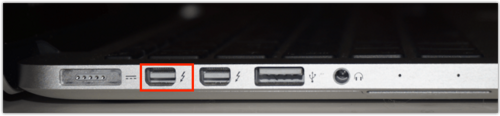
新しいMacのThunderboltポートは他のポートと同じ位置にあり、以前のMDPコネクタと同じ物理的寸法とピン配置を維持しています。Thunderboltを搭載したMacの主な目に見える違いは、ポートの横にあるThunderboltのシンボルです。[11]
DisplayPort規格は、物理的に互換性のあるAppleのMDPコネクタを共有しているため、Thunderboltと部分的に互換性があります。iMacのターゲットディスプレイモードでは、別のThunderbolt対応コンピュータからのビデオ入力信号を受信するためにThunderboltケーブルが必要です。[58] DPモニターは、Thunderboltデバイスのチェーンの最後(または唯一の)デバイスでなければなりません。
インテルは2011年第2四半期に開発キットをリリースすると発表しました。 [59]一方、ハードウェア開発機器メーカーはThunderboltデバイスのテストと開発のサポートを追加することを示唆しています。[60]開発キットはリクエストに応じてのみ提供されます。[61]
2011 年 7 月、ソニーは、電気的には USB のように動作するコンビネーション ポートを使用して外部グラフィック カードに接続するために光学式 Thunderbolt (Light Peak) を使用する「Power Media Dock」を搭載した Vaio Z21 シリーズのノートブック コンピューターをリリースしました。このコンビネーション ポートには、Thunderbolt に必要な光学式相互接続も含まれています。
Thunderbolt 1は10Gbit/sで動作し、当時のUSBよりも高速でした。[62]
サンダーボルト2
2013年6月、インテルは、コードネーム「Falcon Ridge」(20Gbit/sで動作)のコントローラをベースにしたThunderboltの次期バージョンが正式に「Thunderbolt 2」と命名され、2013年に生産に入ると発表しました。[63] 20Gbit/sのデータレートは、既存の2つの10Gbit/sチャネルを結合することで可能になりました。これにより最大帯域幅は変わりませんが、より柔軟に使用できるようになります。
2013年6月、Appleは6つのThunderbolt 2ポートを搭載したMac Pro(Late 2013)[64]を発表しました。 2013年10月、 Appleは2つのThunderbolt 2ポートを搭載したMacBook Pro (Retina、13インチ、Late 2013) [ 65 ]とMacBook Pro (Retina、15インチ、Late 2013)[66]を発表しました。 2014年10月、Appleは2つのThunderbolt 2ポートを搭載したMac mini(Late 2014)[67]とiMac (Retina 5K、27インチ、Late 2014)[68]を発表しました。 2015年3月、Appleは1つのThunderbolt 2ポートを搭載したMacBook Air (11インチ、Early 2015)[69]とMacBook Air (13インチ、Early 2015)[70]を発表しました。
物理レベルでは、Thunderbolt 1とThunderbolt 2の帯域幅は同一であり、Thunderbolt 1のケーブルはThunderbolt 2のインターフェースと互換性があります。論理レベルでは、Thunderbolt 2はチャネル集約を可能にし、以前は別々だった2つの10Gbit/sチャネルを1つの論理20Gbit/sチャネルに統合することができます。[71]
Intelによれば、Thunderbolt 2では4Kビデオを転送しながら同時に別個のモニターに表示できるようになるという。 [72]
Thunderbolt 2 にはDisplayPort 1.2サポートが組み込まれており、単一の 4K ビデオ モニターまたはデュアル QHD モニターへのビデオ ストリーミングが可能です。Thunderbolt 2 は下位互換性があり、すべての Thunderbolt ケーブルとコネクタは Thunderbolt 1 と互換性があります。
消費者市場向けの最初のThunderbolt 2製品は、2013年8月19日に発表されたAsusのZ87-Deluxe/Quadマザーボードでした。[73] Thunderbolt 2を搭載した最初のシステムは、2013年10月22日に発売されたAppleの2013年後期Retina MacBook Proでした。[74]
サンダーボルト3


Thunderbolt 3は、Intelが開発したハードウェアインターフェースです。[75] USBとUSB-Cコネクタを共有し、 USB 3.1 Gen 2をサポートします。[76] [77] [78]また、0.5メートル(1.5フィート)を超えるケーブル長で最大のパフォーマンスを得るには、特別な「アクティブ」ケーブルが必要になる場合があります。Thunderbolt 2と比較すると、帯域幅は40 Gbit/s(5 GB/s)に倍増しています。汎用データ転送用に最大4レーンのPCI Express 3.0(32.4 Gbit/s)と、ビデオ用に4レーンのDisplayPort 1.4 HBR3(8/10エンコーディング除去前は32.40 Gbit/s、除去後は25.92 Gbit/s)を使用できますが、[79]最大合計データレートは40 Gbit/sを超えることはできません 。ビデオデータは必要な速度をすべて使用するため、PCIeデータは制限されます。 DP 1.2のサポートは必須ですが、DP 1.4はオプションです。その他のオーバーヘッドは、PCIeデータ(128b/130bの1.5%も削除)とThunderbolt 3プロトコル(速度またはレイテンシのどちらかを最適化)で発生する可能性があり、後者では21.6 Gbit/sから25 Gbit/sしか得られません。[80] Thunderbolt 3はその後64b/66bエンコーディングを使用するため、実際の速度は40 Gbit/sより大きく、2倍の20.625 Gbit/sになります。
IntelのThunderbolt 3コントローラー(コードネームAlpine Ridge、または新しいTitan Ridge)は、消費電力を半分にし、以前のコントローラーが駆動できた1台のディスプレイではなく、60 Hzで2台の外付け4Kディスプレイ(または120 Hzで1台の外付け4Kディスプレイ、または2016年後半のMacBook ProのAppleの実装を使用する場合は60 Hzで1台の5Kディスプレイ)を同時に駆動します。新しいコントローラーは、PCIe 3.0と、DisplayPort 1.2 (60 Hzで4K解像度を可能にする)を含む他のプロトコルをサポートしています。[81] Thunderbolt 3は、銅ケーブルで最大15ワットの電力供給が可能ですが、光ケーブルでは電力供給機能がありません。銅ケーブルでUSB-Cを使用すると、USB電源供給を組み込むことができ、ポートで最大100ワットの電力を供給または消費できます。 Thunderbolt 3では、アダプタや移行ケーブルを使用することで、最初の2つのバージョンとの下位互換性が確保されています。[82] [83] [84]
インテルは各コントローラに3種類のタイプを提供している。[85]
- ダブルポート(DP)は、PCIe 3.0 ×4リンクを使用して2つのThunderbolt 3ポート(DSL6540、JHL6540、JHL7540)を提供します。
- シングルポート (SP) は PCIe 3.0 ×4 リンクを使用して 1 つの Thunderbolt 3 ポートを提供します (DSL6340、JHL6340、JHL7340)
- 低電力 (LP) は、PCIe 3.0 ×2 リンクを使用して 1 つの Thunderbolt 3 ポート (JHL6240) を提供します。
これは、第 2 世代 Mac Pro、iMac、Retina MacBook Pro、Mac Miniなどのハイエンド デバイスでは2 ポート コントローラーが使用され、MacBook Air などのローエンドで低電力のデバイスでは 1 ポート バージョンが使用されるという、これまでの慣例に従ったものです。
IntelのSkylakeアーキテクチャチップセットへのサポートが追加され、2015年後半から2016年初頭にかけて出荷されました。[82] [83] [84]
Thunderbolt 3ポートを搭載したデバイスの出荷は2015年12月初旬から開始されており、Microsoft Windows搭載ノートパソコン(Acer、Asus、Clevo、HP、Dell、Dell Alienware、Lenovo、MSI、Razer、Sony製)やマザーボード(Gigabyte Technology製)、0.5mのThunderbolt 3パッシブUSB-Cケーブル(Lintes Technology製)などが含まれている。[86]
2016年10月、Appleは、名前が示すように2つのThunderbolt 3ポートを備えたMacBook Pro ( 13インチ、2016、2つのThunderbolt 3ポート) [ 87]、 4つのThunderbolt 3ポートを備えたMacBook Pro (13インチ、2016、4つのThunderbolt 3ポート)[88]、および4つのThunderbolt 3ポートを備えたMacBook Pro (15インチ、2016)[89]を発表しました。 2017年6月、Appleは2つのThunderbolt 3ポートを搭載したiMac (21.5インチ、2017)[90] 、iMac (Retina 4K、21.5インチ、2017)[91] 、iMac (Retina 5K、27インチ、2017)[92]、および4つのThunderbolt 3ポートを搭載し2017年12月に発売されたiMac Pro [93]を発表しました。2018年10月、 Appleは2つのThunderbolt 3ポートを搭載したMacBook Air (Retina、13インチ、2018)[94]と4つのThunderbolt 3ポートを搭載したMac mini(2018)[95]を発表しました。 2019年6月、Appleは最大12個のThunderbolt 3ポートを搭載したMac Pro(2019)[96]とMac Pro(ラック、2019)[97]、および1個のThunderbolt 3ポートを搭載したPro Display XDR [98]を発表し、どちらも2019年12月に発売されました。2021年4月、Appleは1個のThunderbolt 3ポートを搭載したiPad Pro 11インチ(第3世代)[99]とiPad Pro 12.9インチ(第5世代)[100]を発表しました。2022年3月、Appleは1個のThunderbolt 3ポートを搭載したStudio Display [101]をリリースしました。
2018年1月8日、インテルは「強化された堅牢性」とDisplayPort 1.4のサポートを備えた製品リフレッシュ(コードネームTitan Ridge)を発表しました。インテルは、このホストコントローラのシングルポート(JHL7340)とダブルポート(JHL7540)バージョン、および2つのThunderbolt 3ポート(JHL7440)をサポートする周辺コントローラを提供しています。新しい周辺コントローラは、USBシンク(通常のUSB-Cポートと互換性がある)として機能できるようになりました。[102]
macOS で 2 つの HBR3 接続を使用して Mac に接続できる Apple Pro Display XDR は、Display Stream Compression (DSC) をサポートしていません。これは 51.84 Gbit/s となり、Thunderbolt 3 では不可能ですが、XDR ディスプレイの 2 つの 3008×3384 10bpc 60 Hz 648.91 MHz 信号に必要なのは合計 38.9 Gbit/s のみであり、Thunderbolt は HBR3 帯域幅を埋めるために使用される DisplayPort スタッフィング シンボルを送信しないため、機能します。
USB4
USB4仕様は、 Thunderbolt 3プロトコル仕様に基づいて、USB Implementers Forumによって2019年8月29日にリリースされました。[ 103] [104]
40 Gbit/s(5 GB/s)のスループットをサポートし、オプションでThunderbolt 3と互換性があり、USB 3.2およびUSB 2.0と下位互換性があります。[105] [106]このアーキテクチャは、単一の高速リンクを複数のエンドデバイスタイプで動的に共有する方法を定義し、タイプとアプリケーションによるデータ転送に最適です。
USB4は代替モードでDisplayPort 2.0をサポートしています。 [107] [108]
2020年11月、AppleはUSB4を搭載したMacBook Air (M1、2020)[109] 、MacBook Pro (13インチ、M1、2020)[110]、Mac mini(M1、2020)[111]を発表しました。2021年4月、Appleは2つのUSB4ポートを備えたiMac (24インチ、M1、2021)[112]を発表しました。
USB4 PCIe モード
USB4 は Thunderbolt の PCIe 部分を「オープンソース」にします。PCIe USB デバイスは Thunderbolt 認証なしでリリースできます。ただし、これらのデバイスは Thunderbolt ブランドを使用することはできません。ただし、Thunderbolt 4 デバイスは、認証ラベルを追加した PCIe モードを使用し、下位互換性を促進します。つまり、複数の競合デバイスが同じタスクを実行するために異なるブランドを使用できるということです。USB4 PCIe デバイスは Thunderbolt 1~3 と下位互換性がありますが、これは必須ではありません。USB4 PCIe モードは DisplayPort 代替モードのような代替モードではなく、Microsoft は現在、WHQL/Windows 認証 PC となるために USB4 搭載デバイスに PCIe サポートを含めることを要求しています。[113] [114] [115] [116] [117]
サンダーボルト4
Thunderbolt 4はCES 2020で発表され[118]、最終仕様は2020年7月にリリースされました。[119] Thunderbolt 4とThunderbolt 3の主な違いは、PCIeリンクの最小帯域幅要件が32Gbit/sであること、デュアル4Kディスプレイ(DisplayPort 1.4)のサポート、[120] [121]および物理的なDMA攻撃を防ぐためのIntel VT-dベースのダイレクトメモリアクセス保護です。
もう一つの大きな改善点は、Thunderbolt 4がデイジーチェーン接続だけでなく、Thunderbolt Alternate Mode USBハブ(「マルチポートアクセサリアーキテクチャ」)をサポートしていることです。[3] [4]これらのハブはThunderbolt 3デバイスと下位互換性があり、Thunderbolt 3ホスト(Titan Ridgeのみ。Alpine Ridgeでは追加のダウンストリームポートがUSB 3にダウングレードされます)と下位互換性があります。[122] [123]
最大帯域幅は40Gbit/sのままで、Thunderbolt 3と同じで、USB 3.2 Gen 2x1の4倍の速度です。[124] [119]サポート製品は2020年後半に登場し始め、 Intel Evoノートブック用のTiger Lakeモバイルプロセッサや8000シリーズのスタンドアロンThunderboltコントローラ(デバイス用コードネームGoshen Ridge、ホスト用コードネームMaple Ridge)が含まれていました。
USB4 は、代替モードを介して DisplayPort 2.0 をサポートしています。DisplayPort 2.0 は、新しい UHBR 10、13.5、および 20 信号規格 (この解像度のために DisplayPort 1.4 で使用される DSC 1.2 はロスレスではありません) により、8 ビットおよび 10 ビット カラーの 8K 60 Hz で 8K を超える解像度をロスレスで 60 Hz でサポートし、最大 80 Gbit/s (有効帯域幅 77.37 Gbit/s) を使用します。これは、(以前の DisplayPort 1.4 と同様に) ほぼすべてのデータを一方向 (モニターへ) に送信するため、一度に 4 つのデータ レーンをすべて使用できるため、USB データに使用できる量の 2 倍です。[125] 10 ビット Y'CbCr 4:4:4 または RGB で最大16K (15360×8640) 60 Hz ディスプレイの解像度が可能です。[126]
2020年11月17日、Appleは2つのThunderbolt 4ポートを搭載したM1 Mac Miniを発表しました。(2023年のM2アップデートでは4つのポートが含まれていました)2021年10月、Appleはそれぞれ3つのThunderbolt 4ポートを備えた14インチ MacBook Pro [127]と16インチ MacBook Pro [128 ]を発表しました。2022年3月、Appleは最大6つのThunderbolt 4ポートを備えた Mac Studio [129]を発表しました。
サンダーボルト5
2023年9月12日、IntelはUSB Implementers Forum (USB-IF)のUSB4 2.0仕様に準拠したThunderbolt 5 (コードネームBarlow Ridge)をプレビューしました。これは、大容量ストレージデバイスなどに対してThunderbolt 4の2倍の80Gbit/sの対称帯域幅を提供し、ディスプレイに対しては120Gbit/sの一方向帯域幅(Thunderbolt 3および4の3倍)を提供し、60Hzでデュアル8Kディスプレイをサポートします。必要な最小帯域幅はThunderbolt 4から変更されていません: PCIeリンクの場合は32Gbit/sです。
完全な仕様は次のとおりです:
- USB4 2.0 80 Gbit/s仕様の最新バージョンをサポート
- Thunderbolt 4 の総帯域幅の 2 倍の 80 Gbit/s を実現し、ビデオを多用する用途では最大 3 倍の 120 Gbit/s の帯域幅を実現
- DisplayPort 2.1のサポート
- PCI Express Gen. 4 x4を使用することで、PCI Express データスループットが2 倍 (64 Gビット/秒) になり、ストレージと外部グラフィックスが高速化されます。
- 最大240Wの充電電力
- PAM-3経由で最大1m(3.3フィート)の既存のパッシブケーブルで動作します。
- 以前のバージョンのThunderbolt、USB、DisplayPortと互換性あり
- インテルの有効化および認定プログラムによってサポートされています
インテルは、Thunderbolt 5と互換性のあるコンピューターとアクセサリが2024年から発売されると発表した。[130]
ロイヤリティ状況
2017年5月24日、インテルは、プロトコルの採用を促進する取り組みの一環として、Thunderbolt 3が2018年にOEMおよびチップメーカー向けのロイヤリティフリーの標準になると発表しました。 [131] Thunderbolt 3仕様はその後、2019年3月4日にUSB-IFにリリースされ、 USB4の形成に使用され、ロイヤリティフリーになりました。[104] [132] [133]インテルは、すべてのThunderbolt 3デバイスの認証を管理し続けると述べています。[134]インテルはまた、「すべてのThunderbolt製品に必須の認証を採用している」と述べています。[135]
2019年3月以前は、認証要件(Intelは非Intelプラットフォームを認証しなかった)のため、ThunderboltをサポートするAMDチップセットやコンピューターはリリースも発表もされていなかった。しかし、Level1TechsのYouTuber Wendell Wilsonは、ファームウェアを変更することで、 Threadripper CPUとTitan Ridgeアドインカードを搭載したAMDコンピューターでThunderbolt 3のサポートを実現できた。これは、非IntelシステムでThunderboltがサポートされていないのはハードウェアの制限によるものではないことを示している。[136] [137] 2019年5月現在、アドインカードを使用してAMDで問題なくThunderbolt 3をサポートすることが可能であり、[138] ASRock X570 CreatorなどのマザーボードにはすでにThunderbolt 3ポートが搭載されている。[139]
2020年1月にIntelは[140] ASRock X570 Phantom Gaming ITX/TB3を認定し、現在ベンダーはThunderboltコントローラーシリコンを自由に製造できるようになりました(これらのASRockマザーボードはIntel Titan Ridgeを使用していましたが)。[141]
ASUSは現在、アドインカードThunderboltex 3-TRを使用してAMDのThunderbolt 3をサポートしており、AMDマザーボードおよびRyzen 3、5(56xx)と互換性があります:ROG Strix B550-E Gaming、ROG Strix B550-F Gaming、Prime B550-PLUS、TUF Gaming B550-Plus。[142] ASUS ProArt B550-Creatorには2つのThunderbolt 4ポートがあります。[143]
GIGABYTEには、Intel Thunderbolt 3コントローラを搭載した 認定マザーボードB550 VISION DPとB550 VISION D [144] [145]もあります。
周辺機器
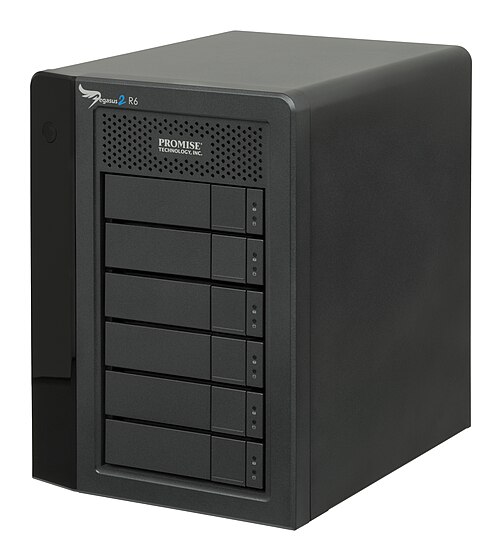
最初の Thunderbolt 周辺機器が小売店に登場したのは、Apple が 2011 年初頭にMacBook Proで初の Thunderbolt 搭載コンピューターをリリースした後の 2011 年後半になってからでした。Promise Technology 製の比較的高価なPegasus R4 (4 ドライブ) およびPegasus R6 (6 ドライブ) RAIDエンクロージャはプロシューマーおよびプロフェッショナル市場を対象としており、当初は最大 12 TB のストレージを提供し、後に 18 TB に増加しました。これらのユニットの販売は、2011 年にタイ(世界のハード ドライブ供給の多くを製造) で発生した洪水によって打撃を受け、その結果、世界中でハード ドライブの生産が削減され、ストレージ コストが上昇しました。そのため、これらの Promise ユニットの小売価格がそれに応じて上昇し、デバイスの普及が鈍化する一因となりました。
他のストレージ メーカーが製品をリリースするのにも時間がかかりました。ほとんどの製品はプロフェッショナル市場向けの小型デバイスで、大容量ではなく速度に重点を置いていました。多くのストレージ デバイスは 1 TB未満のサイズで、一部のデバイスは標準のハード ドライブではなく、外部データ アクセスを高速化するために SSD を搭載していました。
他の企業も、複数の古い、通常は低速な接続を単一の Thunderbolt ポート経由でルーティングできるインターフェイス製品を提供しています。2011 年 7 月、Apple はApple Thunderbolt Display をリリースしました。これは、ギガビット イーサネットとその他の古いコネクタ タイプを備えた、このタイプの最初のハブでした。その後、 Belkin、CalDigit、Other World Computing、Matrox、StarTech、Elgatoなどの企業がThunderbolt ドックをリリースしました。
2012 年後半の時点では、2 桁のTB容量を提供するストレージ デバイスは他にほとんど登場していませんでした。例外としては、Sonnet Technologies の高価なプロフェッショナル ユニットと、Droboの 4 ドライブおよび 5 ドライブ エンクロージャがあり、後者は独自のBeyondRAID専用データ処理システムを備えています。
ほとんどのストレージ デバイスには Thunderbolt ポートが 2 つしかなく、各ポートから最大 6 台のデバイスをデイジー チェーン接続するだけだったので、Thunderbolt 非搭載のコンピューターとの下位互換性が問題でした。2012 年半ば、LaCie 、Drobo、およびその他のデバイス メーカーは、低価格から中価格帯の製品の一部で、2 つの Thunderbolt ポートのうち 1 つをUSB 3.0接続に交換し始めました。後期モデルでは、2 つの Thunderbolt ポートに加えてUSB 3.0 が追加されました。これには、LaCie の2bigシリーズに搭載されているものも含まれます。
Appleデバイス
Apple released its first Thunderbolt-equipped computer in early 2011 with MacBook Pro, and have continued to immediately update their devices with newer generations of Thunderbolt as soon as available.
List of Apple devices featuring Thunderbolt ports include:[146]
- MacBook Pro (Retina, 13-inch, Late 2012 to Early 2013)
- MacBook Pro (Retina, 15-inch, Mid 2012 to Early 2013)
- MacBook Pro (17-inch, Early 2011 to Late 2011)
- MacBook Pro (15-inch, Early 2011 to Mid 2012)
- MacBook Pro (13-inch, Early 2011 to Mid 2012)
- MacBook Air (13-inch, Mid 2011 to Early 2014)
- MacBook Air (11-inch, Mid 2011 to Early 2014)
- Mac Mini (Mid 2011 to Late 2012)
- iMac (27-inch, Mid 2011 to Late 2013)
- iMac (21.5-inch, Mid 2011 to Mid 2014)
The late 2013 Retina MacBook Pro was the first product to have Thunderbolt 2 ports, following which manufacturers started to update their model offerings to those featuring the newer, faster, 20 Gbit/s connection throughout 2014.[147] Again, among the first was Promise Technology, who released updated Pegasus 2 versions of their R4 and R6 models along with an even larger R8 (8-drive) RAID unit, offering up to 32 TBs of storage. Later, other brands similarly introduced high capacity models with the newer connection type, including SanDisk Professional (with their G-RAID Studio models offering up to 24 TB) and LaCie (with their 5big, and rack mounted 8big models, offering up to 48 TB). LaCie also offering updated designed versions of their 2big mainstream consumer models, up to 12 TB, using new 6 TB hard-drives.
List of Apple devices featuring Thunderbolt 2 ports include:[146]
- MacBook Pro (Retina, 15-inch, Late 2013 to Mid 2015)
- MacBook Pro (Retina, 13-inch, Late 2013 to Early 2015)
- MacBook Air (13-inch, Early 2015 to 2017)
- MacBook Air (11-inch, Early 2015)
- Mac Mini (Late 2014)
- iMac (Retina 4K, 21.5-inch, Late 2015)
- iMac (21.5-inch, Late 2015)
- iMac (Retina 5K, 27-inch, Late 2014 to Late 2015)
- Mac Pro (Late 2013)
Thunderbolt 3 was introduced in late 2015, with several motherboard manufacturers and OEM laptop manufacturers including Thunderbolt 3 with their products. Gigabyte and MSI, large computer component manufacturers, entered the market for the first time with Thunderbolt 3 compatible components.[148][149]
Dell was the first to include Thunderbolt 3 ports in laptops with their XPS Series and their Dell Alienware range.[150]
Apple first included Thunderbolt 3 on Mac in 2016.
Although Thunderbolt initially had poor hardware support outside of Apple devices, and had been relegated to a niche gadget port, adoption of Thunderbolt 3, which uses the USB-C connector standard, meant wider market acceptance, especially as it later became part of the USB4 standard.
List of Apple devices featuring Thunderbolt 3 ports include:[146]
- Macbook Pro (14-inch, M3, 2023)
- MacBook Pro (13-inch, M1, 2020 to M2, 2022)
- MacBook Pro (16-inch, 2019)
- MacBook Pro (15-inch, 2016 to 2019)
- MacBook Pro (13-inch, Four Thunderbolt 3 ports, 2016 to 2020)
- MacBook Pro (13-inch, Two Thunderbolt 3 ports, 2016 to 2020)
- MacBook Air (M1, 2020 to M2, 2022)
- MacBook Air (Retina, 13-inch, 2018 to 2020)
- Mac Mini (2018 to M1, 2020)
- iMac (24-inch, M1, 2021)
- iMac (Retina 5K, 27-inch, 2017 to 2020)
- iMac (Retina 4K, 21.5-inch, 2017 to 2019)
- iMac (21.5-inch, 2017)
- iMac Pro
- Mac Pro (2019 + Rack, 2019)
- iPad Pro 12.9-inch (5th generation)
- iPad Pro 11-inch (3rd generation)
Apple started to include Thunderbolt 4 on some of their devices, starting in 2021 with MacBook Pro.
List of Apple devices featuring Thunderbolt 4 ports include:[146]
- MacBook Pro (14-inch, M1 Pro/Max, 2021 to M3 Pro/Max, 2023)
- MacBook Pro (16-inch, M1 Pro/Max, 2021 to M3 Pro/Max, 2023)
- Mac Studio (2022 to 2023)
- Mac Mini (2023)
- Mac Pro (2023 + Rack, 2023)
Security vulnerabilities
Vulnerability to DMA attacks
Thunderbolt 3 – like many high-speed expansion buses, including PCI Express, PC Card, ExpressCard, FireWire, PCI, and PCI-X — is potentially vulnerable to a direct memory access (DMA) attack. If users extend the PCI Express bus (the most common high-speed expansion bus in systems as of 2018[update]) with Thunderbolt, it allows very low-level access to the computer. An attacker could physically attach a malicious device, which, through its direct and unimpeded access to system memory and other devices, would be able to bypass almost all security measures of the operating system, allowing the attacker to read and write system memory, potentially exposing encryption keys or installing malware.[151] Such attacks have been demonstrated, modifying inexpensive commodity Thunderbolt hardware.[152][153] The IOMMU virtualization, if present, and configured by the BIOS and the operating system, can close a computer's vulnerability to DMA attacks,[152] but only if the IOMMU can block the DMA access of malicious device. As of 2019, the major OS vendors had not taken into account the variety of ways in which a malicious device could take advantage of complex interactions between multiple emulated peripherals, exposing subtle bugs and vulnerabilities.[154] Some motherboard and UEFI implementations offer Kernel DMA Protection. Intel VT-d-based direct memory access (DMA) protection is a mandatory requirement for Thunderbolt 4 Host Certification.[155]
This vulnerability is not present when Thunderbolt is used as a system interconnection (IPoTB supported on OS X Mavericks), because the IP implementation runs on the underlying Thunderbolt low-latency packet-switching fabric, and the PCI Express protocol is not present on the cable. That means that if IPoTB networking is used between a group of computers, there is no threat of such DMA attack between them.[151][152][156][157]
Vulnerability to Option ROM attacks
When a system with Thunderbolt boots, it loads and executes Option ROMs from attached devices. A malicious Option ROM can allow malware to execute before an operating system is started. It can then invade the kernel, log keystrokes, or steal encryption keys.[158] The ease of connecting Thunderbolt devices to portable computers makes them ideal for evil-maid attacks.[159]
Some systems load Option ROMs during firmware updates, allowing the malware in a Thunderbolt device's Option ROM to potentially overwrite the SPI flash ROM containing the system's boot firmware.[160][161] In February 2015, Apple issued a Security Update to Mac OS X to eliminate the vulnerability of loading Option ROMs during firmware updates, although the system is still vulnerable to Option ROM attacks during normal boots.[162]
Firmware-enforced boot security measures, such as UEFI Secure Boot (which specifies the enforcement of signatures or hash allowlists of Option ROMs) are designed to mitigate this kind of attack.
Vulnerability to data exposure attacks (Thunderspy)
In May 2020, seven major security flaws were discovered in the Thunderbolt protocol, collectively named Thunderspy. They allow a malicious party to access all data stored in a computer, even if the device is locked, password-protected, and has an encrypted hard drive. These vulnerabilities affect all Thunderbolt 1, 2 and 3 ports.[153] The attack requries the computer to be in sleep mode and have a Thunderbolt controller with a writable fireware chip. A well-trained attacker with physical access to the computer ("evil maid") can perform the required steps in 5 minutes. With a malicious firmware, the attacker can covertly disable Thunderbolt security, clone device identities, and proceed to use DMA to extract data.[163] Thunderspy vulnerabilities can largely be mitigated using Kernel DMA Protection, along with traditional anti-intrusion hardware features.[164][165]
Cables

In June 2011, Apple introduced the first Thunderbolt cable, a 2 m (6.6 ft), 10 Gbit/s, full-duplex, active cable costing US$49.[166]
In June 2012, Apple began selling a Thunderbolt-to-gigabit Ethernet adapter for US$29.[167] In the third quarter of 2012, other manufacturers started shipping Thunderbolt cables, including cables reaching the 3 metres (9.8 feet) length limit, while some storage-enclosure builders began bundling Thunderbolt cables with their devices, rather than making customers buy them separately, as had been standard practice.
In January 2013, Apple reduced the price of their 2 m (6.6 ft) length cable to US$39 and added a half-meter cable for US$29.[168]
In Thunderbolt 3’s introduction, Intel announced passive USB-C cables would connect Thunderbolt devices at speeds greater than USB 3.1 (though less than active Thunderbolt cables), thereby eliminating the adoption barrier of Thunderbolt active cable costs.[169]
In mid-2016, copper Thunderbolt 3 cables became available at lengths up to 2 m (6.6 ft). However, 40 Gbit/s on copper required either active cables, or short (initially 0.5 m (1.6 ft), later 0.8 m (3 ft)) passive cables. Passive copper cables exceeding 0.8 m (3 ft) are limited to 20 Gbit/s. Despite that limit, passive cables provide USB 3 (20 Gbit/s) backward compatibility, while active cables support only USB 2.0 (480 Mbit/s). In April 2020, optical Thunderbolt 3 cables debuted (see Copper vs. optical).
Copper versions of Thunderbolt 4 cables offer full 40 Gbit/s speed and backward compatibility with all versions of USB (up to USB4), DisplayPort Alternate Mode (DP 1.4 HBR3), and Thunderbolt 3. Released in early 2021, they are also all to be available in three specified lengths: 0.2 m (0.66 ft), 0.8 m (2.6 ft), and 2 m (6.6 ft) – with many companies initially offering 0.8 m (2.6 ft) lengths. Copper Thunderbolt 4 cables up to 1 m (3.3 ft) are passive cables, while longer cables must integrate active signal conditioning circuitry. Interestingly, Apple are currently the only company that offers a 3 m (9.8 ft) copper cable, whilst other companies maximum length of copper cables are 2 m (6.6 ft). Optical Thunderbolt 4 cables were targeting lengths from ~5 m (16 ft) to 50 m (160 ft),[43] although this may not happen, instead jumping to Thunderbolt 5 optical cables, sometime after the arrival of that standard in late 2024.
Controllers
- ^ a b c d All speeds up to HBR3 plus UHBR10 and UHBR20. No support for UHBR13.5.
See also
- Apple Thunderbolt Display
- Computer bus
- DisplayPort / Mini DisplayPort
- IEEE 1394 (FireWire)
- Interconnect bottleneck
- Lightning
- DockPort
- List of interface bit rates
- List of computer peripheral bus bit rates
- MacBook Pro
- Optical communication
- Fiber-optic cable
- Parallel optical interface
- eGPU
- USB 3.0
- USB4
- USB-C
References
- ^ a b "Apple Updates MacBook Pro with Next Generation Processors, Graphics & Thunderbolt I/O Technology" (Press release). Apple. 24 February 2011. Archived from the original on 10 July 2011. Retrieved 17 August 2011.
- ^ a b c d e "Thunderbolt – Technology Brief". Intel. Retrieved 1 October 2012.
- ^ a b "OWC Thunderbolt Hub". Retrieved 19 November 2020.
- ^ a b "Thunderbolt 4 Press deck" (PDF). Thunderbolt technology. Retrieved 19 November 2020.
- ^ a b "Thunderbolt Device Driver Programming Guide". Apple. Retrieved 21 December 2011.
- ^ a b "Frequently Asked Questions (FAQs)". Thunderbolt Technology Community. Retrieved 14 January 2024.
- ^ Shamah, David. "Thunderbolt 3: How USB cooperation could lead to 100 million connected computers soon". ZDNet. Retrieved 26 August 2021.
- ^ Shah, Agam (6 June 2013). "Intel shows 'world's fastest thumb drive'". Computerworld. Retrieved 26 August 2021.
- ^ Frakes, Dan (24 February 2011). "What you need to know about Thunderbolt". MacWorld. Retrieved 17 April 2019.
- ^ Cunningham, Andrew. "USB 3.1 and Type-C: The only stuff at CES that everyone is going to use". Ars Technica.
- ^ a b c Foresman, Chris (24 February 2011). "Thunderbolt smokes USB, FireWire with 10 Gb/s throughput". Ars Technica. Condé Nast Digital. Retrieved 24 February 2011.
- ^ a b c Dilger, Daniel Eran (24 February 2011). "Intel details Thunderbolt, says Apple has a full year's head start". AppleInsider. Retrieved 25 February 2011.
- ^ Nilsson, LG (25 February 2011). "Intel announces Thunderbolt". VR-Zone. VR Media. Archived from the original on 26 February 2011. Retrieved 27 February 2011.
- ^ "Light Peak: Overview" (PDF). Intel. Retrieved 29 June 2011.
- ^ "White Paper: The 50G Silicon Photonics Link" (PDF). Intel. Retrieved 29 June 2011.
- ^ "Thunderbolt trademark rights will be transferred from Apple to Intel". AppleInsider. 20 May 2011. Retrieved 16 June 2013.
- ^ "Sumitomo Electric Starts Selling Optical Thunderbolt Cable at Amazon Online". Global Sei.
- ^ a b c "Optical Cables by Corning launched as the first Thunderbolt all-optical fiber cables". Corning. 11 September 2013. Retrieved 22 September 2013.
- ^ Patel, Nilay (24 September 2009). "Video: Intel's Light Peak running an HD display while transferring files... on a hackintosh". Engadget. AOL. Retrieved 25 February 2011.
- ^ Ziller, Jason (26 January 2010). Intel Light Peak Interconnect Technology Update (YouTube). Intel. Event occurs at 1:20. Archived from the original on 23 March 2011. Retrieved 23 February 2011.
- ^ Light Peak to Connect Consumer Devices at Record Speed on YouTube
- ^ "Light Peak to succeed USB 3.0". UK: The Register. 15 April 2010.
- ^ Shiels, Maggie (25 September 2009). "Future is TV-shaped, says Intel". BBC News. Retrieved 27 September 2009.
- ^ Collins, Barry (4 May 2010). "Intel shows off first Light Peak laptop". PC Pro. Dennis Publishing. Retrieved 5 May 2010.
- ^ Hollister, Sean (14 September 2010). "Intel's Light Peak optical interconnect shrinks slightly, LaCie, WD, Compal and Avid begin prototyping". Engadget. AOL. Retrieved 28 November 2010.
- ^ Hachman, Mark (24 February 2011). "Intel Thunderbolt Rollout Won't Be Lightning Fast". PC Mag. Ziff Davis. Retrieved 26 February 2011.
- ^ Shankland, Stephen (23 September 2009). "Intel's Light Peak: One PC cable to rule them all". CNet News. CBS Interactive. Retrieved 28 November 2010.
- ^ a b Crothers, Brooke (29 September 2009). "Sources: 'Light Peak' technology not Apple idea". CNet News. CNet. Retrieved 23 February 2011.
- ^ Branscombe, Mary (5 August 2010). "Intel Light Peak: a tech guide". ZDNet. Ziff Davis. Retrieved 22 October 2012.
- ^ Shah, Agam (8 January 2011). "Intel says Light Peak interconnect technology is ready". Computerworld. International Data. Retrieved 23 February 2011.
- ^ "IPtronics Develops Components for Light Peak Technology" (Press release). IPtronics. 1 October 2009. Retrieved 5 April 2011.
- ^ Clarke, Peter (1 October 2009). "IPtronics, Avago chip in to Intel's optical interconnect". EE Times. Retrieved 1 October 2009.
- ^ a b Metz, Cade (24 February 2011). "Intel: 'PC makers took the light out of Light Peak'". The Register. Situation Publishing. Retrieved 25 February 2011.
- ^ Ziller, Jason (23 January 2010). Light Peak to Connect Consumer Devices at Record Speed (YouTube). Intel. Event occurs at 1:13. Retrieved 23 February 2011.
- ^ "Sumitomo Electric Starts Selling Optical Thunderbolt Cable at Amazon Online" (Press release). Global SEI. 2013. Retrieved 16 June 2013.
- ^ "Delock Cable Thunderbolt optical male/male 30 m black". DeLock. Retrieved 15 October 2013.
- ^ "PSA: For Thunderbolt 3 over distance; use *OPTICAL Thunderbolt 1/2 cables!*". Macrumors. 28 March 2018. Retrieved 28 January 2019.
- ^ "Optical thunderbolt 3 cables from Corning. Up to 60m. #NAB2019 #NABShow". Twitter. Mat X. 9 April 2019. Retrieved 11 June 2019.
- ^ "Corning's Optical Thunderbolt 3 Cables Now Available in Lengths From 5 to 50 Meters". Macrumors. 30 September 2020. Retrieved 8 October 2020.
- ^ "Optical Thunderbolt 3 Cables Begin Rolling Out in Lengths Up to 50 Meters". Macrumors. 26 March 2020. Retrieved 28 April 2020.
- ^ "Thunderbolt 4 / USB 4 Cable (2m) Active 40Gb/s, 100W, 20V, 5A". CalDigit.
- ^ "Cable Matters Active Thunderbolt 4 Cable". Cable Matters.
- ^ a b "Intel Thunderbolt 4 announcement press deck" (PDF). Intel Thunderbolt. 8 July 2020. Retrieved 23 April 2021.
- ^ Crothers, Brooke (19 February 2011). "New high-speed connection tech due from Apple". CNet News. CBS Interactive. Retrieved 25 February 2011.
- ^ Kim, Arnold (19 February 2011). "Apple to Introduce Light Peak (High Speed Connection Technology) Soon?". MacRumors. Retrieved 25 February 2011.
- ^ Smith, Mat (21 May 2012). "ASUS and MSI launch Thunderbolt motherboards, tie for first place". Engadget.
- ^ "Thunderbolt: Next-Generation high-speed I/O technology". Apple. 24 February 2011. Archived from the original on 26 February 2011. Retrieved 25 February 2011.
- ^ "MacBook Pro (13-inch, Early 2011) – Technical Specifications". support.apple.com. Retrieved 6 September 2022.
- ^ "MacBook Pro (15-inch, Early 2011) – Technical Specifications". support.apple.com. Retrieved 6 September 2022.
- ^ "MacBook Pro (17-inch, Early 2011) – Technical Specifications". support.apple.com. Retrieved 6 September 2022.
- ^ "iMac (21.5-inch, Mid 2011) – Technical Specifications". support.apple.com. Retrieved 6 September 2022.
- ^ "iMac (27-inch, Mid 2011) – Technical Specifications". support.apple.com. Retrieved 6 September 2022.
- ^ "Mac mini (Mid 2011) – Technical Specifications". support.apple.com. Retrieved 6 September 2022.
- ^ "MacBook Air (11-inch, Mid 2011) – Technical Specifications". support.apple.com. Retrieved 6 September 2022.
- ^ "MacBook Air (13-inch, Mid 2011) – Technical Specifications". support.apple.com. Retrieved 6 September 2022.
- ^ "Apple Thunderbolt Display – Technical Specifications". support.apple.com. Retrieved 6 September 2022.
- ^ "Apple Announces New iMac With Next Generation Quad-Core Processors, Graphics & Thunderbolt I/O Technology". Apple. Retrieved 10 May 2011.
- ^ "iMac (Mid 2011): Target Display Mode does not accept video over a Mini DisplayPort cable". Apple. 14 July 2011. Retrieved 17 July 2011.
- ^ Shah, Agam (12 April 2011). "Intel to Open up Thunderbolt Development This Quarter". PC World. PCWorld Communications. Retrieved 13 April 2011.
- ^ Holland, Colin (12 April 2011). "LeCroy lines up armada for Thunderbolt testing". Retrieved 18 April 2011.
- ^ "Registration required for developer information". Intel. Retrieved 22 August 2012.
- ^ https://arstechnica.com/gadgets/2011/02/thunderbolt-smokes-usb-firewire-with-10gbps-throughput/
- ^ "Video Creation Bolts Ahead – Intel's Thunderbolt 2 Doubles Bandwidth, Enabling 4K Video Transfer & Display". Intel. 4 June 2013.
- ^ "Mac Pro (Late 2013) – Technical Specifications". support.apple.com. Retrieved 6 September 2022.
- ^ "MacBook Pro (Retina, 13-inch, Late 2013) – Technical Specifications". support.apple.com. Retrieved 6 September 2022.
- ^ "MacBook Pro (Retina, 15-inch, Late 2013) – Technical Specifications". support.apple.com. Retrieved 6 September 2022.
- ^ "Mac mini (Late 2014) - Technical Specifications". support.apple.com. Retrieved 6 September 2022.
- ^ "iMac (Retina 5K, 27-inch, Late 2014) – Technical Specifications". support.apple.com. Retrieved 6 September 2022.
- ^ "MacBook Air (11-inch, Early 2015) – Technical Specifications". support.apple.com. Retrieved 6 September 2022.
- ^ "MacBook Air (13-inch, Early 2015) – Technical Specifications". support.apple.com. Retrieved 6 September 2022.
- ^ Apple (2013) "Thunderbolt". Apple. Retrieved 4 February 2014.
- ^ "Video Creation Bolts Ahead – Intel's Thunderbolt 2 Doubles Bandwidth, Enabling 4K Video Transfer & Display". intel.com. Retrieved 1 January 2016.
- ^ Walton, Jarred (19 August 2013). "ASUS Introduces Z87-Deluxe/Quad: World's First Thunderbolt 2 Certified Motherboard". AnandTech. Retrieved 28 December 2013.
- ^ Torres, Edwin (28 January 2013) [1]. MacRumors. Retrieved 28 January 2014.
- ^ "Intel". Facebook.
- ^ Byrne, Seamus (2 June 2015). "One port to rule them all: Thunderbolt 3 and USB Type-C join forces". CNET. Retrieved 12 March 2018.
- ^ "Thunderbolt 3 is twice as fast and uses reversible USB Type-C". Engadget. 2 June 2015.
- ^ "Thunderbolt 3 embraces USB Type-C connector, doubles bandwidth to 40Gbps". arstechnica.co.uk. 2 June 2015.
- ^ "Intel® 7000 Series Thunderbolt™ 3 Controllers" (PDF). Intel.
- ^ "Thunderbolt 3 Technology Brief" (PDF). Intel.
- ^ "Thunderbolt 3 – The USB-C That Does It All". Thunderbolt Technology Community. Retrieved 24 November 2015.
- ^ a b "Leaked Info on Third-Generation Thunderbolt Points to 40Gbps Transfer Speeds". MacRumors. 21 April 2014. Retrieved 19 November 2014.
- ^ a b "Next-gen Thunderbolt details: 40Gbps, PCIe 3.0, HDMI 2.0, and 100W power delivery for single-cable PCs". Extreme Tech. 22 April 2014. Retrieved 19 November 2014.
- ^ a b "Next-gen Thunderbolt doubles speeds but changes the connector". Ars Technica. 22 April 2014. Retrieved 19 November 2014.
- ^ "Day 1 of Thunderbolt peripheral training Q4 15 final v1.0" (PDF), Thunderbolt technology
- ^ "Thunderbolt 3 devices". Thunderbolt Technology. January 2016. Retrieved 9 January 2016.
- ^ "MacBook Pro (13-inch, 2016, Two Thunderbolt 3 ports) – Technical Specifications". support.apple.com. Retrieved 6 September 2022.
- ^ "MacBook Pro (13-inch, 2016, Four Thunderbolt 3 ports) – Technical Specifications". support.apple.com. Retrieved 6 September 2022.
- ^ "MacBook Pro (15-inch, 2016) – Technical Specifications". support.apple.com. Retrieved 6 September 2022.
- ^ "iMac (21.5-inch, 2017) – Technical Specifications". support.apple.com. Retrieved 6 September 2022.
- ^ "iMac (Retina 4K, 21.5-inch, 2017) – Technical Specifications". support.apple.com. Retrieved 6 September 2022.
- ^ "iMac (Retina 5K, 27-inch, 2017) – Technical Specifications". support.apple.com. Retrieved 6 September 2022.
- ^ "iMac Pro (2017) – Technical Specifications". support.apple.com. Retrieved 6 September 2022.
- ^ "MacBook Air (Retina, 13-inch, 2018) – Technical Specifications". support.apple.com. Retrieved 6 September 2022.
- ^ "Mac mini (2018) – Technical Specifications". support.apple.com. Retrieved 6 September 2022.
- ^ "Mac Pro (2019) – Technical Specifications". support.apple.com. Retrieved 6 September 2022.
- ^ "Mac Pro (Rack, 2019) – Technical Specifications". support.apple.com. Retrieved 6 September 2022.
- ^ "Pro Display XDR – Technical Specifications". Apple. Retrieved 6 September 2022.
- ^ "iPad Pro, 11-inch (3rd generation) – Technical Specifications". support.apple.com. Retrieved 6 September 2022.
- ^ "iPad Pro, 12.9-inch (5th generation) – Technical Specifications". support.apple.com. Retrieved 6 September 2022.
- ^ "Studio Display – Technical Specifications". Apple. Retrieved 6 September 2022.
- ^ Ziller, Jason. "New Intel Thunderbolt 3 controllers offer DisplayPort 1.4, and basic peripheral compatibility with USB-C computer ports". Thunderbolt Technology. Intel. Retrieved 15 January 2018.
- ^ "USB Promoter Group USB4 Specification". USB implementers forum. 29 August 2019.
- ^ a b Bright, Peter (4 March 2019). "Thunderbolt 3 becomes USB4, as Intel's interconnect goes royalty-free". Ars Technica. Retrieved 4 March 2019.
- ^ Grunin, Lori (4 March 2019). "USB4 marries Thunderbolt 3 for faster speeds and smarter transfers". CNET. Retrieved 4 March 2019.
- ^ Brant, Tom (4 March 2019). "Thunderbolt 3 Merges With USB to Become USB4". PC Magazine. Retrieved 4 March 2019.
- ^ "VESA Releases Updated DisplayPort Alt Mode Spec to Bring DisplayPort 2.0 Performance to USB4 and New USB Type-C® Devices". VESA - Interface Standards for The Display Industry. 29 April 2020. Retrieved 22 November 2021.
- ^ "Thunderbolt 4 Explained | Tripp Lite". Tripp Lite Website. Retrieved 20 December 2021.
- ^ "MacBook Air (M1, 2020) – Technical Specifications". support.apple.com. Retrieved 6 September 2022.
- ^ "MacBook Pro (13-inch, M1, 2020) – Technical Specifications". support.apple.com. Retrieved 6 September 2022.
- ^ "Mac mini (M1, 2020) – Technical specifications". support.apple.com. Retrieved 6 September 2022.
- ^ "iMac (24-inch, M1, 2021) – Technical Specifications". support.apple.com. Retrieved 6 September 2022.
- ^ USB type C system overview (PDF), USB
- ^ "USB4 Systems PCIe Tunneling Support". Microsoft.
- ^ "USB4 is Coming! Here is What You Need to Know". Black box.
- ^ "DisplayPort Alt Mode 2.0 Spec Released: Defining Alt Mode for USB4". Anand tech.
- ^ "USB4 vs. USB C". Linux hint.
- ^ Owen, Malcolm (7 January 2020). "Intel confirms Thunderbolt 4 on way with four-times USB 3 speed". Apple Insider. Retrieved 7 January 2020.
- ^ a b Introducing Thunderbolt 4 universal cable connectivity for everyone, Intel
- ^ Introducing Thunderbolt 4: Universal Cable Connectivity for Everyone. Intel. July 8, 2020
- ^ "What is Thunderbolt 4?". Cable Matters.
- ^ "Razer Thunderbolt 4 Dock". Retrieved 5 February 2021.
- ^ "Sonnet Thunderbolt 4 Dock Compatibility" (PDF). Archived from the original (PDF) on 19 February 2021. Retrieved 19 February 2021.
- ^ S, Ganesh T. "Intel Teases Thunderbolt 4, Light on Details". Anandtech. Retrieved 16 May 2020.
- ^ Smith, Ryan. "DisplayPort Alt Mode 2.0 Spec Released: Defining Alt Mode for USB4". www.anandtech.com. Retrieved 22 November 2021.
- ^ "VESA Releases Updated DisplayPort Alt Mode Spec to Bring DisplayPort 2.0 Performance to USB4 and New USB Type-C® Devices". VESA – Interface Standards for The Display Industry. 29 April 2020. Retrieved 22 November 2021.
- ^ "MacBook Pro (14-inch, 2021) – Technical Specifications". support.apple.com. Retrieved 6 September 2022.
- ^ "MacBook Pro (16-inch, 2021) – Technical Specifications". support.apple.com. Retrieved 22 May 2024.
- ^ "Mac Studio (2022) – Technical Specifications". support.apple.com. Retrieved 6 September 2022.
- ^ "Intel Introduces Thunderbolt 5 Connectivity Standard". Intel. 19 October 2022. Retrieved 12 September 2023.
- ^ "Intel has a grand plan to bring Thunderbolt 3 ports to every laptop". Techradar. 24 May 2017. Retrieved 24 May 2017.
- ^ "USB Promoter Group Announces USB4 Specification" (PDF). USB. Retrieved 7 July 2019.
- ^ "USB4 Specification". USB. Retrieved 3 September 2019.
- ^ "The new USB4 spec promises a lot: Thunderbolt 3 support, 40Gbps bandwidth, and less confusion". PCWorld. 5 March 2019. Retrieved 7 July 2019.
- ^ "Introducing Thunderbolt 4: Universal Cable Connectivity for Everyone". PCWorld. 8 July 2020. Retrieved 11 July 2020.
- ^ "Where is Thunderbolt on Threadripper?! Here it is, but…", Level1Techs, 29 July 2018, archived from the original on 3 November 2021, retrieved 20 February 2019 – via You tube
- ^ Lilly, Paul (30 July 2018). "Complex Threadripper hack gets Intel's Thunderbolt 3 working on AMD hardware". PC Gamer. Retrieved 20 February 2019.
- ^ "Thunderbolt 3 AMD Threadripper 1950X + RTX 2080@32Gbps-TB3". eGPU.io. Retrieved 26 May 2019.
- ^ "ASRock X570 Creator". Asrock. Retrieved 9 November 2019.
- ^ "X570 Phantom Gaming–ITX/TB3". Thunderbolt Technology Community. Retrieved 4 March 2020.
- ^ Broekhuijsen, Niels (6 February 2020). "Intel Finally Certified an AMD Thunderbolt Motherboard: Here's Why That Matters (Updated)". Tom's Hardware. Retrieved 3 March 2020.
- ^ "THUNDERBOLTEX 3-TR|Motherboards|ASUS Global". www.asus.com. Retrieved 21 July 2022.
- ^ "ProArt B550-CREATOR|Motherboards|ASUS Global". ASUS Global. Retrieved 21 July 2022.
- ^ B550 VISION D
- ^ B550 VISION D-P
- ^ a b c d "Identify the ports on your Mac". Apple Support. Retrieved 6 September 2022.
- ^ Butler, Stacey (7 November 2023). "What Exactly Is Thunderbolt and How Is It Different From USB-C? • macReports". macReports. Retrieved 8 November 2023.
- ^ "Gigabyte Unveils the Z170X-UD5 TH Thunderbolt 3 Certified Motherboard". Retrieved 30 September 2015.
- ^ "MSI embraces Skylake and Thunderbolt 3.0 for new gaming laptops". Retrieved 30 September 2015.
- ^ "New Alienware laptops pack Thunderbolt 3 and prettier screens, but oddly lack Skylake". Retrieved 30 September 2015.
- ^ a b Graham, Robert (24 February 2011). "Thunderbolt: Introducing a new way to hack Macs". Errata Security. Retrieved 5 March 2011.
- ^ a b c Sevinsky, Russ (1 August 2013). Funderbolt: Adventures in Thunderbolt DMA Attacks (PDF). Black Hat Briefings. Las Vegas.
- ^ a b Porter, Jon (11 May 2020). "Thunderbolt flaw allows access to a PC's data in minutes". The Verge. Retrieved 11 May 2020.
- ^ "Thunderclap: Exploring Vulnerabilities in Operating System IOMMU Protection via DMA from Untrustworthy Peripherals – NDSS Symposium". Retrieved 21 January 2020.
- ^ "Thunderbolt 3 vs. Thunderbolt 4 Technology: What's the Difference?". Retrieved 23 February 2023.
- ^ "Thunderbolt how it works". Intel. 2014. Archived from the original on 29 October 2014. Retrieved 1 May 2018.
- ^ Sevinsky, Russ (1 October 2013). Black Hat USA 2013 – Funderbolt: Adventures in Thunderbolt DMA Attacks. Archived from the original on 3 November 2021. Retrieved 16 July 2014.
- ^ Heasman, John (2007). "Hacking the Extensible Firmware Interface" (PDF). Black Hat.
- ^ Snare (2012). "Mac EFI rootkits" (PDF). Black Hat.
- ^ Hudson, Trammell (27 December 2014). "Thunderstrike: EFI firmware rootkits for MacBooks". Chaos Communication Congress.
- ^ US-CERT/NIST (30 January 2015). "CVE-2014-4498: The Thunderstrike issue".
- ^ "About the security content of OS X Yosemite v10.10.2 and Security Update 2015-001". Apple. 4 February 2015.
- ^ Ruytenberg, Björn (2020). "Thunderspy: When Lightning Strikes Thrice: Breaking Thunderbolt 3 Security". Thunderspy.io. Retrieved 11 May 2020.
- ^ Ruytenberg, Björn. "Thunderspy 2: Kernel DMA Protection for Unpatched Thunderbolt Systems".
- ^ "Kernel DMA Protection (Windows 10) – Microsoft 365 Security". docs.microsoft.com.
- ^ Foresman, Chris (30 June 2011). "The technology inside Apple's $50 Thunderbolt cable". Retrieved 2 July 2011.
- ^ van Beijnum, Iljitsch (20 June 2012). "Hands-on: Apple's Thunderbolt Gigabit Ethernet adapter". Ars Technica.
- ^ Gurman, Mark (10 January 2013). "Apple slashes price on Thunderbolt cable, releases additional shorter model". 9to5Mac.
- ^ Anthony, Sebastian (2 June 2015). "Thunderbolt 3 embraces USB Type-C connector, doubles bandwidth to 40Gbps". Ars Technica UK.
- ^ "Thunderbolt Controllers". intel.com.
- ^ "Thunderbolt 2 Controllers". intel.com.
- ^ "Thunderbolt 3 Controllers". intel.com.
- ^ "Next-Gen Intel "Alpine Ridge" Thunderbolt Controller Detailed". techpowerup.com.
- ^ "Intel 6000 Series Thunderbolt 3 Controllers" (PDF).
- ^ "Alpine Ridge 頻寬可達 40Gb/s,新一代 Thunderbolt 晶片將具更多功能 – VR-Zone 中文版". vr-zone.com. 19 April 2014.
- ^ "Thunderbolt 4 Controllers". intel.com.
- ^ "Thunderbolt 80/120G Controllers". intel.com.
- ^
- Nilsson, LG. "Intel cans 3.4W TDP Cactus Ridge Thunderbolt chip". VR-Zone. Archived from the original on 25 March 2012. Retrieved 30 March 2012.
- Nilsson, LG. "Thunderbolt roadmap unveiled, new features coming to Apple et al". VR-Zone. Archived from the original on 7 May 2012. Retrieved 24 July 2012.
- Chen, Monica. "Intel to release new Thunderbolt chip in 2Q13". Digitimes. Retrieved 24 July 2012.
- Nilsson, LG. "Intel finally shipping 2nd gen Thunderbolt controllers, just in time for new Macs". VR-Zone. Archived from the original on 20 October 2012. Retrieved 14 August 2012.
- Shimpi, Anand. "New Thunderbolt Controllers (DSL4510/4410) and Future 20 Gbps Falcon Ridge TB Controller Announced". AnandTech. Retrieved 8 April 2013.
- Verry, Tim (15 September 2013). "IDF 2013: Products With 20Gbps Thunderbolt 2 Appear At IDF 2013". PC Perspective. Retrieved 14 October 2013.
- "Products", Formerly Falcon Ridge, Intel, retrieved 14 October 2013
- "New Intel Thunderbolt 3 controllers offer DisplayPort 1.4, and basic peripheral compatibility with USB-C computer ports".
Further reading
- Ziller, Jason (2 June 2015). "Thunderbolt 3 – The USB-C That Does It All". thunderbolttechnology.net. Intel.
- "Adapters for the Thunderbolt 3 or USB-C port on your Mac". apple.com. Apple. 11 August 2021.
External links

Wikimedia Commons has media related to Thunderbolt (interface).
- Thunderbolt – official site
- Thunderbolt May Not Be As Fast As You Think – Larry Jordan