
Loading article…
Windows 2000 は、 Microsoftが開発したWindows NTオペレーティングシステムのメジャーリリースで、サーバーおよびビジネス市場を対象としています。Windows NT 4.0の直接の後継であり、1999 年 12 月 15 日に製造向けにリリースされ[ 2 ]、その後 2000 年 2 月 17 日に小売向けにリリースされました。Windows 2000 Datacenter Server は 2000 年 9 月 26 日にリリースされました。
Windows 2000 では、 NTFS 3.0 [ 7 ]暗号化ファイルシステム[ 8 ]、および基本ディスクストレージとダイナミックディスクストレージ[ 9 ]が導入されました。Windows NT 4.0より、多数の新しい支援技術[ 10 ]により障害者のサポートが改善され、Microsoft はさまざまな言語[ 11 ]とロケール情報[ 12 ]のサポートを強化しました。Windows 2000 Server ファミリーには、特にActive Directory [ 13 ]の導入など、追加機能があり、これはその後数年間でビジネス環境で広く使用されるディレクトリ サービスになりました。最終リリースには含まれていませんが、Alphaのサポートは、アルファ、ベータ、およびリリース候補バージョンにありました。後継のWindows XP は、 x86、x86-64、およびItaniumプロセッサのみをサポートしています。 Windows 2000は、製品ラインから「NT」という名前を削除した最初のNTリリースでもありましたが、[ 14 ] 「NT」という名称は、製品のパッケージやオペレーティングシステム内のいくつかの場所(ブート画面やログオン画面など)で使用される「 NTテクノロジーに基づいて構築」というタグラインで最後にもう一度使用されました。
Windows 2000 は、 Professional、Server、Advanced Server、Datacenter Serverの 4 つのエディションがリリースされました。[ 15 ] Datacenter Server は、他のエディションより数か月後にリリースされました。[ 16 ] Windows 2000 の各エディションは異なる市場を対象としていますが、 Microsoft Management Consoleや標準的なシステム管理アプリケーションなどの多くのシステムユーティリティを含むコア機能セットを共有しています。
Microsoft marketed Windows 2000 as the most secure Windows version ever at the time;[17] however, it became the target of a number of high-profile virus attacks such as Code Red[18] and Nimda.[19] Windows 2000 was succeeded by Windows XP in October 2001, while Windows 2000 Server was succeeded by Windows Server 2003 in April 2003. For ten years since its release, it continued to receive patches for security vulnerabilities nearly every month until reaching end of support on July 13, 2010.[6]
Both the original Xbox and the Xbox 360 use a modified version of the Windows 2000 kernel as their system software;[20][21] the former's source code (as well as the source code for Windows NT 3.5) was leaked in 2020.[21]
Windows 2000, originally named Windows NT 5.0, is a continuation of the Microsoft Windows NT family of operating systems, replacing Windows NT 4.0. Chairman and CEO Bill Gates was originally "pretty confident" Windows NT 5.0 would ship in the first half of 1998,[22] revealing that the first set of beta builds had been shipped in early 1997; these builds were identical to Windows NT 4.0, including a very similarly themed logo. Certain features such as the Microsoft Management Console as well as two-tone gradients on the Windows Explorer title bars (inherited from Windows 98) were introduced during this period. Beta versions of Internet Explorer 4 were also featured in these early builds before it was replaced by Internet Explorer 5 in later builds.
The first official beta was released in September 1997, followed by Beta 2 in August 1998.[23][24] Windows NT 5.0 Beta 2 introduced a new "mini" graphical boot screen (in place of a text mode only boot screen in Windows NT 4.0 and prior), and elements of the "dark space" theme were removed in favor of the "square box" theme used in the final product.
1998年10月27日、マイクロソフトはオペレーティングシステムの最終バージョンの名称がWindows 2000になると発表した。この名称は、予定されていたリリース日を指していた。[ 14 ] [ 25 ] Windows 2000は当初、Windows 98とWindows NT 4.0の両方を置き換える予定だった。しかし、1999年6月にWindows 98 Second Editionと呼ばれるWindows 98のアップデート版がリリースされたため、この計画は後に変更された。
Windows 2000 Beta 3 は Beta 2 の後にリリースされました。最終版の新しいログインプロンプトは Beta 3 ビルド 1946 (Beta 3 の最初のビルド) で初めて登場し、新しい更新されたアイコン (マイコンピュータ、ごみ箱など) は Beta 3 ビルド 1964 で初めて登場し、最終版で見られる Windows 2000 の起動画面は Beta 3 ビルド 1983 で初めて登場しました。
Windows NT 5.0 と初期の Windows 2000 ベータ版では起動音とシャットダウン音が異なっていましたが (Windows NT 4.0 と同じ音を再利用したものもありました)、Beta 3 ビルドでは、Steven Ray Allen が作曲したピアノによる新しい起動音とシャットダウン音が作られました。 [ 26 ]これらは Beta 3 のリリース前に最終的な構成に変更され、最終製品とWindows Meに搭載されました。Bill Wolford が作曲した Windows 98 の新たに更新されたシステム サウンドも、後のベータ ビルドで実行されました。[27] Windows 2000 Beta 3 は 1999 年 5 月にリリースされました。[ 23 ]
Windows 2000には実際のコードネームがなかった。Windows NTチームのデイブ・トンプソンによれば、「ジム・オールチンはコードネームが好きではなかった」からである。[ 28 ] Windows 2000のサービスパック1のコードネームは「アステロイド」だった。[ 29 ]
開発中、Alphaアーキテクチャ用のビルドがコンパイルされましたが、 CompaqがAlphaでのWindows NTのサポートを終了すると発表したため、開発の最終段階(RC1とRC2の間[ 30 ])でプロジェクトは中止されました。Alpha 64ビット版のWindows 2000も32ビット版と同時に開発されていましたが(Alpha版Windows NTは、64ビットプロセッサ上で32ビットアプリケーションバイナリインターフェイスを使用していたため、すべてのバージョンが32ビットのみでした)、これも中止されました。当時他にItaniumハードウェアが利用できなかったため、Alpha 64ビット版Windowsの開発は、64ビットIntel Itaniumプラットフォームの開発プラットフォームとしてしばらくの間続けられました。[ 5 ]
From here, Microsoft issued three release candidates between July and November 1999, and finally released the operating system to partners on December 12, 1999, followed by manufacturing three days later on December 15.[31] The public could buy the full version of Windows 2000 on February 17, 2000.
About three days prior to release, which Microsoft advertised as "a standard in reliability," a leaked memo from Microsoft reported on by Mary Jo Foley revealed that Windows 2000 had "over 63,000 potential known defects."[32] After Foley's article was published, she claimed that Microsoft blacklisted her for a considerable time.[33] However, Abraham Silberschatz et al. claim in their computer science textbook that "Windows 2000 was the most reliable, stable operating system Microsoft had ever shipped to that point. Much of this reliability came from maturity in the source code, extensive stress testing of the system, and automatic detection of many serious errors in drivers."[34]InformationWeek summarized the release "our tests show the successor to Windows NT 4.0 is everything we hoped it would be. Of course, it isn't perfect either."[35]Wired News later described the results of the February launch as "lackluster."[36]Novell criticized Microsoft's Active Directory, the new directory service architecture, as less scalable or reliable than its own Novell Directory Services (NDS) alternative.[37]
Microsoft は 2000 年に、 64 ビットIntel Itaniumマイクロプロセッサ上で動作する Windows 2000 のバージョンをリリースする予定でした。[ 38 ] [ 39 ]これは特別に「Janus」というコードネームが付けられていました。[ 40 ] [ 41 ] Windows 2000 の 64 ビット版は、すでに Alpha 64 ビット プラットフォーム (Itanium のテスト環境として使用) 向けに開発されていましたが、[ 5 ]公式にリリースされた最初の 64 ビット版 Windows は、 2001 年 10 月 25 日にWindows XPの 32 ビット版と同時にリリースされたWindows XP 64-Bit Editionでした。 [ 42 ]その後、 Windows Server 2003 (当時はWindows .NET Serverとして知られていた) のプレリリース版のコードベースに基づいたサーバー版のWindows Datacenter Server Limited Editionと、後にWindows Advanced Server Limited Editionがリリースされました。[ 43 ] [ 44 ]これらのエディションは2002年にリリースされ、OEMチャネルを通じてすぐに入手可能になり、その後2003年4月24日にServer 2003の最終バージョンに置き換えられました。[ 44 ]
Windows 2000 は、 Windows 98および 98 SEの多くの新機能をNT ラインに導入しました。[ 45 ]例えば、Windows デスクトップ アップデート、[ 45 ] Internet Explorer 5 ( 2001 年に登場したInternet Explorer 6も Windows 2000 で利用可能です)、[ 45 ] Outlook Express、NetMeeting、FAT32サポート、[ 46 ] 3DNow! Windows 2000 のすべてのエディションに共通する新機能には、NTFS 3.0 [ 7 ]、Microsoft Management Console ( MMC ) [ 49 ]、UDFサポート、暗号化ファイルシステム( EFS ) [ 50 ]、論理ディスクマネージャ [ 51 ]、イメージカラー管理 2.0 [ 52 ]、PostScript 3 ベースのプリンタのサポート [ 52 ]、OpenTypeおよびType 1 PostScriptフォントのサポート[ 52 ] ( OpenTypeの機能を紹介するための新しいフォントPalatino Linotypeを含む[ 53 ] ) 、データ保護API ( DPAPI ) [ 54 ]、LDAP / Active Directory対応アドレス帳[ 55 ] 、ユーザビリティの向上、多言語対応などがあります。ロケールサポート。Windows 2000では、 USBプリンタ、マスストレージクラスデバイス用のUSBデバイスクラスドライバ[ 56 ]、プリンタとスキャナ用のFireWire SBP-2サポートの改善、リムーバブルストレージデバイス用の安全な取り外しアプレットも導入されました[ 57 ] [ 58 ] 。Windows 2000 SP4ではネイティブな(.OTF)(.PFB)USB 2.0、ワイヤレスゼロコンフィギュレーション、SSE3をサポート。Windows 2000 は、ハードウェアメーカーやドライバ開発者からの特別なドライバが必要だった Windows 98 とは異なり、オペレーティングシステムレベルでの休止状態 (OS 制御のACPI S4 スリープ状態) をサポートした最初の Windows バージョンでもあります。[ 59 ]
重要なシステム ファイルを保護するように設計された新しい機能であるWindows ファイル保護が導入されました。これは、パッケージ インストーラ、Windows インストーラ、その他の更新コンポーネントなど、Microsoft のオペレーティングシステム更新メカニズム以外のプログラムが重要な Windows システム ファイルを変更することを防ぐことで、重要な Windows システム ファイルを保護します。[ 60 ]システムファイル チェッカーユーティリティを使用すると、ユーザーは保護されているすべてのシステム ファイルの整合性を手動でスキャンし、必要に応じて、別の「DLLCACHE」ディレクトリに保存されているキャッシュから復元するか、元のインストール メディアから復元して修復することができます。
Microsoft は、重大なエラー (ブルー スクリーン オブ デスまたはストップ エラー) が、常に実行する必要があるサーバーに問題を引き起こす可能性があることを認識していたため、ストップ エラーが発生したときにサーバーを自動的に再起動できるシステム設定を提供しました。[ 61 ]また、最初の 64 KBのメモリ (デバッグ目的で使用される最小のメモリ量で、ミニ ダンプとも呼ばれる) をディスクにダンプするオプション、カーネルのメモリのみをダンプするオプション、またはメモリの内容全体をディスクにダンプするオプション、およびこのイベントが発生したことを Windows 2000イベント ログに書き込むオプションも含まれています。[ 61 ] Windows 2000 を実行しているサーバーのパフォーマンスを向上させるために、Microsoft は、管理者がバックグラウンド サービスまたはアプリケーション用にオペレーティングシステムのメモリとプロセッサの使用パターンを最適化するオプションを提供しました。[ 62 ] Windows 2000では、 Windowsインストーラー[ 63 ]、Windows管理計測[ 64 ]、Windowsイベントトレース(ETW)[ 65 ]などのコアシステム管理機能もオペレーティングシステムに導入されました。
The most notable improvement from Windows NT 4.0 is the addition of Plug and Play with full ACPI and Windows Driver Model support. Similar to Windows 9x, Windows 2000 supports automatic recognition of installed hardware, hardware resource allocation, loading of appropriate drivers, PnP APIs and device notification events. The addition of the kernel PnP Manager along with the Power Manager are two significant subsystems added in Windows 2000.
Windows 2000 introduced version 3 print drivers (user mode printer drivers)[66] based on Unidrv, which made it easier for printer manufacturers to write device drivers for printers.[67] Generic support for 5-button mice is also included as standard[68] and installing IntelliPoint allows reassigning the programmable buttons. Windows 98 lacked generic support.[69]Driver Verifier was introduced to stress test and catch device driver bugs.[70]
Windows 2000 introduces layered windows that allow for transparency, translucency and various transition effects like shadows, gradient fills and alpha-blended GUI elements to top-level windows.[71] Menus support a new Fade transition effect.
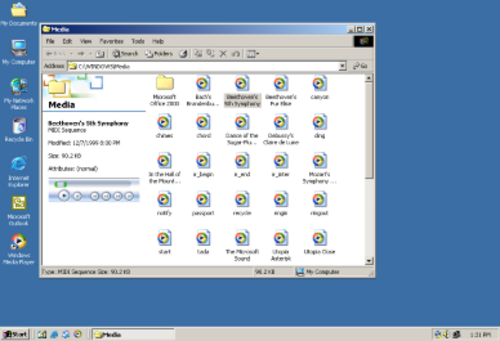
The Start menu in Windows 2000 introduces personalized menus, expandable special folders and the ability to launch multiple programs without closing the menu by holding down the SHIFT key. A Re-sort button forces the entire Start Menu to be sorted by name. The Taskbar introduces support for balloon notifications which can also be used by application developers. Windows 2000 Explorer introduces customizable Windows Explorer toolbars, auto-complete in Windows Explorer address bar and Run box, advanced file type association features, displaying comments in shortcuts as tooltips, extensible columns in Details view (IColumnProvider interface), icon overlays, integrated search pane in Windows Explorer, sort by name function for menus, and Places bar in common dialogs for Open and Save.
Windows Explorer has been enhanced in several ways in Windows 2000. It is the first Windows NT release to include Active Desktop, first introduced as a part of Internet Explorer 4.0 (specifically Windows Desktop Update), and only pre-installed in Windows 98 by that time.[72] It allowed users to customize the way folders look and behave by using HTML templates, having the file extensionHTT. This feature was abused by computer viruses that employed malicious scripts, Java applets, or ActiveX controls in folder template files as their infection vector. Two such viruses are VBS/Roor-C[73] and VBS.Redlof.a.[74]
The "Web-style" folders view, with the left Explorer pane displaying details for the object currently selected, is turned on by default in Windows 2000. For certain file types, such as pictures and media files, the preview is also displayed in the left pane.[75] Until the dedicated interactive preview pane appeared in Windows Vista, Windows 2000 had been the only Windows release to feature an interactive media player as the previewer for sound and video files, enabled by default. However, such a previewer can be enabled in previous versions of Windows with the Windows Desktop Update installed through the use of folder customization templates.[76] The default file tooltip displays file title, author, subject and comments;[77] this metadata may be read from a special NTFS stream, if the file is on an NTFS volume, or from an OLE structured storage stream, if the file is a structured storage document. All Microsoft Office documents since Office 4.0[78] make use of structured storage, so their metadata is displayable in the Windows 2000 Explorer default tooltip. File shortcuts can also store comments which are displayed as a tooltip when the mouse hovers over the shortcut. The shell introduces extensibility support through metadata handlers, icon overlay handlers and column handlers in Explorer Details view.[79]
Windows 2000 Explorer の右ペインは、通常はファイルとフォルダーの一覧を表示するだけですが、カスタマイズすることもできます。たとえば、システムフォルダーの内容はデフォルトでは表示されず、代わりに右ペインに、システムフォルダーの内容を変更するとコンピューターに損害を与える可能性があるという警告が表示されます。フォルダーテンプレートファイルでDIV要素を使用することで、エクスプローラーのペインを追加で定義できます。[ 72 ]このレベルのカスタマイズ性は Windows 2000 で初めて実現したもので、Windows 98 やデスクトップ アップデートでは提供されていませんでした。[ 80 ]新しい DHTML ベースの検索ペインは、以前のすべての Explorer バージョンにあった独立した検索ダイアログとは異なり、Windows 2000 Explorer に統合されています。インデックス サービスもオペレーティングシステムに統合され、エクスプローラーに組み込まれた検索ペインでは、そのデータベースによってインデックス付けされたファイルを検索できます。[ 81 ]
Microsoft は Windows 2000 の一部として NTFS のバージョン 3.0 [ 7 ] (カーネル バージョン番号に関連して誤って「NTFS 5」と呼ばれることもあります) をリリースしました。これにより、ディスク クォータ(QuotaAdvisor によって提供)、ファイルシステム レベルの暗号化、スパース ファイル、および再解析ポイントが導入されました。スパース ファイルを使用すると、非常に大きいがゼロのみの領域が多数含まれるデータセットを効率的に保存できます。[ 82 ]再解析ポイントを使用すると、オブジェクト マネージャがファイル 名前空間のルックアップをリセットし、ファイルシステム ドライバが変更された機能を透過的に実装できます。[ 83 ]再解析ポイントは、ボリューム マウント ポイント、ジャンクション、階層ストレージ管理、ネイティブ構造化ストレージ、およびシングル インスタンス ストレージを実装するために使用されます。[ 83 ]ボリューム マウント ポイントとディレクトリ ジャンクションを使用すると、ファイルをあるファイルまたはディレクトリの場所から別の場所に透過的に参照できます。
Windows 2000 では、ターゲットが移動または名前変更された場合でもファイル ショートカットが機能し続けるように、分散リンク追跡サービスも導入されています。ターゲット オブジェクトの一意の識別子は NTFS 3.0 のショートカット ファイルに保存され、Windows は分散リンク追跡サービスを使用してショートカットのターゲットを追跡できるため、ターゲットが別のハード ドライブに移動した場合でも、ショートカット ファイルはサイレントに更新されます。[ 84 ]
暗号化ファイルシステム (EFS) は、Windows に強力なファイルシステムレベルの暗号化を導入しました。これにより、NTFS ボリューム上の任意のフォルダーやドライブをユーザーが透過的に暗号化できます。[ 50 ] EFS は、EFS サービス、Microsoft のCryptoAPI、および EFS ファイルシステムランタイムライブラリ (FSRTL) と連携して動作します。[ 85 ]
EFS は、バルク対称鍵(ファイル暗号化鍵、または FEK とも呼ばれる)を使用してファイルを暗号化することで機能します。これは、非対称鍵暗号を使用する場合よりも大量のデータの暗号化と復号化にかかる時間が短いためです。[ 85 ]ファイルの暗号化に使用される対称鍵は、ファイルを暗号化したユーザーに関連付けられた公開鍵で暗号化され、この暗号化されたデータは暗号化されたファイルのヘッダーに格納されます。ファイルを復号化するために、ファイルシステムは、ファイルのヘッダーに格納されている対称鍵を復号化するためにユーザーの秘密鍵を使用します。次に、対称鍵を使用してファイルを復号化します。これはファイルシステムレベルで行われるため、ユーザーには透過的です。[ 86 ]
キーへのアクセス権を失ったユーザーのために、EFSにはファイルを復号化できるリカバリエージェントのサポートが組み込まれています。リカバリエージェントとは、公開鍵リカバリ証明書によって権限を与えられたユーザーが、特別な秘密鍵を使用して他のユーザーのファイルを復号化できるようにするものです。デフォルトでは、ローカル管理者がリカバリエージェントになりますが、グループポリシーを使用してカスタマイズすることも可能です。
Windows 2000では、動的ストレージ用の論理ディスクマネージャとdiskpartコマンドラインツールが導入されました。[ 9 ] Windows 2000のすべてのバージョンは、3種類の動的ディスクボリューム(基本ディスクに加えて)をサポートしています。シンプルボリューム、スパンボリューム、ストライプボリュームです。
In addition to these disk volumes, Windows 2000 Server, Windows 2000 Advanced Server, and Windows 2000 Datacenter Server support mirrored volumes and striped volumes with parity:
With Windows 2000, Microsoft introduced the Windows 9x accessibility features for people with visual and auditory impairments and other disabilities into the NT-line of operating systems.[10] These included:
ALT, CTRL and SHIFT) become "sticky": a user can press the modifier key, and then release it before pressing the combination key. (Activated by pressing Shift five times quickly.)CAPS LOCK, NUM LOCK or SCROLL LOCK key is pressed.Additionally, Windows 2000 introduced the following new accessibility features:
Windows 2000 では、多言語ユーザー インターフェイス(MUI) が導入されました。[ 11 ] Windows 2000 は英語の他に、アラビア語、アルメニア語、バルト語、中央ヨーロッパ語、キリル文字、グルジア語、ギリシャ語、ヘブライ語、インド語、日本語、韓国語、簡体字中国語、タイ語、繁体字中国語、トルコ語、ベトナム語、西ヨーロッパ語をサポートしています。[ 89 ]また、さまざまなロケールもサポートしています。[ 12 ]
Windows 2000以降、英語版のWindows(NT)は、右から左に記述する言語(アラビア語など)やCJKV言語の表示と入力をサポートできるようになったが、関連ファイルをコントロールパネルにインストールする必要があった。[ 90 ]
Windows 2000 には、 Windows 98のゲーム開発者がよく使用するDirectX 7.0が含まれています。[ 91 ] Windows 2000 向けにリリースされた最後の DirectX のバージョンは、DirectX 9.0c (シェーダー モデル 3.0) でした。Microsoft は、2010 年 2 月のリリースまで DirectX 9.0c の四半期ごとのアップデートを公開し、その後、2010 年 6 月の SDK でサポートが終了しました。これらのアップデートには、コア ランタイムのバグ修正と、D3DX、XAudio 2、XInput、マネージド DirectXコンポーネントなどの追加ライブラリが含まれています。そのため、DirectX 9.0c (2010 年 2 月のリリースまで) のバージョン向けに作成されたゲームの大部分は、Windows 2000 で動作します。
Windows 2000には、 Windows NT 4.0と同じゲームが含まれていました。フリーセル、マインスイーパー、ピンボール、ソリティアです。[ 92 ]
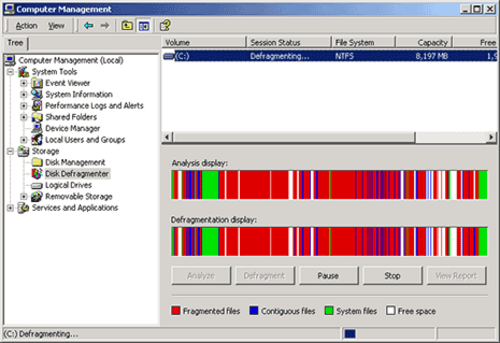
Windows 2000 では、管理ツールの作成、保存、および開くために使用されるMicrosoft Management Console (MMC) が導入されました。 [ 49 ]これらのツールはそれぞれコンソールと呼ばれ、ほとんどの場合、管理者は 1 台の中央コンピューターから他の Windows 2000 コンピューターを管理できます。各コンソールには、スナップインと呼ばれる 1 つまたは複数の特定の管理ツールを含めることができます。[ 49 ]これらは、スタンドアロン (1 つの機能を持つ) または拡張機能 (既存のスナップインに機能を追加する) のいずれかです。コンソールで表示できるスナップインを制御する機能を提供するために、MMC では、コンソールをオーサー モードまたはユーザー モードとして作成できます。[ 49 ]オーサー モードでは、スナップインの追加、新しいウィンドウの作成、コンソール ツリーのすべての部分の表示、およびコンソールの保存が可能です。ユーザー モードでは、制限を適用してコンソールを配布できます。ユーザー モードのコンソールでは、ユーザーにすべての変更に対する完全なアクセス権を付与することも、制限付きアクセス権を付与して、ユーザーがコンソールにスナップインを追加できないようにすることもできますが、コンソールで複数のウィンドウを表示することはできます。あるいは、ユーザーには制限付きアクセス権限が付与され、コンソールへの追加や、単一のコンソール内での複数のウィンドウの表示が禁止される。[ 93 ]
The main tools that come with Windows 2000 can be found in the Computer Management console (in Administrative Tools in the Control Panel).[94] This contains the Event Viewer—a means of viewing system or application-related events and the Windows equivalent of a log file,[95] a system information utility, a backup utility, Task Scheduler and management consoles to view open shared folders and shared folder sessions, configure and manage COM+ applications, configure Group Policy,[96] manage all the local users and user groups, and a device manager.[97] It contains Disk Management and Removable Storage snap-ins,[98] a disk defragmenter as well as a performance diagnostic console, which displays graphs of system performance and configures data logs and alerts. It also contains a service configuration console, which allows users to view all installed services and to stop and start them, as well as configure what those services should do when the computer starts. CHKDSK has significant performance improvements.[99]
Windows 2000 comes with two utilities to edit the Windows registry, REGEDIT.EXE and REGEDT32.EXE.[100] REGEDIT has been directly ported from Windows 98, and therefore does not support editing registry permissions.[100] REGEDT32 has the older multiple document interface (MDI) and can edit registry permissions in the same manner that Windows NT's REGEDT32 program could. REGEDIT has a left-side tree view of the Windows registry, lists all loaded hives and represents the three components of a value (its name, type, and data) as separate columns of a table. REGEDT32 has a left-side tree view, but each hive has its own window, so the tree displays only keys and it represents values as a list of strings. REGEDIT supports right-clicking of entries in a tree view to adjust properties and other settings. REGEDT32 requires all actions to be performed from the top menu bar. Windows XP is the first system to integrate these two programs into a single utility, adopting the REGEDIT behavior with the additional NT features.[100]
The System File Checker (SFC) also comes with Windows 2000. It is a command line utility that scans system files and verifies whether they were signed by Microsoft and works in conjunction with the Windows File Protection mechanism. It can also repopulate and repair all the files in the Dllcache folder.[101]
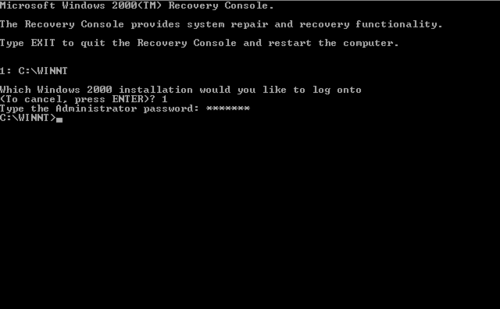
The Recovery Console is run from outside the installed copy of Windows to perform maintenance tasks that can neither be run from within it nor feasibly be run from another computer or copy of Windows 2000.[102] It is usually used to recover the system from problems that cause booting to fail, which would render other tools useless, like Safe Mode or Last Known Good Configuration, or chkdsk. It includes commands like fixmbr, which are not present in MS-DOS.
It has a simple command-line interface, used to check and repair the hard drive(s), repair boot information (including NTLDR), replace corrupted system files with fresh copies from the CD, or enable/disable services and drivers for the next boot.
The console can be accessed in either of the two ways:
Boot.ini, via WinNT32.exe, with the /cmdcons switch.[103] In this case, it can only be started as long as NTLDR can boot from the system partition.Windows 2000 introduced Windows Script Host 2.0 which included an expanded object model and support for logon and logoff scripts.
The Windows 2000 Server family consists of Windows 2000 Server, Windows 2000 Advanced Server, Windows 2000 Small Business Server, and Windows 2000 Datacenter Server.
All editions of Windows 2000 Server have the following services and features built in:
The Server editions include more features and components, including the Microsoft Distributed File System (DFS), Active Directory support and fault-tolerant storage.
The Distributed File System (DFS) allows shares in multiple different locations to be logically grouped under one folder, or DFS root. When users try to access a network share off the DFS root, the user is really looking at a DFS link and the DFS server transparently redirects them to the correct file server and share. A DFS root can only exist on a Windows 2000 version that is part of the server family, and only one DFS root can exist on that server.
There can be two ways of implementing a DFS namespace on Windows 2000: either through a standalone DFS root or a domain-based DFS root. Standalone DFS allows for only DFS roots on the local computer, and thus does not use Active Directory. Domain-based DFS roots exist within Active Directory and can have their information distributed to other domain controllers within the domain – this provides fault tolerance to DFS. DFS roots that exist on a domain must be hosted on a domain controller or on a domain member server. The file and root information is replicated via the Microsoft File Replication Service (FRS).[108]
Windows 2000では、Windows NTの以前のドメインモデルに代わり、Active Directoryと呼ばれるWindowsネットワークドメイン(リソースのグループ)を整理する新しい方法が導入されました。Active Directoryの階層構造により、管理者はユーザーとコンピューターのポリシーおよびユーザーアカウントを管理し、以前のWindowsバージョンよりも高い拡張性と集中管理性でプログラムと更新プログラムを自動的に展開できるようになりました。Active Directoryに保存されたユーザー情報は、エンドユーザーにとって便利な電話帳のような機能も提供しました。Active Directoryドメインは、数百個のオブジェクトを持つ小規模なインストールから、数百万個のオブジェクトを持つ大規模なインストールまで、さまざまな規模に対応できます。Active Directoryは、ドメインのグループを整理してリンクし、連続したドメイン名空間にツリーを形成できます。同じ名前空間外のツリーのグループ同士をリンクしてフォレストを形成することも可能です。
Active Directory サービスは、Windows 2000 Server Standard、Advanced、または Datacenter コンピューターには常にインストールできましたが、Windows 2000 Professional コンピューターにはインストールできませんでした。しかし、Windows 2000 Professional は、Active Directory の新機能を活用できる最初のクライアント オペレーティングシステムです。組織の移行の一環として、すべてのクライアントが Windows 2000 Professional にアップグレードされるまで、Windows NT クライアントは引き続き機能し、アップグレードが完了すると Active Directory ドメインをネイティブ モードに切り替えて、最大限の機能を実現できました。
Active Directoryを使用するには、SRVリソースレコードをサポートするDNSサーバーが必要であり、組織の既存のDNSインフラストラクチャをアップグレードしてSRVリソースレコードをサポートする必要があります。Active Directoryデータベースを保持し、Active Directoryディレクトリサービスを提供するドメインコントローラーが1つ以上必要です。
Windows 2000 Server ファミリーは、シンプルボリューム、スパンボリューム、ストライプボリュームのサポートに加え、フォールトトレラントボリュームタイプもサポートしています。サポートされているタイプは、ミラーボリュームとRAID-5 ボリュームです。
Windows 2000 can be deployed to a site via various methods. It can be installed onto servers via traditional media (such as CD) or via distribution folders that reside on a shared folder. Installations can be attended or unattended. During a manual installation, the administrator must specify configuration options. Unattended installations are scripted via an answer file, or a predefined script in the form of an INI file that has all the options filled in. An answer file can be created manually or using the graphical Setup manager. The Winnt.exe or Winnt32.exe program then uses that answer file to automate the installation. Unattended installations can be performed via a bootable CD, using Microsoft Systems Management Server (SMS), via the System Preparation Tool (Sysprep), via the Winnt32.exe program using the /syspart switch or via Remote Installation Services (RIS). The ability to slipstream a service pack into the original operating system setup files is also introduced in Windows 2000.[109]
The Sysprep method is started on a standardized reference computer – though the hardware need not be similar – and it copies the required installation files from the reference computer to the target computers. The hard drive does not need to be in the target computer and may be swapped out to it at any time, with the hardware configured later. The Winnt.exe program must also be passed a /unattend switch that points to a valid answer file and a /s file that points to one or more valid installation sources.
Sysprep allows the duplication of a disk image on an existing Windows 2000 Server installation to multiple servers. This means that all applications and system configuration settings will be copied across to the new installations, and thus, the reference and target computers must have the same HALs, ACPI support, and mass storage devices – though Windows 2000 automatically detects "plug and play" devices. The primary reason for using Sysprep is to quickly deploy Windows 2000 to a site that has multiple computers with standard hardware. (If a system had different HALs, mass storage devices or ACPI support, then multiple images would need to be maintained.)
Systems Management Server can be used to upgrade multiple computers to Windows 2000. These must be running Windows NT 3.51, Windows NT 4.0, Windows 98 or Windows 95 OSR2.x along with the SMS client agent that can receive software installation operations. Using SMS allows installations over a wide area and provides centralised control over upgrades to systems.
リモート インストール サービス(RIS) は、中央サーバーからネットワーク経由でローカル コンピューターに Windows 2000 Professional (Windows 2000 Server ではない) を自動的にインストールする手段です。イメージは特定のハードウェア構成をサポートする必要はなく、サービスがマシン用に新しい一意のセキュリティ ID (SID) を生成するため、コンピューターの再起動後にセキュリティ設定を構成できます。これは、ローカル アカウントに適切な識別子が割り当てられ、ネットワーク上の他の Windows 2000 Professional コンピューターと競合しないようにするために必要です。[ 110 ] RIS では、クライアント コンピューターが、プリブート実行環境(PXE) ブートROMがインストールされているネットワーク インターフェイス カード を介してネットワーク経由でブートできるか、リモートブート ディスクジェネレーターでサポートされているネットワーク カードがインストールされている必要があります。リモート コンピューターはNet PC仕様も満たす必要があります。RIS が実行されるサーバーは Windows 2000 Server である必要があり、ネットワークDNSサービス、DHCPサービス、および Active Directory サービスにアクセスできる必要があります。 [ 111 ]
マイクロソフトは、さまざまな市場やビジネスニーズに対応するため、Windows 2000の複数のエディション(Professional、Server、Advanced Server、Datacenter Server)をリリースした。それぞれが個別にパッケージ化されていた。
Windows 2000 Professional は、企業やパワーユーザー向けのデスクトップ オペレーティング システムとして設計されました。これは Windows 2000 のクライアント バージョンです。以前の多くの Windows デスクトップ オペレーティング システムよりも優れたセキュリティと安定性を提供します。最大 2 つのプロセッサをサポートし、最大 4 GBのRAMをアドレス指定できます。システム要件は、133 MHz 以上 Pentium プロセッサ (または同等品)、少なくとも 32 MB の RAM、650 MB のハード ドライブの空き容量、およびCD-ROMドライブです (推奨: Pentium II、128 MB の RAM、2 GB のハード ドライブの空き容量、および CD-ROM ドライブ)。[ 112 ]ただし、公式の最小プロセッサ要件にもかかわらず、 80486などの第 4 世代 x86 CPU に Windows 2000 をインストールすることは可能です。
Windows 2000 EmbeddedおよびWindows 2000 Professional Embedded / Windows 2000 Professional For Embedded Systemsは、 ATM、自動販売機、その他の大型組み込み機器を対象とした組み込み用途向けに設計された Windows 2000 Professional のバージョンです。Windows 2000 Embedded は開発中に中止され、Windows XP Embeddedが優先されましたが、バイナリが同一の FES バージョンが代わりにリリースされました。これは、小売版とまったく同じように機能しますが、組み込み用途向けにライセンスされています。[ 113 ]
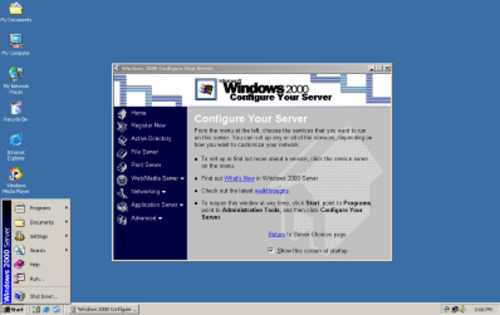
Windows 2000 Server は、Windows 2000 Professional と同じユーザー インターフェイスを共有していますが、サーバーロールを実行し、インフラストラクチャ ソフトウェアやアプリケーション ソフトウェアを実行するための追加コンポーネントが含まれています。サーバー バージョンで導入された重要な新コンポーネントはActive Directoryです。これは、 LDAP (軽量ディレクトリ アクセス プロトコル)に基づくエンタープライズ ワイド ディレクトリ サービスです。さらに、Microsoft はKerberosネットワーク認証を統合し、以前のバージョンで使用されていた、しばしば批判されていたNTLM (NT LAN Manager) 認証システムを置き換えました。これにより、フォレスト(共通のスキーマ、構成、およびグローバル カタログを共有し、双方向の推移的信頼でリンクされた 1 つ以上の Windows 2000 ドメインの集合)内の Windows 2000 Serverドメイン間で、純粋な推移的信頼関係も提供されました。さらに、Windows 2000 では、 IPアドレスの動的な登録を可能にするドメイン ネーム サーバーが導入されました。Windows 2000 Server は、最大 4 つのプロセッサと 4 GB の RAM をサポートし、最小要件は 128 MB の RAM と 1 GB のハードディスク容量ですが、インストールされているコンポーネントによっては要件が高くなる場合があります。[ 112 ]
Windows 2000 Server EmbeddedおよびWindows 2000 Server For Embedded Systemsは、組み込み用途向けに設計された、バイナリ的に同一の Windows 2000 Server です。どちらのバージョンも、市販版と全く同じように機能しますが、組み込み用途向けにライセンスされています。
Windows 2000 Advanced Server is a variant of Windows 2000 Server operating system designed for medium-to-large businesses. It offers the ability to create clusters of servers, support for up to 8 CPUs, a main memory amount of up to 8 GB on Physical Address Extension (PAE) systems and the ability to do 8-way SMP. It supports TCP/IPload balancing and builds on Microsoft Cluster Server (MSCS) in Windows NT Enterprise Server 4.0, adding enhanced functionality for two-node clusters.[114] System requirements are similar to those of Windows 2000 Server,[112] however they may need to be higher to scale to larger infrastructure.
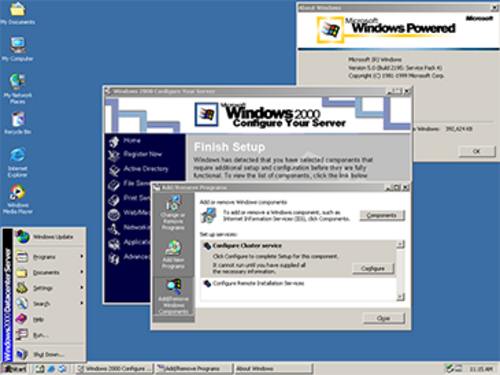
Windows 2000 Datacenter Server is a variant of Windows 2000 Server designed for large businesses that move large quantities of confidential or sensitive data frequently via a central server.[115] Like Advanced Server, it supports clustering, failover and load balancing. Its minimum system requirements are similar to those of Advanced Server,[112] but it was designed to be capable of handing advanced, fault-tolerant and scalable hardware—for instance computers with up to 32 CPUs and 32 GBs RAM, with rigorous system testing and qualification, hardware partitioning, coordinated maintenance and change control. Windows 2000 Datacenter Server was released to manufacturing on August 11, 2000[116] and launched on September 26, 2000.[117] This edition was based on Windows 2000 with Service Pack 1[115] and was not available at retail.[118]

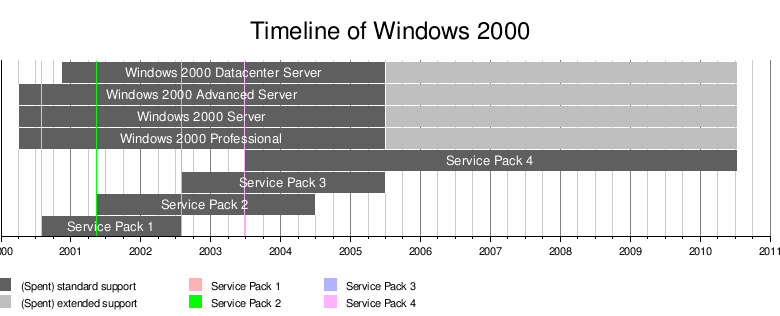
Windows 2000 has received four full service packs and one rollup update package following SP4, which is the last service pack. Microsoft phased out all development of its Java Virtual Machine (JVM) from Windows 2000 in SP3. Internet Explorer 5.01 has also been upgraded to the corresponding service pack level.
Microsoft had originally intended to release a fifth service pack for Windows 2000, but cancelled this project early in its development, and instead released Update Rollup 1 for SP4 on September 13, 2005, which was a collection of all security-related hotfixes and some other significant issues.[119] The Update Rollup does not include all non-security related hotfixes and is not subjected to the same extensive regression testing as a full service pack. Microsoft states that this update will meet customers' needs better than a whole new service pack, and will still help Windows 2000 customers secure their PCs, reduce support costs, and support existing computer hardware.[120]
Several Windows 2000 components are upgradable to the latest versions, which include new versions introduced in later versions of Windows, and other major Microsoft applications are available. These latest versions for Windows 2000 include:
Windows 2000 の時代には、Windows サーバーに対する攻撃の性質が変化しました。インターネット経由でリモート ソースからの攻撃が増加したのです。これにより、IIS サービスを悪用する悪意のあるプログラムが圧倒的に多く発生し、特に悪名高いバッファ オーバーフローの傾向が顕著になりました。[ 121 ]この傾向はオペレーティングシステムのバージョンに固有のものではなく、構成に固有のもので、有効になっているサービスに依存します。[ 121 ]これを受けて、「デフォルトでは、Windows 2000 のインストールには多くの潜在的なセキュリティ上の問題が含まれています。不要なサービスが多数インストールされ、有効になっており、アクティブなローカル セキュリティ ポリシーがありません。」という苦情がよく聞かれます。[ 122 ] SANS Instituteによると、安全でないデフォルト設定に加えて、最もよく発見される欠陥は、リモートから悪用可能なバッファ オーバーフローの脆弱性です。[ 123 ]その他に批判されている欠陥には、脆弱な暗号化技術の使用などがあります。[ 124 ]
Code Red とCode Red II は、 Windows 2000 のインターネット インフォメーション サービス(IIS)のWindows インデックス サービスの脆弱性を悪用した有名な (そして議論の的となった)ワームでした。 [ 18 ] 2003 年 8 月、セキュリティ研究者は、SobigとBlasterと呼ばれる 2 つの主要なワームが 50 万台以上の Microsoft Windows コンピュータに感染したと推定しました。[ 125 ] 2005 年のZotobワームは、 ABC、CNN、ニューヨーク タイムズ社、米国国土安全保障省のWindows 2000 マシンのセキュリティ侵害の原因とされました。[ 126 ]
2009 年 9 月 8 日、マイクロソフトは、月例セキュリティ更新プログラムで対処された 5 つのセキュリティ上の欠陥のうち 2 つのパッチ適用をスキップし、重大なセキュリティ上の欠陥の 1 つにパッチを適用することは「不可能」であると述べました。[ 127 ]マイクロソフトのセキュリティ速報 MS09-048 によると、「 TCP/IP保護を適切にサポートするアーキテクチャはMicrosoft Windows 2000 システムには存在しないため、脆弱性を排除するための Microsoft Windows 2000 Service Pack 4 の修正プログラムを作成することは不可能です。これを行うには、Microsoft Windows 2000 Service Pack 4 オペレーティングシステムの非常に多くの部分を再設計する必要があり、Microsoft Windows 2000 Service Pack 4 で実行するように設計されたアプリケーションが更新されたシステムで引き続き動作するという保証はありません。」この欠陥に対するパッチは、影響を受けるにもかかわらず、より新しいWindows XP (32 ビット) およびWindows XP Professional x64 Editionにもリリースされませんでした。[ 128 ]マイクロソフトは、これらのバージョンでWindows ファイアウォールを有効にすることを推奨しました。[ 129 ]
Windows 2000 ProfessionalとWindows 2000 Serverは、それぞれより新しいMicrosoftのオペレーティングシステムであるWindows XP ProfessionalとWindows Server 2003に置き換えられました。
Windows 2000 ProfessionalおよびServerのユーザーは、Windows Vista BusinessまたはWindows Server 2008へのアップグレードライセンスを購入する資格がありましたが、これらのオペレーティングシステムはいずれもWindows 2000から直接アップグレードインストールを実行することはできません。代わりにクリーンインストールを実行するか、XP/2003を経由して2段階のアップグレードを行う必要があります。Microsoftは、Windows 2000(およびそれ以前のバージョン)からWindows 7へのアップグレードパスを廃止しました。Windows 2000のユーザーは、Windows 7のフルライセンスを購入する必要があります。
Windows 2000 ファミリーのオペレーティングシステムは、2005 年 6 月 30 日にメインストリーム サポートから拡張サポート フェーズに移行しました。マイクロソフトは、これは Windows 2000 が Windows ライフサイクル ポリシーに沿って進化していることを示しています。メインストリーム サポートでは、マイクロソフトはセキュリティ アップデートに加えて、設計変更、サービス パック、セキュリティ関連以外のアップデートを無償で提供しますが、拡張サポートでは、サービス パックは提供されず、セキュリティ関連以外のアップデートは電子メールまたは電話でサポート担当者に問い合わせる必要があります。拡張サポート フェーズでは、マイクロソフトは Windows 2000 のすべてのコンポーネント (Internet Explorer 5.0 SP4 を含む) に対して毎月重要なセキュリティ アップデートを提供し続け、技術的な問題についてはインシデントごとの有償サポートを提供しました。
Windows 2000 は、2010 年 7 月 13 日 (Windows XP の Service Pack 2 と同日) にサポート終了 (EoL) を迎えました。この日以降、新しいセキュリティ アップデートやセキュリティ関連のホットフィックスは提供されなくなります。[ 6 ] [ 130 ]日本では、地方自治体の 13 万台以上のサーバーと 50 万台の PC が影響を受けました。多くの地方自治体は、交換費用を負担する資金がないため、アップデートを行わないと表明しました。[ 131 ]
2011年現在、Windows Updateは、 2010年7月のパッチチューズデーで利用可能になったWindows 2000の更新プログラムをまだサポートしています。たとえば、古いオプションのWindows 2000機能が後で有効になった場合などです。Windows Updateによって毎月XP以降のバージョンにインストールされるWindows悪意のあるソフトウェア削除ツールは、 Windows 2000でも手動でダウンロードできます。[ 132 ]
Windows 2000 上の Microsoft Office 製品には独自の製品ライフサイクルがあります。Windows XP用のInternet Explorer 6 はサポートが終了するまでセキュリティ パッチが提供されていましたが、Windows 2000 上の IE6 にはそのようなことはありません。Windows 2000 は古いOSであるため、Windows Media Player 11やInternet Explorer 7などのコンポーネントの更新バージョンはリリースされていません。Internet Explorer の場合、Microsoft は「IE 7 のセキュリティ作業の一部は、Windows 2000 に移植するのが容易ではない XP SP2 のオペレーティングシステム機能に依存している」と述べています。[ 133 ]
Windows 2000は、製品認証を含まない最後のNTベースのMicrosoft Windowsバージョンですが、MicrosoftはWindows 2000のダウンロードセンターから特定のダウンロードや重要度の低いアップデートを入手するために、 Windows Genuine Advantageを導入しました。
2020 年、マイクロソフトは、古いバージョンの Windows の SHA-1 エンドポイントの Windows Update サービスを無効にすると発表しました。Windows 2000 は SHA-2 のアップデートを受け取らなかったため、2020 年 7 月下旬以降、Windows Update サービスは OS 上で利用できなくなりました。[ 134 ] 2024 年 3 月現在、Windows 2000 の古いアップデートの多くは、Microsoft Update カタログでまだ利用可能です。[ 135 ] Legacy Update というサードパーティ ツールを使用すると、Windows 2000 用に以前にリリースされたアップデートを Update カタログからインストールできます。[ 136 ] Windows Update Restored という独立したプロジェクトも 2022 年以降利用可能で、Windows 2000 を含む古いバージョンの Windows の Windows Update Web サイトを復元することを目的としています。[ 137 ] [ 136 ]
In October 2002, Microsoft commissioned IDC to determine the total cost of ownership (TCO) for enterprise applications on Windows 2000 versus the TCO of the same applications on Linux. IDC's report is based on telephone interviews of IT executives and managers of 104 North American companies in which they determined what they were using for a specific workload for file, print, security and networking services. IDC determined that the four areas where Windows 2000 had a better TCO than Linux – over a period of five years for an average organization of 100 employees – were file, print, network infrastructure and security infrastructure. They determined, however, that Linux had a better TCO than Windows 2000 for web serving. The report also found that the greatest cost was not in the procurement of software and hardware, but in staffing costs and downtime. While the report applied a 40% productivity factor during IT infrastructure downtime, recognizing that employees are not entirely unproductive, it did not consider the impact of downtime on the profitability of the business. The report stated that Linux servers had less unplanned downtime than Windows 2000 servers. It found that most Linux servers ran less workload per server than Windows 2000 servers and also that none of the businesses interviewed used 4-way SMP Linux computers. The report also did not take into account specific application servers – servers that need low maintenance and are provided by a specific vendor. The report did emphasize that TCO was only one factor in considering whether to use a particular IT platform, and also noted that as management and server software improved and became better packaged the overall picture shown could change.[138]
On or shortly before February 12, 2004, "portions of the Microsoft Windows 2000 and Windows NT 4.0 source code were illegally made available on the Internet."[139] The source of the leak was later traced to Mainsoft, a Windows Interface Source Environment partner.[140] Microsoft issued the following statement:
"Microsoft source code is both copyrighted and protected as a trade secret. As such, it is illegal to post it, make it available to others, download it or use it."
警告にもかかわらず、流出したコードを含むアーカイブはファイル共有ネットワーク上で広く拡散した。2004年2月16日、流出したソースコードを研究していた人物によって発見されたとされるMicrosoft Internet Explorerの特定バージョンに対する脆弱性が報告された[ 139 ]。2015年4月15日、GitHubは流出したWindows NT 4.0ソースコードのコピーを含むリポジトリを削除した[ 141 ] 。
{{cite web}}: CS1 maint: deprecated archival service (link)eDirectoryは、NT 4.0、利用可能な場合はWindows 2000、Solaris、NetWare 5で動作するクロスプラットフォームのディレクトリソリューションです。Active DirectoryはWindows 2000環境のみをサポートします。さらに、eDirectoryユーザーは、eビジネス関係を管理および制御するために、最も信頼性が高く、成熟したディレクトリサービスを使用していることを確信できます。1.0リリースではありません。
{{cite journal}}: CS1メンテナンス: アーカイブサービスは非推奨になりました (リンク)マイクロソフトは Windows .NET Server のスケジュールを延期したが、Windows .NET Server ベータ版コードに基づく Windows Datacenter Server の限定版のリリースを進めている。
{{cite web}}: CS1メンテナンス: アーカイブサービスは非推奨になりました (リンク)