
Loading article…
 | |
 iMac (2020) | |
| 開発者 | アップル社 |
|---|---|
| タイプ | オールインワン |
| 発売日 | 2006年1月10日(オリジナルモデル)2020年8月4日(最終モデル) |
| 製造中止 | 2021年4月20日(Retina 4K 21.5インチ) 2021年10月30日(21.5インチ) 2022年3月8日(27インチ) |
| オペレーティング·システム | macOS |
| CPU | Intel Core i3、i5、i7、i9 Intel Core Duo(オリジナルモデル) |
| 前任者 | iMac G5 eMac |
| 後継 | iMac (Apple シリコン) |
| 関連している | Mac Mini Mac Pro iMac Pro |
iMacは、Apple Inc.が設計、製造、販売するオールインワンデスクトップコンピュータのシリーズです。 2006年から2022年の間、iMacシリーズはIntelアーキテクチャに基づくチップセットを使用していました。販売されていた間、それはMacラインナップの3つのデスクトップコンピュータの1つであり、 Mac Miniのオールインワンの代替品として機能し、パフォーマンス範囲Mac Proの下位に位置していました。 2017年から2021年まで、 よりハイエンドのXeonベースのiMac Proと一緒に販売されていました。
初期の Intel iMac は、 iMac G5と同じ白いポリカーボネートの筐体を再利用していました。その後のモデルではアルミニウムとプラスチックに変わり、その後は一体型のアルミニウム筐体になりました。2012 年 10 月以降にリリースされた iMac は、縁がわずか 5 mm という、はるかに薄いディスプレイも特徴としていました。このデザインは、このシリーズが廃止されるまで継続されました。
MacがApple独自のプロセッサに移行する一環として、IntelベースのiMacは2021年からAppleシリコンiMacに引き継がれた。Appleは同年、21.5インチIntel iMacの販売を中止し、27インチモデルはMac Studioと27インチApple Studio Displayの発表を受けて2022年3月に販売を中止した。[1]
概要
iMac はオールインワン パーソナル コンピュータです。このマシンには液晶ディスプレイ(LCD) が内蔵されており、コンピュータ コンポーネントは画面の後ろまたは画面の下の「あご」に内蔵されています。L 字型のアルミ製脚により画面を傾けることができますが、高さの調整はできません。周辺機器を接続するためのポートはコンピュータの下端にあります。一部のモデルでは光学式ドライブが右端に沿って配置されています。ワイヤレス周辺機器を使用する場合、iMac の唯一のケーブルは背面を通る電源コードです。
2020年6月22日、Appleの世界開発者会議の基調講演では、将来のMacintoshコンピューターが再びApple独自のARMベースのシステムオンチップに移行することが発表されました。 [2] 2021年4月、AppleはM1システムオンチップをベースに再設計されたiMacを発表しました。[3]
モデル
ホワイト(2006)
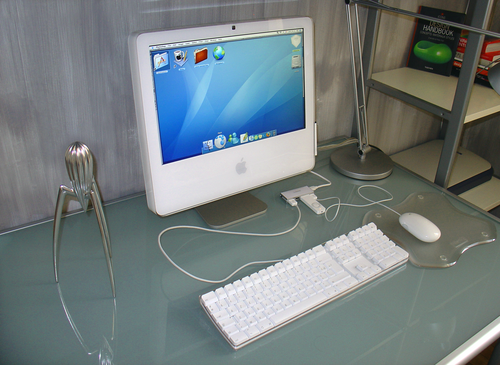
2006年1月10日のMacworld Conference and Expoで、スティーブ・ジョブズは新しいiMacがIntelプロセッサを採用した最初のMacintoshになると発表しました。MacBook Proと並んで発表された新しいiMacは、Appleが設定したスケジュールより6ヶ月早い、MacのIntelプロセッサへの移行の始まりでした。 [4]先代のiMac G5の外観と機能を継承し、最薄部で1.5インチ (3.8 cm) 未満の白いプラスチック製の筐体を採用しました。また、同じ価格で出荷されました。最初のIntel iMacは、Intel Core DuoプロセッサとPCI Expressグラフィックス処理ユニット (GPU) を搭載していました。iMac G5のiSightリビジョンと同様に、このマシンはユーザーによる修理を想定して設計されておらず、ほぼすべてのコンポーネントはアクセスが困難です。例外はマシンの底部にあるランダムアクセスメモリスロットです。 [4] [5] [6] iMac G5からのアップデートの1つは、Mini-DVIポートの追加で、これによりコンピュータの内容を2台目のモニターに拡張し、画像をミラーリングできるようになりました。[7]
2006 年 2 月初旬、Apple は新しい Intel ベースの iMac でビデオ表示の問題が発生するという報告を確認しました。Apple のFront Rowメディア ブラウザでビデオを再生すると、一部の 20 インチ iMac (アップグレードされたビデオ カードで受注生産されたもの) で、ランダムな水平線、ゴースト、ビデオのティアリングなどの問題が発生しました。この問題はソフトウェア アップデートで修正されました。
2006年7月に出荷された教育専用モデルのiMacは、AppleのラインナップでeMacに取って代わりました。このモデルは低価格でしたが、他のiMacのSuperDriveではなく、より小さなハードドライブ、統合グラフィックプロセッサ、コンボ光学ドライブを備えていました。 [8] iMacの全ラインナップは、 Core 2 Duoチップと低価格で2006年9月に刷新されました。 [9] Appleは、 IPSパネルディスプレイと1920×1200( WUXGA )の解像度を備えた新しい24インチモデルを追加しました。これにより、 1080pコンテンツをフル解像度で表示できる最初のiMacとなり、VESAフラットディスプレイマウントインターフェイスも備えました。[要出典]
これらの初期のiMacは概して賞賛され、ウォルト・モスバーグはインテルベースのiMacが今でも最高のデスクトップパソコンであると書いている。[6] [10]パフォーマンスはソフトウェアに依存しており、PCMagやその他の調査では、インテルプロセッサに最適化されていないソフトウェアは動作が遅く、特にMacに最適化されていないゲームは動作が遅いことがわかった。[7] Macworldは、インテルマシン用のソフトウェアが増えるまで購入を控えるよう推奨した。[11]その他の批判としては、初期メモリの容量が少ないこと、ユーザーによる保守性の欠如、アナンド・ラル・シンピが「下が重い」と呼んだ顎部などが挙げられる。[6] [5]
ポリカーボネートiMacの仕様
アルミニウム(2007年~2009年)

2007年8月、AppleはiMacの完全な再設計を発表し、アルミニウム、ガラス、プラスチックの筐体を採用した。[17]黒いプラスチックのバックプレートはユーザーが取り外すことはできない。17インチモデルはラインナップから完全に削除され、20インチと24インチモデルのみで販売された。[18] 24インチモデルのディスプレイは、幅広い視野角でコントラストと色の適合性が向上している。[18]コンピュータ全体で目に見えるネジは、iMacの底部にあるメモリスロットにアクセスするためのネジ1本のみである。前世代のプラスチックモデルは、教育機関の購入者向けのオプションとして残された。[19]
2009年3月、AppleはiMacシリーズのマイナーチェンジ版をリリースした。変更点としては、4つ目のUSBポート、2つのFireWire 400ポートを1つのFireWire 800ポートに置き換え、mini-DVIをMini DisplayPortに置き換え、ベースをわずかに再設計して縦方向に薄くしたことなどがある。それ以外の外観デザインは2007年モデルと2008年モデルとほぼ同じである。モデルは20インチ構成が1つ、24インチ構成が3つ(以前のように画面サイズごとに2つずつ)であった。[20]
AppleはすべてのモデルでデフォルトのRAMとハードディスクのサイズを2倍にし、RAMをDDR3 [21]仕様に移行しました。この改訂では、テンキーと前方削除キーを削除し、代わりにfn + Deleteキーボードショートカットをデフォルトで採用した、より小型でコンパクトな新しいAppleキーボードも導入されました。 [22] [23]ただし、ユーザーはAppleのオンラインストアで注文することで、テンキー付きのより伝統的なフルサイズモデルに交換することができました。
アルミニウムiMacの仕様
Appleによれば、これらのモデルはすべて廃止されているとのことだ。[a] [24]
ユニボディ(2009–2011)
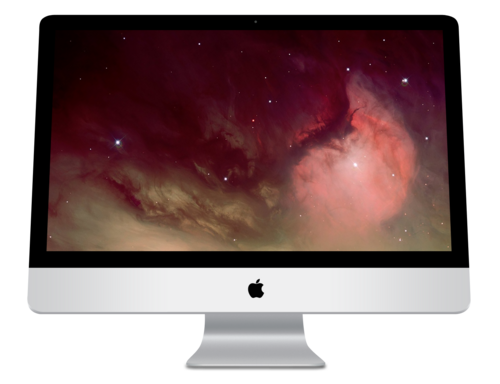
2009年10月、21.5インチと27インチのモデルに16:9のアスペクト比の画面が導入され、以前のアルミニウムモデルの20インチと24インチの16:10アスペクト比の画面が置き換えられました(24インチのiMacは2021年に異なるアスペクト比ではあるものの復活しました)。背面はプラスチックではなくアルミニウム製で、前面と側面のアルミニウムボディの延長です。ビデオカードのオプションは、ベースの小型モデルに標準で搭載されているNvidiaカードを除いて、完全にAMDに切り替わりました。iMacのプロセッサの選択肢は大幅に増えました。
Intel i シリーズ チップは、より高性能な 27 インチ モデルで初めて Mac に導入されました。
iMacシリーズ全体でデフォルトのRAMも増加しました。画面の大型化に伴い、Appleはメモリスロットの数を2つから4つに倍増しました。その結果、最大メモリ容量も2倍(16 GB)になり、[37] Intel Core iシリーズ(27インチ)では4倍の32 GBになりました。
このシリーズの 27 インチ モデルは、ターゲット ディスプレイ モードを提供する最初のモデルとなり、Mini DisplayPort経由で接続すると、iMac を別の Mac コンピュータの外部ディスプレイとして使用できるようになりました。この機能は、 Thunderboltの導入により、21.5 インチ モデル以降にも拡張されました。
Mid 2010 iMac 27 インチには、AMD Radeon HD5650 および HD5750 グラフィック カードが搭載されています。どちらのカードも低レベルのMetal API をサポートできないため、このモデルを Mojave および Catalina にアップグレードすることはできません。AMD は、両方のグラフィック カードが Metal をサポートし、Mid 2010 iMac を最新の macOS にアップグレードできるようにするファームウェア アップグレードを開発しましたが、Apple はそれを認定することを拒否しました。
2011 年後期 Unibody iMac は、内部SuperDrive を搭載した最後のモデルでもあります。
ユニボディiMacの仕様
Appleによれば、これらのモデルはすべて廃止されているとのことだ。[a] [24]
スリムユニボディ(2012~2017年)
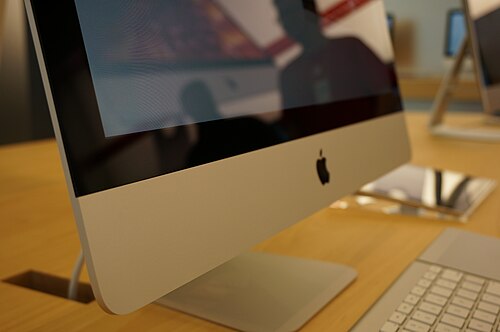
2012年10月、前モデルよりも本体の厚みが薄く、最薄部で5mm、SuperDriveを内蔵しない新しいiMacモデルが発表されました。これは、フルラミネーションと呼ばれるプロセスを使用することで部分的に実現されました。ディスプレイとガラスがラミネートされ、その間の2mmの隙間がなくなりました。21.5インチと27インチの画面の解像度は、それぞれ1920 × 1080と2560 × 1440と、以前のままです。
2009年モデルと同様に、メモリがアップグレードされました。標準仕様は8GBになりましたが、21.5インチモデルは最大16GB、27インチモデルは最大32GBをサポートします。21.5インチiMacは、MacBook AirやRetinaディスプレイのMacBook Proと同様に、交換不可能なはんだ付けメモリを搭載すると報告されましたが[46]、分解により、取り外し可能なメモリを使用していることがわかりましたが、モジュールにアクセスするには、画面を剥がしてマザーボードを取り外す必要があります。[47] 27インチバージョンには、ディスプレイを分解せずにメモリをアップグレードするためのアクセスポートが搭載されています。[48] Appleは、コンピュータのプロセッサもアップグレードし、IntelのIvy Bridge マイクロアーキテクチャベースのCore i5およびCore i7マイクロプロセッサを使用しました。
ビデオ カードは標準でNvidiaになりました。USB 3.0 ポートが初めて搭載されました。2012 iMac には、 SSDと従来のHDD を組み合わせてより効率的で高速なストレージを作成するFusion Driveのオプションも用意されています。Apple は 2012 モデルから内蔵光学ドライブも削除しました。
2013年3月5日、Appleはひっそりと教育機関向けiMacのバージョンを発表した。スペックは低めだが価格は安かった。3.3GHzデュアルコアIntel Core i3プロセッサ、4GBメモリ、500GBハードドライブ、Intel HD Graphics 4000を搭載し、小売価格は1,099ドルで、一般消費者向けiMacの基本モデルより200ドル安かった。[49]
2013年9月24日、2012年モデルのiMacは第4世代Intel HaswellプロセッサとNvidia 7xxシリーズGPUにアップデートされ、最大1.4倍のパフォーマンス向上が約束された。また、最大1300 Mbit / s [50]の速度に達することができる802.11ac Wi-FiとPCIeベースのフラッシュストレージを備え、以前のIvy BridgeユニボディiMacの最大1.5倍のパフォーマンスを提供する。これは、Fusion Driveと純粋なSSDの両方のオプションに適用される。これらは、翌年に導入されたRetinaラインが解像度の違いによりこの機能と互換性がないため、ターゲットディスプレイモードを提供する最後のiMacとなった。
2017年6月5日のWWDCでは、 Kaby LakeプロセッサとBluetooth 4.2のサポートを備えたリフレッシュモデルが追加されました。Appleは21.5インチモデルを2021年10月29日まで販売しました。2.3GHzデュアルコア第7世代Intel Core i5プロセッサを搭載し、1,099ドルで販売された単一のストック構成でした。このマシンは、遅れた仕様、時代遅れのデザイン、比較的高価なため、(生産終了に向かうにつれて)厳しく批判されました。しかし、このマシンは教育関係者の間で人気があったと言われています。[51]これは、 Fusion Drive (オプションではありますが)を搭載した最後のMacであり、36年間搭載した後、従来のハードドライブを搭載した最後のMacでした。また、Retinaディスプレイを搭載していない最後のApple製品でもありました。
スリムユニボディiMacの仕様
Retina (2014–2020)
A Retina Display "5K" model with a resolution of 5120 × 2880 was introduced alongside the previous year's models during a keynote on October 16, 2014. This 27-inch model was given faster Haswell processors and its two Thunderbolt ports were updated to Thunderbolt 2. Secondary storage was also upgraded to a 1 TB[68] Fusion drive as standard and video options changed over to AMD Radeon R9 M290X and M295X.
In May 2015, a separate, affordable, budget counterpart of the 5K 27-inch iMac was announced with lower specifications. That same day the Late 2013 iMac lineup was completely discontinued. Later that year, a 21.5-inch "4K" model with a resolution of 4096 × 2304 was released on October 13, 2015, with older Broadwell processors, as the 27-inch counterparts were upgraded that day directly to Skylake ones. The new rechargeable and wireless peripherals were also introduced that day.
In 2017, both 21.5 and 27-inch iMacs were refreshed with Kaby Lake processors, DDR4 memories and upgraded AMD graphics with doubled or more graphic memories, Thunderbolt 3 (USB-C) ports, and Bluetooth 4.2. They were refreshed again in 2019 with Coffee Lake processors, including an 8-core build-to-order option, faster memory, and upgraded graphics including AMD Vega graphics as top of line build-to-order options.
On August 4, 2020, Apple refreshed the 27-inch 5K iMac with Comet Lake processors, AMD RDNA architecture GPUs, the T2 security chip, a 1080p FaceTime camera, Bluetooth 5, improved speakers and microphones, and solid state drives (SSD) standard. 10 Gigabit Ethernet and nano-etched glass, similar to the Pro Display XDR, are available as upgrade options. All models include non-replaceable, soldered SSDs, while models upgraded to 4 TB and 8 TB include an expansion bay for a second SSD. It was the last Mac with an Intel processor introduced by Apple, as well as the only Intel Mac introduced after the announcement of the Mac transition to Apple silicon.[69]
The 2019 21.5-inch models remained available but received a minor configuration change with SSDs standard, with higher-capacity Fusion Drives as a free build-to-order option, while hard disk drives were no longer available.[70] The 2020 refresh marked the end of hard disk drives in standard configuration Macs, having been available in Macs since the Macintosh XL in 1985, as the 21.5-inch iMac was the only Mac still sold with them.[71] In March 2021, Apple silently removed the 512 GB and 1 TB SSD configurations for the 21.5-inch iMac.[72]
The 21.5 inch iMac with 4K Retina Display was discontinued on April 20, 2021, after the announcement of the first Apple silicon-based iMac. The 27-inch model was discontinued on March 8, 2022, after the announcement of the Mac Studio and 27-inch Apple Studio Display, and marked the end of Intel-based iMac models, and the return of the iMac to a single sized model since the introduction of 17" inch iMac G4 in 2002.
Specifications of Retina iMacs
Supported operating systems
Timeline of iMac models
Notes
- ^ a b c Apple products that have been discontinued for 7 years and no longer receive hardware support nor spare parts
- ^ a b Includes 21.5" non-Retina models released in the same date (Late 2015 and Mid 2017)
- ^ Windows XP can only be installed on Macs built up until late 2009 with Boot Camp 3 or earlier, excluding the late 2009 high-end 27-inch model. This includes Mac OS X 10.6 or earlier and copies of Mac OS X 10.7 that have not been updated to Boot Camp 4.
- ^ a b Windows Vista can only be installed on Macs built up until late 2009 with Boot Camp 3 or earlier, excluding the late 2009 high-end 27-inch model. This includes Mac OS X 10.6 or earlier and copies of Mac OS X 10.7 that have not been updated to Boot Camp 4.
- ^ The 32-bit version of Windows 7 can only be installed on Macs with Boot Camp 3.1 to 6.0. This includes OS X 10.11 and earlier.
- ^ The 64-bit version of Windows 7 can only be installed on Macs with Boot Camp 3.1 or later, running macOS High Sierra or earlier. Later versions of macOS no longer support Windows 7.
- ^ Windows 8 can only be installed on Macs with Boot Camp 5.0 to 6.0. This includes OS X 10.11 and earlier.
- ^ a b c Only 64-bit versions of Windows are supported for Windows 8 and later.
- ^ Windows 8.1 can only be installed on Macs with Boot Camp 5.1 or later, running macOS High Sierra or earlier. Later versions of macOS no longer support Windows 8.1.
- ^ Windows 10 can only be installed on Macs with Boot Camp 6.0 or later. It is the only supported version of Windows on macOS Mojave and later.
References
- ^ Hall, Zac (March 8, 2022). "Goodbye, 27-inch iMac; hello Mac Studio and Studio Display — Apple discontinues all-in-one". 9to5Mac. Archived from the original on March 8, 2022. Retrieved March 8, 2022.
- ^ "This is Apple's roadmap for moving the first Macs away from Intel". Ars Technica. June 22, 2020. Archived from the original on June 23, 2020. Retrieved June 23, 2020.
- ^ Gonzalez, Oscar. "New iMac comes with magnetic power plug that doubles as Ethernet cable". CNET. Archived from the original on April 20, 2021. Retrieved April 21, 2021.
- ^ a b Flynn, Laurie; Bajaj, Vikas (January 10, 2006). "Apple Moves Quickly to Use Intel Chips". The New York Times. Retrieved August 25, 2024.
- ^ a b Lal Shimpi, Anand (January 30, 2006). "Apple Makes the Switch: iMac G5 vs. iMac Core Duo". Anandtech. pp. 1–15.
- ^ a b c Bangeman, Eric (January 17, 2006). "iMac 17" Core Duo". Ars Technica. pp. 1–7. Retrieved August 25, 2024.
- ^ a b Staff (January 19, 2006). "Apple iMac (Intel Core Duo)". PCMag. Retrieved August 25, 2024.
- ^ a b Seff, Jonathan (July 23, 2006). "iMac Education Configuration". Macworld. Retrieved August 25, 2024.
- ^ "Apple Updates iMac Desktop Computers". The New York Times. September 7, 2006. p. C13. Retrieved August 25, 2024.
- ^ Mossberg, Walt (January 18, 2006). "The Mossberg Solution: The iMac Gets A Brain Transplant; We Test New Apple Desktop To Gauge Impact of Intel Chip; Will All Your Software Work?". The Wall Street Journal. p. D1.
- ^ Staff (January 26, 2006). "17-inch iMac Core Duo". Macworld. Retrieved August 25, 2024.
- ^ "iMac (Early 2006) – Technical Specifications". Apple Inc. Archived from the original on February 21, 2015. Retrieved October 22, 2009.
- ^ "iMac (Late 2006) – Technical Specifications". Apple Inc. Archived from the original on February 21, 2015. Retrieved October 22, 2009.
- ^ "Apple Unveils New iMac with Intel Core Duo Processor". Apple. January 10, 2006. Archived from the original on October 9, 2017. Retrieved December 4, 2017.
- ^ "Apple Introduces $899 Education Configuration for 17-inch iMac". Apple. July 5, 2006. Archived from the original on January 13, 2020. Retrieved December 4, 2017.
- ^ "Apple iMac Line Now Features Intel Core 2 Duo Processors In Every Model". Apple. September 6, 2006. Archived from the original on December 5, 2017. Retrieved December 4, 2017.
- ^ "Apple Releases New Aluminum iMacs, Refreshes Mac mini". TidBITS. August 13, 2007. Retrieved June 22, 2024.
- ^ a b Seff, Jonathan (November 20, 2007). "iMac (2007) Review". Macworld. Retrieved June 27, 2024.
- ^ Moren, Dan (March 23, 2009). "17-inch iMac still available to education institutions". Macworld. Retrieved August 25, 2024.
- ^ "iMac (Early 2009) - Technical Specifications". Retrieved July 7, 2023.
- ^ a b "iMac (Mid 2007) – Technical Specifications". Apple Inc. Archived from the original on February 15, 2015. Retrieved October 22, 2009.
- ^ Spear, Zach (March 3, 2009). "Apple introduces compact wired keyboard with new iMacs". AppleInsider.
- ^ "Mac OS X keyboard shortcuts". Archived from the original on June 28, 2010. Retrieved June 25, 2010.
- ^ a b c "Obtaining service for your Apple product after an expired warranty". support.apple.com. March 20, 2023. Retrieved March 23, 2023.
- ^ "iMac (Early 2008) – Technical Specifications". Apple Inc. Archived from the original on March 1, 2015. Retrieved October 22, 2009.
- ^ "iMac (Early 2009) – Technical Specifications". Apple Inc. Archived from the original on February 19, 2015. Retrieved October 22, 2009.
- ^ "iMac (20-inch, Mid 2009) – Technical Specifications". Apple Inc. Archived from the original on February 19, 2015. Retrieved August 8, 2021.
- ^ "Apple Unveils New iMac". Apple. August 7, 2007. Archived from the original on December 5, 2017. Retrieved December 4, 2017.
- ^ "Apple Updates iMac". Apple. April 28, 2008. Archived from the original on December 5, 2017. Retrieved December 4, 2017.
- ^ "Apple Updates Consumer Desktop Line". Apple. March 3, 2009. Archived from the original on October 10, 2017. Retrieved December 4, 2017.
- ^ "iMac 20-Inch "Core 2 Duo" 2.0 (Mid-2009) Specs (Mid-2009 (Edu), MC015LL/A, iMac9,1, A1224, 2266): EveryMac.com". EveryMac.com. Archived from the original on August 14, 2021. Retrieved August 8, 2021.
- ^ a b "iMac 20-Inch "Core 2 Duo" 2.26 (Mid-2009) Specs (Mid-2009 (Edu), MC015LL/B*, iMac9,1, A1224, 2316): EveryMac.com". EveryMac.com. Archived from the original on August 13, 2021. Retrieved August 8, 2021.
- ^ a b c d e f g h "How to identify iMac models". Archived from the original on October 28, 2014. Retrieved October 23, 2014.
- ^ a b c How to identify your iMac, Apple Inc., archived from the original on August 2, 2010, retrieved September 28, 2010
- ^ a b c How to identify iMac modelss, Apple Inc., archived from the original on January 19, 2012, retrieved January 24, 2012
- ^ a b c d e "OpenCore Legacy Patcher".
"OpenCore Legacy Patcher Supported iMac Models". - ^ 1 GB = 10243 B
- ^ "iMac (21.5 and 27-inch, Late 2009) – Technical Specifications". Apple Inc. Archived from the original on February 18, 2015. Retrieved October 22, 2009.
- ^ "iMac (21.5 and 27-inch, Mid 2010) – Technical Specifications". Apple Inc. Archived from the original on August 1, 2010. Retrieved July 27, 2010.
- ^ "iMac (21.5 and 27-inch, Mid 2011) – Technical Specifications". Apple Inc. Archived from the original on October 28, 2011. Retrieved November 7, 2011.
- ^ "iMac (21.5-inch, Late 2011) – Technical Specifications". Apple Inc. Archived from the original on February 28, 2015. Retrieved January 5, 2017.
- ^ "Apple Unveils New iMac With 21.5 and 27-inch Displays". Apple. October 20, 2009. Archived from the original on December 5, 2017. Retrieved December 4, 2017.
- ^ "Apple Updates iMac Line". Apple. July 27, 2010. Archived from the original on December 5, 2017. Retrieved December 4, 2017.
- ^ "Apple Announces New iMac With Next Generation Quad-Core Processors, Graphics & Thunderbolt I/O Technology". Apple. May 3, 2011. Archived from the original on December 5, 2017. Retrieved December 4, 2017.
- ^ "Can the Late 2009 27" iMac handle 32 GB of RAM?". MacRumors. September 18, 2012. Archived from the original on October 10, 2022. Retrieved February 19, 2013.
- ^ "Users can't upgrade the RAM in Apple's new 21.5-inch iMac". October 24, 2012. Archived from the original on January 2, 2013. Retrieved January 2, 2013.
- ^ "IMac Intel 21.5" EMC 2544 Teardown". December 2012. Archived from the original on January 26, 2013. Retrieved January 2, 2013.
- ^ "Upgrading RAM On The New 27-inch iMac Is Easy, Here's How | Cult of Mac". December 3, 2012. Archived from the original on February 20, 2017. Retrieved January 2, 2013.
- ^ Slivka, Eric (March 5, 2013). "Apple Launches $1099 21.5-Inch iMac With 3.3 GHz Dual-Core i3 Processor for Educational Institutions". Archived from the original on May 27, 2013. Retrieved June 16, 2013.
- ^ 1 MBit = 10002 bit
- ^ "Apple Discontinues Intel-Based 21.5-Inch iMac". MacRumors. October 30, 2021. Archived from the original on October 30, 2021. Retrieved October 30, 2021.
- ^ "iMac (21.5-inch, Late 2012) – Technical Specifications". Apple Inc. Archived from the original on February 25, 2015. Retrieved February 18, 2017.
- ^ "iMac (27-inch, Late 2012) – Technical Specifications". Apple Inc. Archived from the original on February 13, 2015. Retrieved February 18, 2017.
- ^ "iMac (21.5-inch, Late 2013) – Technical Specifications". Apple Inc. Archived from the original on March 1, 2015. Retrieved February 18, 2017.
- ^ "iMac (27-inch, Late 2013) – Technical Specifications". Apple Inc. Archived from the original on February 15, 2015. Retrieved February 18, 2017.
- ^ "iMac (21.5-inch, Mid 2014) – Technical Specifications". Apple Inc. Archived from the original on February 25, 2015. Retrieved February 18, 2017.
- ^ "iMac (21.5-inch, Late 2015) – Technical Specifications". Apple Inc. Archived from the original on October 10, 2022. Retrieved February 18, 2017.
- ^ "iMac Available on November 30". Apple. November 27, 2012. Archived from the original on November 10, 2017. Retrieved December 4, 2017.
- ^ "New 27-inch iMac orders won't ship until January | Macworld". Macworld. Archived from the original on September 5, 2014. Retrieved January 15, 2013.
- ^ "iMac Available on November 30". Apple Newsroom. Archived from the original on November 10, 2017. Retrieved May 19, 2019.
- ^ "Apple Updates iMac". Apple. September 24, 2013. Archived from the original on December 13, 2017. Retrieved December 4, 2017.
- ^ "Apple Introduces New Entry Level 21.5-inch iMac". Apple. June 18, 2014. Archived from the original on October 10, 2022. Retrieved December 4, 2017.
- ^ a b "Apple Updates iMac Family with Stunning New Retina Displays". Apple. October 13, 2015. Archived from the original on October 11, 2017. Retrieved December 4, 2017.
- ^ "Lookup Mac Specs By Serial Number, Order, Model & EMC Number, Model ID @ EveryMac.com". Archived from the original on August 16, 2021. Retrieved December 28, 2020.
- ^ "iMac Intel 21.5" EMC 2544 Teardown". iFixit. December 1, 2012. Archived from the original on May 23, 2017. Retrieved May 21, 2017.
- ^ "Fusion Drive Now Available as Option for Low End 21.5" iMac". MacRumors. January 5, 2013. Archived from the original on July 21, 2014. Retrieved January 7, 2013.
- ^ "Apple Adds New 256 GB and 512 GB Flash Storage Options to iMac". MacRumors. May 2, 2013. Archived from the original on August 15, 2014. Retrieved May 2, 2013.
- ^ 1 TB = 10004 B
- ^ "2020 iMac Teardown Reveals Internal Changes and Similarities". MacRumors. August 8, 2020. Archived from the original on August 9, 2020. Retrieved August 8, 2020.
- ^ Bohn, Dieter (August 4, 2020). "Apple updates the iMac with new Intel processors and a better webcam". The Verge. Archived from the original on October 10, 2022. Retrieved August 5, 2020.
- ^ "Apple's 21.5-inch iMac marks ditches mechanical hard drives for SSDs". AppleInsider. August 5, 2020. Archived from the original on August 6, 2020. Retrieved August 5, 2020.
- ^ "Apple Discontinues 512 GB and 1 TB SSD Configurations of 4K 21.5-inch iMac". MacRumors. March 20, 2021. Archived from the original on March 27, 2021. Retrieved March 26, 2021.
- ^ "iMac (Retina 27-inch, Late 2014) – Technical Specifications". Apple Inc. Archived from the original on October 10, 2022. Retrieved February 18, 2017.
- ^ "iMac (Retina 21.5-inch, Late 2015) – Technical Specifications". Apple Inc. Archived from the original on October 10, 2022. Retrieved February 18, 2017.
- ^ "iMac (Retina 27-inch, Late 2015) – Technical Specifications". Apple Inc. Archived from the original on October 10, 2022. Retrieved February 18, 2017.
- ^ "Apple Introduces 27-inch iMac with Retina 5K Display". Apple. October 16, 2014. Archived from the original on December 5, 2017. Retrieved December 4, 2017.
- ^ "iMac Intel 21.5" Retina 4K Display 2017 Teardown". iFixit.com. June 7, 2017. Archived from the original on October 10, 2022. Retrieved June 8, 2017.
- ^ "Lookup Mac Specs By Serial Number, Order, Model & EMC Number, Model ID @ EveryMac.com". everymac.com. Archived from the original on March 1, 2021. Retrieved September 13, 2019.
- ^ "Lookup Mac Specs By Serial Number, Order, Model & EMC Number, Model ID @ EveryMac.com". everymac.com. Archived from the original on February 24, 2021. Retrieved September 13, 2019.
- ^ a b c "Identify your iMac model". support.apple.com. Archived from the original on May 25, 2021. Retrieved April 16, 2019.
- ^ "Lookup Mac Specs By Serial Number, Order, Model & EMC Number, Model ID @ EveryMac.com". EveryMac. Archived from the original on August 6, 2022. Retrieved May 17, 2022.
- ^ "Apple Cuts Price of Nano-Texture Glass for 27-inch iMac to $300, Down From $500". MacRumors. April 21, 2021. Archived from the original on August 15, 2022. Retrieved May 15, 2022.
- ^ "Get up to 64 GB MaxRAM Options for New 27" 5K iMac". October 13, 2015. Archived from the original on September 24, 2020. Retrieved August 14, 2017.
- ^ "OWC Confirms Support for 64 GB of RAM in All Apple 27" iMac 2017 Models". June 7, 2017. Archived from the original on June 12, 2020. Retrieved August 14, 2017.
- ^ "It's Official: OWC's 128 GB Memory Upgrade For The 2019 iMac Retina 5K". Other World Computing Blog. March 27, 2019. Archived from the original on March 28, 2019. Retrieved March 28, 2019.
- ^ See System Profiler at El Capitan
- ^ "iMac (Retina 5K, 27-inch, Late 2015) – Technical Specifications". support.apple.com. Archived from the original on February 20, 2022. Retrieved May 27, 2017.
- ^ "iMac (Retina 5K, 27-inch, 2017) – Technical Specifications". support.apple.com. Archived from the original on May 1, 2019. Retrieved December 15, 2019.
- ^ "Set up and use Apple Pro Display XDR". Apple Support. Archived from the original on December 13, 2019. Retrieved December 15, 2019.
- ^ a b c d e f "System requirements to install Windows on your Mac via Boot Camp". March 10, 2015. Archived from the original on March 12, 2015. Retrieved August 21, 2020.
- ^ a b Keizer, Gregg (August 2, 2011). "OS X Lion requires Windows 7 for Boot Camp". Computerworld. Retrieved August 2, 2011.[permanent dead link]
- ^ Hu, Jonathan (August 12, 2015). "Apple Released Boot Camp 6.1 with Windows 10 Support". nextofwindows. Archived from the original on August 9, 2020. Retrieved August 21, 2020.
- ^ a b c "System requirements to install Windows using Boot Camp for macOS". Apple Support. December 6, 2018. Archived from the original on March 12, 2015. Retrieved August 21, 2020.
- ^ "Use Windows 8.1 on your Mac with Boot Camp". Apple Support. September 24, 2018. Archived from the original on September 6, 2017. Retrieved August 21, 2020.
- ^ "Install Windows 10 on your Mac with Boot Camp Assistant". Apple Support. June 16, 2020. Archived from the original on August 21, 2020. Retrieved August 21, 2020.