
Loading article…
 | |||
| タイプ | デジタルオーディオ/ビデオコネクタ | ||
|---|---|---|---|
| 生産履歴 | |||
| デザイナー | ヴェサ | ||
| 設計 | 2006年5月 | ||
| メーカー | 様々な | ||
| 生産 | 2008年~現在 | ||
| 廃止 | DVI、VGA、SCART、RGBコンポーネント | ||
| 代替品 | なし | ||
| 一般仕様 | |||
| 長さ | 様々な | ||
| ホットプラグ可能 | はい | ||
| 外部の | はい | ||
| オーディオ信号 | オプション; 1~8 チャンネル、16 または 24 ビットリニア PCM ; 32~192 kHz サンプリング レート; 最大ビットレート 36,864 kbit/s (4,608 kB/s) | ||
| ビデオ信号 | オプション、最大解像度は利用可能な帯域幅によって制限されます | ||
| ピン | デスクトップ、ノートブック、グラフィック カード、モニターなどの外部コネクタ用の 20 ピンと、グラフィック エンジンと内蔵フラット パネル間の内部接続用の 30/20 ピン。 | ||
| データ | |||
| データ信号 | はい | ||
| ビットレート | レーンあたり1.62、2.7、5.4、8.1、10、13.5、または 20 Gbit/s のデータ レート。1、2、または 4 レーン。(4 レーン リンクの場合、実効合計 5.184、8.64、17.28、25.92、38.69、52.22、または 77.37 Gbit/s)。補助チャネルの場合は 2 または 720 Mbit/s (実効 1 または 576 Mbit/s)。 | ||
| プロトコル | マイクロパケット | ||
| ピン配置 | |||
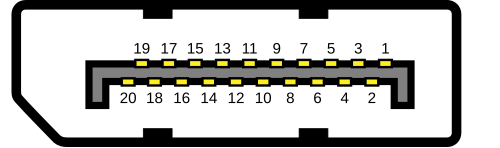 | |||
| PCB 上の外部コネクタ(ソース側) | |||
| ピン1 | ML_レーン 0 (p) [a] | レーン0 (+) | |
| ピン2 | グランド | 地面 | |
| ピン3 | ML_レーン 0 (n) [a] | レーン0 (−) | |
| ピン4 | ML_レーン 1 (p) [a] | レーン1 (+) | |
| ピン5 | グランド | 地面 | |
| ピン6 | ML_レーン 1 (n) [a] | レーン1 (−) | |
| ピン7 | ML_レーン 2 (p) [a] | レーン2 (+) | |
| ピン8 | グランド | 地面 | |
| ピン9 | ML_レーン 2 (n) [a] | レーン2 (−) | |
| ピン10 | ML_レーン 3 (p) [a] | レーン3 (+) | |
| ピン11 | グランド | 地面 | |
| ピン12 | ML_レーン 3 (n) [a] | レーン3 (−) | |
| ピン13 | 構成1 | 接地されている[b] | |
| ピン14 | 構成2 | 接地されている[b] | |
| ピン15 | 補助 チャンネル (p) | 補助チャンネル(+) | |
| ピン16 | グランド | 地面 | |
| ピン17 | 補助 チャンネル (n) | 補助チャンネル(−) | |
| ピン18 | ホット プラグ | ホットプラグ検出 | |
| ピン19 | 戻る | 権力への復帰 | |
| ピン20 | DP_パワー | コネクタ用電源(3.3 V 500 mA) | |
| |||
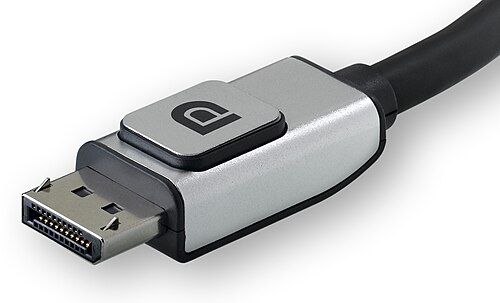

DisplayPort ( DP ) は、PC およびチップ製造業者のコンソーシアムによって開発され、Video Electronics Standards Association (VESA) によって標準化された独自の デジタル ディスプレイ インターフェイスです。主にビデオ ソースをコンピューター モニターなどのディスプレイ デバイスに接続するために使用されます。また、オーディオ、USB 、およびその他の形式のデータを伝送することもできます。[1]
DisplayPortは、 VGA、FPD-Link、デジタルビジュアルインターフェース(DVI)の代替として設計されました。アクティブまたはパッシブアダプターを使用することで、DVIやハイデフィニションマルチメディアインターフェース(HDMI)などの他のインターフェースとの下位互換性があります。 [ 2 ]
これは、イーサネット、USB、PCI Expressなどの技術に見られるデジタル通信の一形態であるパケット化データ伝送を採用した最初のディスプレイインターフェースです。内部および外部ディスプレイ接続を使用できます。出力ごとにクロック信号を送信する従来の標準とは異なり、そのプロトコルはマイクロパケットと呼ばれる小さなデータパケットに基づいており、データストリームにクロック信号を埋め込むことができるため、より少ないピンでより高い解像度を実現できます。[3]データパケットを使用することで拡張性も高まり、物理インターフェースに大きな変更を加えることなく、時間の経過とともにより多くの機能を追加できます。[4]
DisplayPort はオーディオとビデオを同時に送信できますが、どちらか一方だけを送信することもできます。ビデオ信号パスはカラー チャネルあたり 6 ~ 16 ビットの範囲で、オーディオ パスには最大 8 チャネルの 24 ビット、192 kHz の非圧縮PCMオーディオを含めることができます。[1]双方向の半二重補助チャネルは、VESA EDID、MCCS、DPMS標準などのメイン リンクのデバイス管理およびデバイス制御データを伝送します。このインターフェイスは双方向 USB 信号を伝送することもできます。[5]
このインターフェースは、 DVI や HDMI と互換性のない差動信号を使用します。ただし、デュアルモード DisplayPort ポートは、外部パッシブアダプターを使用してインターフェースを介してシングルリンクDVI または HDMI プロトコル ( TMDS ) を送信するように設計されており、互換モードを有効にして信号を 3.3 ボルトから 5 ボルトに変換します。アナログVGA / YPbPrおよびデュアルリンク DVIの場合、互換性のためには電源付きのアクティブアダプターが必要であり、デュアル モードに依存しません。アクティブ VGA アダプターは DisplayPort コネクターから直接電源が供給されますが、アクティブ デュアルリンク DVI アダプターは通常、USB などの外部電源に依存します。
バージョン
1.0から1.1
最初のバージョン1.0は、2006年5月3日にVESAによって承認されました。[6]バージョン1.1は2007年4月2日に批准され、[7]バージョン1.1aは2008年1月11日に批准されました。[8]
DisplayPort 1.0~1.1aは、標準の 4 レーン メイン リンクで最大 10.8 Gbit/s (データ レート 8.64 Gbit/s) の帯域幅を可能にします。10.8 Gbit/s の帯域幅全体をサポートするには、最長 2 メートルの DisplayPort ケーブルが必要です。 [8] DisplayPort 1.1 では、デバイスが光ファイバーなどの代替リンク層を実装できるため、信号劣化なしでソースとディスプレイ間の距離を大幅に延ばすことができますが、[9]代替実装は標準化されていません。また、 DisplayPort コンテンツ保護 (DPCP) に加えてHDCP も含まれています。DisplayPort 1.1a 規格は、VESA の Web サイトから無料でダウンロードできます。[10] [検証失敗]
1.2
DisplayPortバージョン1.2は、2010年1月7日に導入されました。[11]このバージョンでの最も重要な改善点は、 高ビットレート2(HBR2)モードでのデータレートが17.28 Gbit/sに倍増したことです。これにより、解像度の向上、リフレッシュレートの向上、 60 Hz 10 bpc RGBで3840 × 2160などの色深度の向上が可能になります。その他の改善点には、マルチストリームトランスポート(MST)と呼ばれる複数の独立したビデオストリーム(複数のモニターとのデイジーチェーン接続)、立体3Dの機能、AUXチャネル帯域幅の増加(1 Mbit/sから720 Mbit/sへ)、 xvYCC、scRGB、Adobe RGB 1998などのより多くの色空間、および1μs未満のオーディオ/ビデオ同期のためのグローバルタイムコード(GTC)があります。また、Apple社のMini DisplayPortコネクタは、ノートパソコンやその他の小型デバイス向けに設計されたはるかに小型のコネクタであり、新しい規格と互換性があります。[1] [12] [13] [14]
1.2a
DisplayPortバージョン1.2aは2013年1月にリリースされ[15]、オプションでVESAのAdaptive Syncを含む場合があります。[16] AMDの FreeSyncは、DisplayPort Adaptive-Sync機能を使用して動作します。FreeSyncは、Embedded DisplayPort規格のPanel-Self-Refresh (PSR)機能を使用して、 CES 2014でToshiba Satelliteラップトップで初めて実演されました。[17] AMDからの提案を受けて、VESAは後にPanel-Self-Refresh機能をスタンドアロンディスプレイで使用できるように調整し、バージョン1.2aで「Adaptive-Sync」という名前でメインのDisplayPort規格のオプション機能として追加しました。[18]これはオプション機能であるため、ディスプレイがDisplayPort 1.2aに準拠するためにAdaptive-Syncのサポートは必要ありません。
1.3
DisplayPortバージョン1.3は、2014年9月15日に承認されました。[19]この規格では、レーンあたり8.1 Gbit/s(バージョン1.2のHBR2の5.4 Gbit/sから増加)の 新しいHBR3モードにより、全体の伝送帯域幅が32.4 Gbit/sに増加し、8b/10bエンコードのオーバーヘッドを考慮すると、合計データスループットは25.92 Gbit/sになります。この帯域幅は、120 Hzで24 bit/pxのRGBカラーの4K UHDディスプレイ(3840 × 2160 )、 60 Hzで30 bit/pxのRGBカラーの5Kディスプレイ( 5120 × 2880 ) 、または30 Hzで24 bit/pxのRGBカラーの8K UHDディスプレイ(7680 × 4320 )に十分です。マルチストリームトランスポート (MST) を使用すると、DisplayPort ポートは 2 台の 4K UHD ( 3840 × 2160 ) ディスプレイを 60 Hz で、または最大 4 台の WQXGA ( 2560 × 1600 ) ディスプレイを 60 Hz で 24 bit/px RGB カラーで駆動できます。新しい規格には、DVI および HDMI アダプターの必須デュアルモードが含まれており、HDMI 2.0 規格とHDCP 2.2 コンテンツ保護を実装しています。[20] Thunderbolt 3接続規格には、もともと DisplayPort 1.3 機能が含まれる予定でしたが、最終リリースでは Intel® 6000 シリーズ Thunderbolt™ 3 コントローラー用のバージョン 1.2 のみになりました。その後、Intel® 7000 シリーズ Thunderbolt™3 コントローラーがHDR を含む DisplayPort 1.4 機能をサポートするようになりました。DisplayPort バージョン 1.3 の VESA の Adaptive Sync 機能は、仕様のオプション部分のままです。[21]
1.4
DisplayPortバージョン1.4は2016年3月1日に公開されました。[22]新しい伝送モードは定義されていないため、 バージョン1.3で導入されたHBR3(32.4 Gbit/s)が依然として利用可能な最高モードのままです。DisplayPort 1.4では、 HDMI相互運用性のために、 Display Stream Compression 1.2(DSC)、Forward Error Correction、CTA-861.3で定義されたHDR10メタデータ(静的および動的メタデータとRec. 2020色空間を含む)のサポートが追加され、[23]インラインオーディオチャンネルの最大数が32に拡張されました。[24]
1.4a
DisplayPortバージョン1.4aは2018年4月に公開されました。 [25] VESAはこのバージョンについて公式のプレスリリースを発表していません。DisplayPortのディスプレイストリーム圧縮実装がDSC 1.2から1.2aに更新されました。 [26]
2.0
2019年6月26日、VESAは正式にDisplayPort 2.0規格をリリースしました。[27] VESAは、バージョン2.0は2016年3月以来のDisplayPort規格の最初のメジャーアップデートであり、以前のバージョンのDisplayPort(1.4a)と比較してデータレートが最大約3倍(25.92 Gbit/sから77.37 Gbit/s)向上し、従来のディスプレイの将来のパフォーマンス要件に対応する新しい機能も備えていると述べています。これには、8Kを超える解像度、より高いリフレッシュレート、高解像度でのハイダイナミックレンジ(HDR)のサポート、複数のディスプレイ構成のサポートの改善、4K以上のVR解像度のサポートを含む拡張/仮想現実(AR/VR)ディスプレイのユーザーエクスペリエンスの向上が含まれます。
VESAが2016年9月に公開したロードマップによると、DisplayPortの新バージョンは「2017年初頭」に発売される予定だった。リンクレートは8.1 Gbit/sから10.0 Gbit/sに向上し、23%の増加となるはずだった。[28] [29]これにより、総帯域幅は32.4 Gbit/sから40.0 Gbit/sに増加するはずだった。しかし、2017年には新バージョンはリリースされなかった。HDMIフォーラムが2017年1月に次期規格(HDMI 2.1)では最大48 Gbit/sの帯域幅を提供すると発表した後、さらなる改良を行うために延期された可能性が高い。2018年1月3日のプレスリリースによると、「VESAは現在、メンバーとともに次期DisplayPort規格の開発に取り組んでおり、DisplayPortで実現するデータレートを2倍以上に高める計画だ。VESAは今後18か月以内にこのアップデートを公開する予定だ」という。[30] CES 2019でVESAは、新しいバージョンが 圧縮なしで8K @ 60 Hzをサポートし、2019年上半期にリリースされる予定であると発表した。[31]
DP 2.0 構成例
DisplayPort 2.0によって帯域幅が拡大したことにより、VESAはより高いディスプレイ解像度とリフレッシュレートに対応する高い汎用性と構成を提供します。前述の HDR対応の60Hzでの8K解像度に加えて、DisplayPort AltモードとしてUSB-C経由のDP 2.0(UHBR20)により、さまざまな高性能構成が可能になります[32]。
- 単一ディスプレイ解像度
- 16K ( 15360 × 8640 ) ディスプレイ 1 台、60 Hz、10 bpc (30 bit/px、HDR) RGB/Y′C B C R 4:4:4 カラー (DSC 付き)
- 1 台の 10K ( 10240 × 4320 ) ディスプレイ @ 60 Hz、8 bpc (24 ビット/ピクセル、SDR) RGB/Y′C B C R 4:4:4 カラー (非圧縮)
- デュアルディスプレイ解像度
- 2 台の 8K ( 7680 × 4320 ) ディスプレイ @ 120 Hz、10 bpc (30 bit/px、HDR) RGB/Y′C B C R 4:4:4 カラー (DSC 付き)
- 2 つの 4K ( 3840 × 2160 ) ディスプレイ @ 144 Hz および 8 bpc (24 ビット/ピクセル、SDR) RGB/Y′C B C R 4:4:4 カラー (非圧縮)
- 3つのディスプレイ解像度
- 3 台の 10K ( 10240 × 4320 ) ディスプレイ @ 60 Hz、10 bpc (30 bit/px、HDR) RGB/Y′C B C R 4:4:4 カラー (DSC 付き)
- 3 つの 4K ( 3840 × 2160 ) ディスプレイ @ 90 Hz および 10 bpc (30 bit/px、HDR) RGB/Y′C B C R 4:4:4 カラー (非圧縮)
DP Alt モードを介して USB-C コネクタの 2 つのレーンのみを使用して、SuperSpeed USB データとビデオを同時に処理できるようにする場合、DP 2.0 では次のような構成が可能になります。
- 3 つの 4K ( 3840 × 2160 ) ディスプレイ @ 144 Hz、10 bpc (30 bit/px、HDR) RGB/Y′C B C R 4:4:4 カラー (DSC 付き)
- 2 つの 4K × 4K ( 4096 × 4096 ) ディスプレイ (AR/VR ヘッドセット用) @ 120 Hz および 10 bpc (30 bit/px、HDR) RGB/Y′C B C R 4:4:4 カラー (DSC 付き)
- 3 つの QHD ( 2560 × 1440 ) @ 120 Hz および 8 bpc (24 ビット/ピクセル、SDR) RGB/Y′C B C R 4:4:4 カラー (非圧縮)
- 8K ( 7680 × 4320 ) ディスプレイ 1 台、30 Hz、10 bpc (30 bit/px、HDR) RGB/Y′C B C R 4:4:4 カラー (非圧縮)
2.1
VESAは2022年10月17日にDisplayPort規格のバージョン2.1を発表しました。[33]このバージョンには、バージョン2.0で導入されたUHBR10(40Gbit /s)およびUHBR20(80Gbit /s)の速度でDisplayPortケーブルが適切に動作するかをテストする新しいDP40およびDP80ケーブル認証が組み込まれています。さらに、USB4との統合を改善するために、DisplayPortデバイスの電気的要件の一部が改訂されています。VESAの言葉を借りれば、
DisplayPort 2.1 は、USB Type-C 仕様および USB4 PHY 仕様との整合性を強化し、DisplayPort と USB4 の両方に対応する共通 PHY を実現しました。さらに、DisplayPort 2.1 では新しい DisplayPort 帯域幅管理機能が追加され、DisplayPort トンネリングが USB4 リンク上で他の I/O データ トラフィックとより効率的に共存できるようになりました。
2.1a
VESAは2024年1月8日にDisplayPort規格のバージョン2.1aを発表しました。[34]このバージョンでは、DP40ケーブル認証が新しいDP54認証に置き換えられ、バージョン2.0で導入されたUHBR13.5(54Gbit/s)の速度でDisplayPortケーブルが適切に動作するかどうかをテストします 。
仕様
主要
- ^ DisplayPort 仕様バージョン 1.0 および 1.1a のみ、 VESAとの秘密保持契約の締結は必要ありません。
- ^ 総帯域幅(1 秒あたりに送信される 2 進数の数)は、サポートされている最高の送信モードのレーンあたりの帯域幅にレーン数を掛けたものに等しくなります。
- ^ 総帯域幅はインターフェイスを介して送信される物理ビット数を表しますが、すべてのビットがビデオ データを表すわけではありません。送信されるビットの一部はエンコードの目的で使用されるため、DisplayPort インターフェイスを介してビデオ データを送信できる速度は総帯域幅の一部にすぎません。
- ^ 8b/10b エンコーディング方式では、8 ビットのデータ送信に 10 ビットの帯域幅を使用するため、データ スループットに使用できるのは帯域幅の 80% のみです。追加の 2 ビットは DC バランス調整に使用されます (1 と 0 の数がほぼ同数になるようにします)。これらは帯域幅を消費しますが、データを表すものではありません。
- ^ DisplayPort 1.0~1.1aでは、RGB画像は特定の色彩情報なしで送信される。
メインリンク
DisplayPortのメインリンクは、ビデオとオーディオの伝送に使用されます。メインリンクは、レーンと呼ばれる、同時に動作する多数の単方向シリアルデータチャネルで構成されています。標準のDisplayPort接続には4つのレーンがありますが、DisplayPortのアプリケーションによっては、最大8つのレーンのDisplayPortを実装するThunderbolt 3インターフェイスなど、より多くのレーンを実装しています。[40] : 4
標準の DisplayPort 接続では、各レーンには専用のツイストペア線があり、差動信号を使用してその線を介してデータを送信します。これは自己クロックシステムであるため、専用のクロック信号チャネルは必要ありません。[8] : §1.7.1 特定のビデオ フォーマットに必要な正確な速度に合わせて伝送速度を変える DVI や HDMI とは異なり、DisplayPort はいくつかの特定の速度でのみ動作します。伝送中の余分なビットは「スタッフィング シンボル」で埋められます。[8] : §2.2.1.4
DisplayPort バージョン 1.0~1.4a では、データは送信前に ANSI 8b/10b エンコードを使用してエンコードされます。この方式では、送信される 10 ビットのうち 8 ビットのみがデータを表します。余分なビットは DC バランスに使用されます (1 と 0 の数がほぼ同数になるようにします)。その結果、データ送信速度は物理ビットレートの 80% のみになります。送信速度は、「リンク シンボル レート」という用語で表現されることもあります。これは、これらの 8b/10b エンコード シンボルが送信される速度 (つまり、8 ビットがデータを表す 10 ビットのグループが送信される速度) です。バージョン 1.0~1.4a では、次の送信モードが定義されています。
- RBR (Reduced Bit Rate): レーンあたり 1.62 Gbit/s の帯域幅 (162 MHz リンク シンボル レート)
- HBR (高ビットレート): レーンあたり 2.70 Gbit/s の帯域幅 (270 MHz リンク シンボル レート)
- HBR2 (高ビットレート 2): レーンあたり 5.40 Gbit/s の帯域幅 (540 MHz リンク シンボル レート)、DP 1.2で導入
- HBR3 (高ビットレート 3): レーンあたり 8.10 Gbit/s の帯域幅 ( リンク シンボル レート 810 MHz)、DP 1.3で導入
DisplayPort 2.0は128b/132bエンコーディングを使用し、送信される132ビットの各グループは128ビットのデータを表します。この方式の効率は96.96%です。 [ 41]さらに、リンク層制御パケットやその他のさまざまな操作に少量のオーバーヘッドが追加され、全体的な効率は約96.7%になります。[42] :§3.5.2.18 DP 2.0では次の送信モードが追加されました。
- UHBR 10 (超高ビットレート 10): レーンあたり 10.0 Gbit/s の帯域幅
- UHBR 13.5 (超高ビットレート 13.5): レーンあたり 13.5 Gbit/s の帯域幅
- UHBR 20 (超高ビットレート 20): レーンあたり 20.0 Gbit/s の帯域幅
標準的な 4 レーン接続のメイン リンクの 合計帯域幅は、すべてのレーンの合計です。
- RBR : 4 × 1.62 Gbit/s = 6.48 Gbit/s 帯域幅 (データ レート 5.184 Gbit/s または 8b/10b エンコードで 648 MB/s)
- HBR : 4 × 2.70 Gbit/s = 10.80 Gbit/s 帯域幅 (データ レート 8.64 Gbit/s または 1.08 GB/s)
- HBR2 : 4 × 5.40 Gbit/s = 21.60 Gbit/s 帯域幅 (データ レート 17.28 Gbit/s または 2.16 GB/s)
- HBR3 : 4 × 8.10 Gbit/s = 32.40 Gbit/s 帯域幅 (データ レート 25.92 Gbit/s または 3.24 GB/s)
- UHBR 10 : 4 × 10.0 Gbit/s = 40.00 Gbit/s 帯域幅 ( 128b/132b エンコーディングと FEC を使用した場合のデータ レートは 38.69 Gbit/s または 4.84 GB/s)
- UHBR 13.5 : 4 × 13.5 Gbit/s = 54.00 Gbit/s 帯域幅 (データ レート 52.22 Gbit/s または 6.52 GB/s)
- UHBR 20 : 4 × 20.0 Gbit/s = 80.00 Gbit/s 帯域幅 (データ レート 77.37 Gbit/s または 9.69 GB/s)
DisplayPort メインリンクで使用される伝送モードは、接続が確立されると、リンクトレーニングと呼ばれるプロセスを通じてソースデバイスとシンクデバイスによってネゴシエートされます。このプロセスにより、接続の最大可能速度が決定されます。たとえば、DisplayPort ケーブルの品質が HBR2 速度を確実に処理するには不十分な場合、DisplayPort デバイスはこれを検出し、より低いモードに切り替えて安定した接続を維持します。[8] : §2.1.1 同期の損失が検出された場合、リンクはいつでも再ネゴシエートできます。[8] : §1.7.3
オーディオデータはビデオブランキングインターバル(ビデオデータの各ラインとフレーム間の短い休止期間)中にメインリンクを介して送信される。[8] :§2.2.5.3
補助チャンネル
DisplayPort AUXチャンネルは、半二重(双方向)データチャンネルで、EDID( I2C )やCECコマンドなど、ビデオやオーディオ以外のさまざまな追加データのために使用されます。 [8] : §2.4 ビデオレーン信号はソースからディスプレイへの単方向であるため、この双方向データチャンネルは必須です。AUX信号は、専用のツイストペア線セットを介して送信されます。DisplayPort 1.0は、2 MBd信号レート(1 Mbit/sデータレート)のマンチェスター符号化を指定しました。 [8] : §3.4 DisplayPort規格のバージョン1.2では、FAUX(Fast AUX)と呼ばれる2番目の伝送モードが導入されました。これは、 8b/10b符号化(576 Mbit/sデータレート)で720 Mbit/sで動作しました。 [38] : §3.4 しかし、バージョン1.3では非推奨になりました。
ケーブルとコネクタ
ケーブル
互換性と機能サポート
すべてのDisplayPortケーブルは、各デバイスのバージョンやケーブル認証レベルに関係なく、すべてのDisplayPortデバイスと互換性があります。[43]
DisplayPort のすべての機能は、どの DisplayPort ケーブルでも機能します。DisplayPort には複数のケーブル設計はありません。すべての DP ケーブルは基本的なレイアウトと配線が同じで、オーディオ、デイジーチェーン、G-Sync / FreeSync、HDR、DSC などのすべての機能をサポートします。
DisplayPort ケーブルは、サポートする伝送速度が異なります。DisplayPort は、段階的に高くなる帯域幅をサポートする 7 つの異なる伝送モード (RBR、HBR、HBR2、HBR3、UHBR 10、UHBR 13.5、および UHBR 20) を指定します。すべての DisplayPort ケーブルが 7 つの伝送モードすべてに対応しているわけではありません。VESA は、さまざまなレベルの帯域幅の認定を提供しています。これらの認定はオプションであり、すべての DisplayPort ケーブルが VESA によって認定されているわけではありません。
伝送速度が制限されているケーブルは、すべての DisplayPort デバイスと互換性がありますが、利用可能な最大解像度またはリフレッシュ レートに制限が課される場合があります。
DisplayPort ケーブルは「バージョン」で分類されていません。ケーブルには一般的にバージョン番号が付けられており、 たとえば HBR2 ケーブルは「DisplayPort 1.2 ケーブル」として宣伝されていますが、この表記は VESA では許可されていません。[43]ケーブルにバージョン番号を使用すると、DisplayPort 1.4 ディスプレイには「DisplayPort 1.4 ケーブル」が必要である、またはバージョン 1.4 で導入された HDR や DSC などの機能が古い「DP 1.2 ケーブル」では機能しないという誤っ た印象を与える可能性があります。DisplayPort ケーブルは、認証されている場合、帯域幅認証レベル (RBR、HBR、HBR2、HBR3 など) のみで分類されます。
ケーブル帯域幅と認証
すべてのDisplayPortケーブルが最高レベルの帯域幅で機能できるわけではありません。ケーブルはVESAに提出して、さまざまな帯域幅レベルでのオプションの認証を受けることができます。VESAは、標準、DP8K、DP40、DP54、DP80の5つのレベルのケーブル認証を提供しています。[42] :§4.1 これらは、DisplayPortケーブルが次の速度で適切に動作することを認証します。
2013 年 4 月、VESA は、DisplayPort ケーブル認証には HBR と HBR2 の帯域幅に明確な階層がなく、DisplayPort 1.1 で認証されたものも含め、認証された標準 DisplayPort ケーブルはすべて、DisplayPort 1.2 規格で導入された HBR2 の 21.6 Gbit/s 帯域幅を処理できるという記事を発表しました。 [43] DisplayPort 1.2 規格では、HBR と HBR2 の両方の速度で使用される高ビット レート ケーブル アセンブリの仕様が 1 つだけ定義されていますが、DP ケーブル認証プロセスは DisplayPort PHY コンプライアンス テスト規格 (CTS) によって管理されており、DisplayPort 規格自体によって管理されているわけではありません。[38] : §5.7.1、§4.1
DP8K認証はVESAによって2018年1月に発表されたもので、HBR3速度( レーンあたり8.1Gbit/s、 合計32.4Gbit/s)でケーブルが適切に動作することを証明するものである。[44]
2019年6月、DisplayPort規格のバージョン2.0がリリースされ、VESAはDP8K認証が新しいUHBR10伝送モードにも十分であると発表しました。UHBR13.5およびUHBR20モードについては新しい認証は発表されていません。VESAは、これらの速度ではスタンドアロンケーブルを市場に投入するのではなく、ディスプレイにテザーケーブルを使用することを推奨しています。[41]
また、DisplayPort 1.4 で導入されたディスプレイ ストリーム圧縮 (DSC) を使用すると 、ケーブルの帯域幅要件が大幅に削減されることにも留意してください。通常 DisplayPort 1.4 の制限を超えるフォーマット( 144 Hz 8 bpc RGB/Y′C B C R 4:4:4 (非圧縮時のデータ レート 31.4 Gbit/s) の 4K (3840 × 2160)など) は、DSC を使用することでのみ実装できます。これにより、物理的な帯域幅要件が 2 ~ 3 倍削減され、HBR2 定格ケーブルの能力に十分収まります。
これは、DisplayPort ケーブルが「バージョン」によって分類されない理由を例示しています。DSC はバージョン 1.4 で導入されましたが、これは、いわゆる「DP 1.4 ケーブル」(HBR3 定格ケーブル) が機能する必要があるという意味ではありません。HBR3 ケーブルは、HBR2 レベルの帯域幅を超えるアプリケーションにのみ必要であり、DisplayPort 1.4 を含むすべてのアプリケーションに必要というわけではありません。DSC を使用して帯域幅要件を HBR2 レベルに下げる場合は、HBR2 定格ケーブルで十分です。
バージョン 2.1 では、VESA は DP40 および DP80 ケーブル認証層を導入し、それぞれ UHBR10 および UHBR20 速度のケーブルを検証しました。DisplayPort 2.1a では、UHBR13.5 速度の DP54 ケーブル認証が導入されました。
ケーブル長
DisplayPort規格ではケーブルの最大長は規定されていないが、DisplayPort 1.2規格では、長さ2メートルまでのすべてのケーブルはHBR2速度(21.6 Gbit/s)をサポートし、長さに関係なくすべてのケーブルはRBR速度(6.48 Gbit/s)をサポートするという最低要件を設定している。[38] :§5.7.1、§4.1 2メートルを超えるケーブルはHBR/HBR2速度をサポートする場合とサポートしない場合があり、長さに関係なくすべてのケーブルはHBR3以上の速度をサポートする場合とサポートしない場合があります。
コネクタとピン構成

DisplayPort ケーブルとポートには、「フルサイズ」コネクタまたは「ミニ」コネクタがあります。これらのコネクタは物理的な形状のみが異なり、どのコネクタが使用されても DisplayPort の機能は同じです。ミニ DisplayPort コネクタを使用しても、接続のパフォーマンスや機能のサポートには影響しません。
フルサイズDisplayPortコネクタ
標準のDisplayPortコネクタ(現在ではミニコネクタと区別するために「フルサイズ」コネクタと呼ばれている)[38] : §4.1.1 は、DisplayPort 1.0で導入された唯一のコネクタタイプです。これは、摩擦ロックとオプションの機械式ラッチを備えた20ピンの単方向コネクタです。標準のDisplayPortレセプタクルの寸法は、16.10 mm(幅)× 4.76 mm(高さ)× 8.88 mm(奥行き) です。 [8] :§4.2.1.7、p201
標準的なDisplayPortコネクタのピン割り当ては次のとおりです: [8] : §4.2.1
- メインリンク用の12ピン– メインリンクは4本のシールド付きツイストペアで構成されています。各ペアには3本のピンが必要です。2本のワイヤに1本ずつ、シールドに3本目が必要です。[8] : §4.1.2、p183 (ピン1~12)
- 追加のアースピン 2 本(ピン 13 と 14)
- 補助チャネル用の 3 ピン– 補助チャネルは別の 3 ピン シールド ツイスト ペア (ピン 15 ~ 17) を使用します。
- HPD 用 1 ピン- ホットプラグ検出 (ピン 18)
- 電源用ピン 2 本- 3.3 V 電源とリターン ライン (ピン 19 と 20)
Mini DisplayPortコネクタ
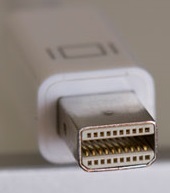
Mini DisplayPort コネクタは、Appleが自社のコンピュータ製品で使用するために開発しました。2008 年 10 月に、新型 MacBook および Cinema Display で使用するために初めて発表されました。2009 年に VESA がこれを公式規格として採用し、2010 年に DisplayPort 1.2 のリリースでこの仕様はメインの DisplayPort 規格に統合されました。Apple は VESA にこの仕様を無償でライセンス供与しています。
The Mini DisplayPort (mDP) connector is a 20-pin single-orientation connector with a friction lock. Unlike the full-size connector, it does not have an option for a mechanical latch. The mDP receptacle has dimensions of 7.50 mm (width) × 4.60 mm (height) × 4.99 mm (depth).[45]: §2.1.3.6, pp27–31 The mDP pin assignments are the same as the full-size DisplayPort connector.[45]: §2.1.3
DP_PWR (pin 20)
Pin 20 on the DisplayPort connector, called DP_PWR, provides 3.3 V (±10%) DC power at up to 500 mA (minimum power delivery of 1.5 W).[8]: §3.2 This power is available from all DisplayPort receptacles, on both source and display devices. DP_PWR is intended to provide power for adapters, amplified cables, and similar devices, so that a separate power cable is not necessary.
Standard DisplayPort cable connections do not use the DP_PWR pin. Connecting the DP_PWR pins of two devices directly together through a cable can create a short circuit which can potentially damage devices, since the DP_PWR pins on two devices are unlikely to have exactly the same voltage (especially with a ±10% tolerance).[46] For this reason, the DisplayPort 1.1 and later standards specify that passive DisplayPort-to-DisplayPort cables must leave pin 20 unconnected.[8]: §3.2.2
However, in 2013 VESA announced that after investigating reports of malfunctioning DisplayPort devices, it had discovered that a large number of non-certified vendors were manufacturing their DisplayPort cables with the DP_PWR pin connected:
Recently VESA has experienced quite a few complaints regarding troublesome DisplayPort operation that ended up being caused by improperly made DisplayPort cables. These "bad" DisplayPort cables are generally limited to non-DisplayPort certified cables, or off-brand cables. To further investigate this trend in the DisplayPort cable market, VESA purchased a number of non-certified, off-brand cables and found that an alarmingly high number of these were configured improperly and would likely not support all system configurations. None of these cables would have passed the DisplayPort certification test, moreover some of these cables could potentially damage a PC, laptop, or monitor.
The stipulation that the DP_PWR wire be omitted from standard DisplayPort cables was not present in the DisplayPort 1.0 standard. However, DisplayPort products (and cables) did not begin to appear on the market until 2008, long after version 1.0 had been replaced by version 1.1. The DisplayPort 1.0 standard was never implemented in commercial products.[47]
Resolution and refresh frequency limits
The tables below describe the refresh frequencies that can be achieved with each transmission mode. In general, maximum refresh frequency is determined by the transmission mode (RBR, HBR, HBR2, HBR3, UHBR10, UHBR13.5, or UHBR20). These transmission modes were introduced to the DisplayPort standard as follows:
- RBR and HBR were defined in the initial release of the DisplayPort standard, version 1.0
- HBR2 was introduced in version 1.2
- HBR3 was introduced in version 1.3
- UHBR10, UHBR13.5, and UHBR20 were introduced in version 2.0
However, transmission mode support is not necessarily dictated by a device's claimed "DisplayPort version number". For example, older versions of the DisplayPort Marketing Guidelines allowed a device to be labeled as "DisplayPort 1.2" if it supported the MST feature, even if it didn't support the HBR2 transmission mode.[48]: 9 Newer versions of the guidelines have removed this clause, and currently (as of the June 2018 revision) there are no guidelines on the usage of DisplayPort version numbers in products.[49] DisplayPort "version numbers" are therefore not a reliable indication of what transmission speeds a device can support.
In addition, individual devices may have their own arbitrary limitations beyond transmission speed. For example, NVIDIA Kepler GK104 GPUs (such as the GeForce GTX 680 and 770) support "DisplayPort 1.2" with the HBR2 transmission mode, but are limited to 540 Mpx/s, only 3⁄4 of the maximum possible with HBR2.[50] Consequently, certain devices may have limitations that differ from those listed in the following tables.
To support a particular format, the source and display devices must both support the required transmission mode, and the DisplayPort cable must also be capable of handling the required bandwidth of that transmission mode. (See: Cables and connectors)
Refresh frequency limits for common resolutions
The maximum limits for the RBR and HBR modes are calculated using standard data rate calculations.[51] For UHBR modes, the limits are based on the data efficiency calculations provided by the DisplayPort standard.[52]: §3.5.2.18 All calculations assume uncompressed RGB video with CVT-RB v2 timing. Maximum limits may differ if compression (i.e. DSC) or Y′CBCR 4:2:2 or 4:2:0 chroma subsampling are used.
Display manufacturers may also use non-standard blanking intervals rather than CVT-RB v2 to achieve even higher frequencies when bandwidth is a constraint. The refresh frequencies in the below table do not represent the absolute maximum limit of each interface, but rather an estimate based on a modern standardized timing formula. The minimum blanking intervals (and therefore the exact maximum frequency that can be achieved) will depend on the display and how many secondary data packets it requires, and therefore will differ from model to model.
Below 30 Hz
30–60 Hz
60–120 Hz
120–240 Hz
Above 240 Hz
Refresh frequency limits for standard video
Color depth of 8 bpc (24 bit/px or 16.7 million colors) is assumed for all formats in these tables. This is the standard color depth used on most computer displays. Note that some operating systems refer to this as "32-bit" color depth—this is the same as 24-bit color depth. The 8 extra bits are for alpha channel information, which is only present in software. At the transmission stage, this information has already been incorporated into the primary color channels, so the actual video data transmitted across the cable only contains 24 bits per pixel.
- ^ Only a portion of DisplayPort's bandwidth is used for carrying video data. The RBR, HBR, HBR2, and HBR3 transmission modes use 8b/10b encoding, which means that 80% of the bits transmitted across the link represent data, and the other 20% are used for encoding purposes. The maximum bit rates of these modes (6.48, 10.8, 21.6, and 32.4 Gbit/s) therefore transport video data at rates of 5.184, 8.64, 17.28, and 25.92 Gbit/s respectively. DisplayPort UHBR modes use 128b/132b encoding, and therefore the maximum bit rates of UHBR10, 13.5, and 20 (40, 54, and 80 Gbit/s) transport data at rates of 38.69, 52.22, and 77.37 Gbit/s.
- ^ These data rates are for uncompressed 8 bpc (24 bit/px) color depth with RGB or YCBCR 4:4:4 color format and CVT-R2 timing. Uncompressed data rate for RGB video in bits per second is calculated as bits per pixel × pixels per frame × frames per second. Pixels per frame includes blanking intervals as defined by CVT-R2.
- ^ a b Although this format slightly exceeds the maximum data rate of this transmission mode with CVT-R2 timing, it is close enough to be achieved with non-standard timings
- ^ Only a portion of DisplayPort's bandwidth is used for carrying video data. The RBR, HBR, HBR2, and HBR3 transmission modes use 8b/10b encoding, which means that 80% of the bits transmitted across the link represent data, and the other 20% are used for encoding purposes. The maximum bit rates of these modes (6.48, 10.8, 21.6, and 32.4 Gbit/s) therefore transport video data at rates of 5.184, 8.64, 17.28, and 25.92 Gbit/s respectively. DisplayPort UHBR modes use 128b/132b encoding, and therefore the maximum bit rates of UHBR10, 13.5, and 20 (40, 54, and 80 Gbit/s) transport data at rates of 38.69, 52.22, and 77.37 Gbit/s.
- ^ These data rates are for uncompressed 8 bpc (24 bit/px) color depth with RGB or YCBCR 4:4:4 color format and CVT-R2 timing. Uncompressed data rate for RGB video in bits per second is calculated as bits per pixel × pixels per frame × frames per second. Pixels per frame includes blanking intervals as defined by CVT-R2.
- ^ This format can only be achieved with full RGB color if DSC (display stream compression) is used.
- ^ This format can only be achieved uncompressed if the YCBCR format with either 4:2:2 or 4:2:0 chroma subsampling (as noted) is used
- ^ This format can only be achieved if DSC is used together with either YCbCr 4:2:2 or 4:2:0 chroma subsampling (as noted)
- ^ a b Although this format slightly exceeds the maximum data rate of this transmission mode with CVT-R2 timing, it is close enough to be achieved with non-standard timings
Refresh frequency limits for HDR video
Color depth of 10 bpc (30 bit/px or 1.07 billion colors) is assumed for all formats in these tables. This color depth is a requirement for various common HDR standards, such as HDR10. It requires 25% more bandwidth than standard 8 bpc video.
HDR extensions were defined in version 1.4 of the DisplayPort standard. Some displays support these HDR extensions, but may only implement HBR2 transmission mode if the extra bandwidth of HBR3 is unnecessary (for example, on 4K 60 Hz HDR displays). Since there is no definition of what constitutes a "DisplayPort 1.4" device, some manufacturers may choose to label these as "DP 1.2" devices despite their support for DP 1.4 HDR extensions.[53] As a result, DisplayPort "version numbers" should not be used as an indicator of HDR support.
- ^ Only a portion of DisplayPort's bandwidth is used for carrying video data. The RBR, HBR, HBR2, and HBR3 transmission modes use 8b/10b encoding, which means that 80% of the bits transmitted across the link represent data, and the other 20% are used for encoding purposes. The maximum bit rates of these modes (6.48, 10.8, 21.6, and 32.4 Gbit/s) therefore transport video data at rates of 5.184, 8.64, 17.28, and 25.92 Gbit/s respectively. DisplayPort UHBR modes use 128b/132b encoding, and therefore the maximum bit rates of UHBR10, 13.5, and 20 (40, 54, and 80 Gbit/s) transport data at rates of 38.69, 52.22, and 77.37 Gbit/s.
- ^ These data rates are for uncompressed 10 bpc (30 bit/px) color depth with RGB or YCBCR 4:4:4 color format and CVT-R2 timing. Uncompressed data rate for RGB video in bits per second is calculated as bits per pixel × pixels per frame × frames per second. Pixels per frame includes blanking intervals as defined by CVT-R2.
- ^ a b c d e f g Although this format slightly exceeds the maximum data rate of this transmission mode with CVT-R2 timing, it is close enough to be achieved with non-standard timings
- ^ Only a portion of DisplayPort's bandwidth is used for carrying video data. The RBR, HBR, HBR2, and HBR3 transmission modes use 8b/10b encoding, which means that 80% of the bits transmitted across the link represent data, and the other 20% are used for encoding purposes. The maximum bit rates of these modes (6.48, 10.8, 21.6, and 32.4 Gbit/s) therefore transport video data at rates of 5.184, 8.64, 17.28, and 25.92 Gbit/s respectively. DisplayPort UHBR modes use 128b/132b encoding, and therefore the maximum bit rates of UHBR10, 13.5, and 20 (40, 54, and 80 Gbit/s) transport data at rates of 38.69, 52.22, and 77.37 Gbit/s.
- ^ These data rates are for uncompressed 10 bpc (30 bit/px) color depth with RGB or YCBCR 4:4:4 color format and CVT-R2 timing. Uncompressed data rate for RGB video in bits per second is calculated as bits per pixel × pixels per frame × frames per second. Pixels per frame includes blanking intervals as defined by CVT-R2.
- ^ This format can only be achieved with full RGB color if DSC (display stream compression) is used. A compression ratio of 3.75:1 (8 bit/px compression) is assumed here.
- ^ This format can only be achieved uncompressed if the YCBCR format with either 4:2:2 or 4:2:0 chroma subsampling (as noted) is used
- ^ a b c d e Although this format slightly exceeds the maximum data rate of this transmission mode with CVT-R2 timing, it is close enough to be achieved with non-standard timings
- ^ This format can only be achieved if DSC and chroma subsampling are used together. The DisplayPort standard permits lower values for DSC output size when subsampling is used; 6 bit/px for 4:2:0 subsampling and 7 bit/px for 4:2:2 subsampling, compared to 8 bit/px for non-subsampled output (RGB and 4:4:4).
Features
DisplayPort Dual-Mode (DP++)

DisplayPort Dual-Mode (DP++), also called Dual-Mode DisplayPort, is a standard which allows DisplayPort sources to use simple passive adapters to connect to HDMI or DVI displays. Dual-mode is an optional feature, so not all DisplayPort sources necessarily support DVI/HDMI passive adapters, though in practice nearly all devices do. Officially, the "DP++" logo should be used to indicate a DP port that supports dual-mode, but most modern devices do not use the logo.[54]
Devices which implement dual-mode will detect that a DVI or HDMI adapter is attached, and send DVI/HDMI TMDS signals instead of DisplayPort signals. The original DisplayPort Dual-Mode standard (version 1.0), used in DisplayPort 1.1 devices, only supported TMDS clock speeds of up to 165 MHz (4.95 Gbit/s bandwidth). This is equivalent to HDMI 1.2, and is sufficient for up to 1920 × 1200 at 60 Hz.
In 2013, VESA released the Dual-Mode 1.1 standard, which added support for up to a 300 MHz TMDS clock (9.00 Gbit/s bandwidth), and is used in newer DisplayPort 1.2 devices. This is slightly less than the 340 MHz maximum of HDMI 1.4, and is sufficient for up to 1920 × 1080 at 120 Hz, 2560 × 1440 at 60 Hz, or 3840 × 2160 at 30 Hz. Older adapters, which were only capable of the 165 MHz speed, were retroactively termed "Type 1" adapters, with the new 300 MHz adapters being called "Type 2".[55]
Dual-mode limitations

- Limited adapter speed – Although the pinout and digital signal values transmitted by the DP port are identical to a native DVI/HDMI TMDS source, the transmission lines on a DisplayPort source are AC-coupled (a series capacitor isolates the line from passing DC voltages) while DVI and HDMI TMDS are DC-coupled. As a result, dual-mode adapters must contain a level-shifting circuit which couples the signal lines to a DC source.[54]: §5.5 The presence of this circuit places a limit on how quickly the adapter can operate, and therefore newer adapters are required for each higher speed added to the standard.
- Unidirectional – Although the dual-mode standard specifies a method for DisplayPort sources to output DVI/HDMI signals using simple passive adapters, there is no counterpart standard to give DisplayPort displays the ability to receive DVI/HDMI input signals through passive adapters. As a result, DisplayPort displays can only receive native DisplayPort signals; any DVI or HDMI input signals must be converted to the DisplayPort format with an active conversion device. DVI and HDMI sources cannot be connected to DisplayPort displays using passive adapters.
- Single-link DVI only – Since DisplayPort dual-mode operates by using the pins of the DisplayPort connector to send DVI/HDMI signals, the 20-pin DisplayPort connector can only produce a single-link DVI signal (which uses 19 pins). A dual-link DVI signal uses 25 pins, and is therefore impossible to transmit natively from a DisplayPort connector through a passive adapter. Dual-link DVI signals can only be produced by converting from native DisplayPort output signals with an active conversion device.
- Unavailable on USB-C – The DisplayPort Alternate Mode specification for sending DisplayPort signals over a USB-C cable does not include support for the dual-mode protocol. As a result, DP-to-DVI and DP-to-HDMI passive adapters do not function when chained from a USB-C to DP adapter.
Multi-Stream Transport (MST)
Multi-Stream Transport is a feature first introduced in the DisplayPort 1.2 standard. It allows multiple independent displays to be driven from a single DP port on the source devices by multiplexing several video streams into a single stream and sending it to a branch device, which demultiplexes the signal into the original streams. Branch devices are commonly found in the form of an MST hub, which plugs into a single DP input port and provides multiple outputs, but it can also be implemented on a display internally to provide a DP output port for daisy-chaining, effectively embedding a 2-port MST hub inside the display.[38]: Fig. 2-59 [56] Theoretically, up to 63 displays can be supported,[38]: 20 but the combined data rate requirements of all the displays cannot exceed the limits of a single DP port (17.28 Gbit/s for a DP 1.2 port, or 25.92 Gbit/s for a DP 1.3/1.4 port). In addition, the maximum number of links between the source and any device (i.e. the maximum length of a daisy-chain) is 7,[38]: §2.5.2 and the maximum number of physical output ports on each branch device (such as a hub) is 7.[38]: §2.5.1 With the release of MST, standard single-display operation has been retroactively named "SST" mode (Single-Stream Transport).
Daisy-chaining is a feature that must be specifically supported by each intermediary display; not all DisplayPort 1.2 devices support it. Daisy-chaining requires a dedicated DisplayPort output port on the display. Standard DisplayPort input ports found on most displays cannot be used as a daisy-chain output. Only the last display in the daisy-chain does not need to support the feature specifically or have a DP output port. DisplayPort 1.1 displays can also be connected to MST hubs, and can be part of a DisplayPort daisy-chain if it is the last display in the chain.[38]: §2.5.1
The host system's software also needs to support MST for hubs or daisy-chains to work. While Microsoft Windows environments have full support for it, Apple operating systems currently do not support MST hubs or DisplayPort daisy-chaining as of macOS 10.15 ("Catalina").[57][58] DisplayPort-to-DVI and DisplayPort-to-HDMI adapters/cables may or may not function from an MST output port; support for this depends on the specific device.[citation needed]
MST is supported by USB Type-C DisplayPort Alternate Mode, so standard DisplayPort daisy-chains and MST hubs do function from Type-C sources with a simple Type-C to DisplayPort adapter.[59]
High dynamic range (HDR)
Support for HDR video was introduced in DisplayPort 1.4. It implements the CTA 861.3 standard for transport of static HDR metadata in EDID.[22]
Content protection
DisplayPort 1.0 includes optional DPCP (DisplayPort Content Protection) from Philips, which uses 128-bit AES encryption. It also features full authentication and session key establishment. Each encryption session is independent, and it has an independent revocation system. This portion of the standard is licensed separately. It also adds the ability to verify the proximity of the receiver and transmitter, a technique intended to ensure users are not bypassing the content protection system to send data out to distant, unauthorized users.[8]: §6
DisplayPort 1.1 added optional implementation of industry-standard 56-bit HDCP (High-bandwidth Digital Content Protection) revision 1.3, which requires separate licensing from the Digital Content Protection LLC.[8]: §1.2.6
DisplayPort 1.3 added support for HDCP 2.2, which is also used by HDMI 2.0.[19]
Cost
VESA, the creators of the DisplayPort standard, state that the standard is royalty-free to implement. However, in March 2015, MPEG LA issued a press release stating that a royalty rate of $0.20 per unit applies to DisplayPort products manufactured or sold in countries that are covered by one or more of the patents in the MPEG LA license pool, which includes patents from Hitachi Maxell, Philips, Lattice Semiconductor, Rambus, and Sony.[60][61] In response, VESA updated their DisplayPort FAQ page with the following statement:[62]
MPEG LA is making claims that DisplayPort implementation requires a license and a royalty payment. It is important to note that these are only CLAIMS. Whether these CLAIMS are relevant will likely be decided in a US court.
As of August 2019, VESA's official FAQ no longer contains a statement mentioning the MPEG LA royalty fees.
While VESA does not charge any per-device royalty fees, VESA requires membership for access to said standards.[63] The minimum cost is presently $5,000 (or $10,000 depending on Annual Corporate Sales Revenue) annually.[64]
Advantages over DVI, VGA and FPD-Link
In December 2010, several computer vendors and display makers including Intel, AMD, Dell, Lenovo, Samsung and LG announced they would begin phasing out FPD-Link, VGA, and DVI-I over the next few years, replacing them with DisplayPort and HDMI.[65][66][67]
DisplayPort has several advantages over VGA, DVI, and FPD-Link.[68]
- Standard available to all VESA members[dubious – discuss] with an extensible standard to help broad adoption[69]
- Fewer lanes with embedded self-clock, reduced EMI with data scrambling and spread spectrum mode
- Based on a micro-packet protocol
- Allows easy expansion of the standard with multiple data types
- Flexible allocation of available bandwidth between audio and video
- Multiple video streams over single physical connection (version 1.2)
- Long-distance transmission over alternative physical media such as optical fiber (version 1.1a)
- High-resolution displays and multiple displays with a single connection, via a hub or daisy-chaining[70]
- HBR2 mode with 17.28 Gbit/s of effective video bandwidth allows four simultaneous 1080p60 displays (CEA-861 timings), two 2560 × 1600 × 30 bit @ 120 Hz (CVT-R timings), or 4K UHD @ 60 Hz[note 1]
- HBR3 mode with 25.92 Gbit/s of effective video bandwidth, using CVT-R2 timings, allows eight simultaneous 1080p displays (1920 × 1080) @ 60 Hz, stereoscopic 4K UHD (3840 × 2160) @ 120 Hz, or 5120 × 2880 @ 60 Hz each using 24 bit RGB, and up to 8K UHD (7680 × 4320) @ 60 Hz using 4:2:0 subsampling[71]
- Designed to work for internal chip-to-chip communication
- Aimed at replacing internal FPD-Link links to display panels with a unified link interface
- Compatible with low-voltage signaling used with sub-micron CMOS fabrication
- Can drive display panels directly, eliminating scaling and control circuits and allowing for cheaper and slimmer displays
- Link training with adjustable amplitude and preemphasis adapts to differing cable lengths and signal quality
- Reduced bandwidth transmission for 15-metre (49 ft) cable, at least 1920 × 1080p @ 60 Hz at 24 bits per pixel
- Full bandwidth transmission for 3 metres (9.8 ft)
- High-speed auxiliary channel for DDC, EDID, MCCS, DPMS, HDCP, adapter identification etc. traffic
- Can be used for transmitting bi-directional USB, touch-panel data, CEC, etc.
- Self-latching connector
Comparison with HDMI
Although DisplayPort has much of the same functionality as HDMI, it is a complementary connection used in different scenarios.[72][73] A dual-mode DisplayPort port can emit an HDMI signal via a passive adapter.
- As of 2008, HDMI Licensing, LLC charged an annual fee of US$10,000 to each high-volume manufacturer and a per-unit royalty rate of US$0.04 to US$0.15.[74][needs update] DisplayPort is royalty-free, but implementers thereof are not prevented from charging (royalty or otherwise) for that implementation.[75]
- DisplayPort 1.2 has more bandwidth at 21.6 Gbit/s[76] (17.28 Gbit/s with overhead removed) as opposed to HDMI 2.0's 18 Gbit/s[77] (14.4 Gbit/s with overhead removed).
- DisplayPort 1.3 raises that to 32.4 Gbit/s (25.92 Gbit/s with overhead removed), and HDMI 2.1 raises that up to 48 Gbit/s (42.67 Gbit/s with overhead removed), adding an additional TMDS link in place of clock lane. DisplayPort also has the ability to share this bandwidth with multiple streams of audio and video to separate devices.
- DisplayPort has historically had higher bandwidth than the HDMI standard available at the same time. The only exception is from HDMI 2.1 (2017) having higher transmission bandwidth @48 Gbit/s than DisplayPort 1.3 (2014) @32.4 Gbit/s. DisplayPort 2.0 (2019) retook transmission bandwidth superiority @80.0 Gbit/s.
- DisplayPort in native mode lacks some HDMI features such as Consumer Electronics Control (CEC) commands. The CEC bus allows linking multiple sources with a single display and controlling any of these devices from any remote.[8][78][79] DisplayPort 1.3 added the possibility of transmitting CEC commands over the AUX channel[80] From its very first version HDMI features CEC to support connecting multiple sources to a single display as is typical for a TV screen. The other way round, Multi-Stream Transport allows connecting multiple displays to a single computer source. This reflects the facts that HDMI originated from consumer electronics companies whereas DisplayPort is owned by VESA which started as an organization for computer standards.
- HDMI uses unique Vendor-Specific Block structure, which allows for features such as additional color spaces. However, these features can be defined by CEA EDID extensions.[81]
- Both HDMI and DisplayPort have published specification for transmitting their signal over the USB-C connector. For more details, see USB-C § Alternate Mode partner specifications.
Market share
Figures from IDC show that 5.1% of commercial desktops and 2.1% of commercial notebooks released in 2009 featured DisplayPort.[65] The main factor behind this was the phase-out of VGA, and that both Intel and AMD planned to stop building products with FPD-Link by 2013. Nearly 70% of LCD monitors sold in August 2014 in the US, UK, Germany, Japan, and China were equipped with HDMI/DisplayPort technology, up 7.5% on the year, according to Digitimes Research.[82] IHS Markit, an analytics firm, forecast that DisplayPort would surpass HDMI in 2019.[83][needs update]
Companion standards
Mini DisplayPort
Mini DisplayPort (mDP) is a standard announced by Apple in the fourth quarter of 2008. Shortly after announcing Mini DisplayPort, Apple announced that it would license the connector technology with no fee. The following year, in early 2009, VESA announced that Mini DisplayPort would be included in the upcoming DisplayPort 1.2 specification. On 24 February 2011, Apple and Intel announced Thunderbolt, a successor to Mini DisplayPort which adds support for PCI Express data connections while maintaining backwards compatibility with Mini DisplayPort based peripherals.[84]
Micro DisplayPort
Micro DisplayPort would have targeted systems that need ultra-compact connectors, such as phones, tablets and ultra-portable notebook computers. This standard would have been physically smaller than the currently available Mini DisplayPort connectors. The standard was expected to be released by Q2 2014.[85]
DDM
Direct Drive Monitor (DDM) 1.0 standard was approved in December 2008. It allows for controller-less monitors where the display panel is directly driven by the DisplayPort signal, although the available resolutions and color depth are limited to two-lane operation.
Display Stream Compression
Display Stream Compression (DSC) is a VESA-developed video compression algorithm designed to enable increased display resolutions and frame rates over existing physical interfaces, and make devices smaller and lighter, with longer battery life.[86]
eDP
Embedded DisplayPort (eDP) is a display panel interface standard for portable and embedded devices. It defines the signaling interface between graphics cards and integrated displays. The various revisions of eDP are based on existing DisplayPort standards. However, version numbers between the two standards are not interchangeable. For instance, eDP version 1.4 is based on DisplayPort 1.2, while eDP version 1.4a is based on DisplayPort 1.3. Embedded DisplayPort has displaced LVDS as the predominant panel interface in modern laptops and modern smartphones.
eDP 1.0 was adopted in December 2008.[87] It included advanced power-saving features such as seamless refresh rate switching. Version 1.1 was approved in October 2009 followed by version 1.1a in November 2009. Version 1.2 was approved in May 2010 and includes DisplayPort 1.2 HBR2 data rates, 120 Hz sequential color monitors, and a new display panel control protocol that works through the AUX channel.[12] Version 1.3 was published in February 2011; it includes a new optional Panel Self-Refresh (PSR) feature developed to save system power and further extend battery life in portable PC systems.[88] PSR mode allows the GPU to enter a power saving state in between frame updates by including framebuffer memory in the display panel controller.[12] Version 1.4 was released in February 2013; it reduces power consumption through partial-frame updates in PSR mode, regional backlight control, lower interface voltages, and additional link rates; the auxiliary channel supports multi-touch panel data to accommodate different form factors.[89] Version 1.4a was published in February 2015; the underlying DisplayPort version was updated to 1.3 in order to support HBR3 data rates, Display Stream Compression 1.1, Segmented Panel Displays, and partial updates for Panel Self-Refresh.[90] Version 1.4b was published in October 2015; its protocol refinements and clarifications are intended to enable adoption of eDP 1.4b in devices by mid-2016.[91] Version 1.5 was published in October 2021; adds new features and protocols, including enhanced support for Adaptive-Sync, that provide additional power savings and improved gaming and media playback performance.[92]
iDP
Internal DisplayPort (iDP) is a standard that defines an internal link between a digital TV system on a chip controller and the display panel's timing controller. Version 1.0 was approved in April 2010. It aims to replace currently used internal FPD-Link lanes with a DisplayPort connection.[93] iDP features a unique physical interface and protocols, which are not directly compatible with DisplayPort and are not applicable to external connection, however they enable very high resolution and refresh rates while providing simplicity and extensibility.[12] iDP features a non-variable 2.7 GHz clock and is nominally rated at 3.24 Gbit/s per lane, with up to sixteen lanes in a bank, resulting in a six-fold decrease in wiring requirements over FPD-Link for a 1080p24 signal; other data rates are also possible. iDP was built with simplicity in mind so doesn't have an AUX channel, content protection, or multiple streams; it does however have frame sequential and line interleaved stereo 3D.[12]
PDMI
Portable Digital Media Interface (PDMI) is an interconnection between docking stations/display devices and portable media players, which includes 2-lane DisplayPort v1.1a connection. It has been ratified in February 2010 as ANSI/CEA-2017-A.
wDP
Wireless DisplayPort (wDP) enables the bandwidth and feature set of DisplayPort 1.2 for cable-free applications operating in the 60 GHz radio band. It was announced in November 2010 by WiGig Alliance and VESA as a cooperative effort.[94]
SlimPort

SlimPort, a brand of Analogix products,[95] complies with Mobility DisplayPort, also known as MyDP, which is an industry standard for a mobile audio/video Interface, providing connectivity from mobile devices to external displays and HDTVs. SlimPort implements the transmission of video up to 4K-UltraHD and up to eight channels of audio over the micro-USB connector to an external converter accessory or display device. SlimPort products support seamless connectivity to DisplayPort, HDMI and VGA displays.[96] The MyDP standard was released in June 2012,[97] and the first product to use SlimPort was Google's Nexus 4 smartphone.[98] Some LG smartphones in LG G series also adopted SlimPort.
SlimPort is an alternative to Mobile High-Definition Link (MHL).[99][100]
DisplayID
DisplayID is designed to replace the E-EDID standard. DisplayID features variable-length structures which encompass all existing EDID extensions as well as new extensions for 3D displays and embedded displays.
The latest version 1.3 (announced on 23 September 2013) adds enhanced support for tiled display topologies; it allows better identification of multiple video streams, and reports bezel size and locations.[101] As of December 2013, many current 4K displays use a tiled topology, but lack a standard way to report to the video source which tile is left and which is right. These early 4K displays, for manufacturing reasons, typically use two 1920×2160 panels laminated together and are currently generally treated as multiple-monitor setups.[102] DisplayID 1.3 also allows 8K display discovery, and has applications in stereo 3D, where multiple video streams are used.
DockPort
DockPort, formerly known as Lightning Bolt, is an extension to DisplayPort to include USB 3.0 data as well as power for charging portable devices from attached external displays. Originally developed by AMD and Texas Instruments, it has been announced as a VESA specification in 2014.[103]
USB-C
On 22 September 2014, VESA published the DisplayPort Alternate Mode on USB Type-C Connector Standard, a specification on how to send DisplayPort signals over the newly released USB-C connector. One, two or all four of the differential pairs that USB uses for the SuperSpeed bus can be configured dynamically to be used for DisplayPort lanes. In the first two cases, the connector still can carry a full SuperSpeed signal; in the latter case, at least a non-SuperSpeed signal is available. The DisplayPort AUX channel is also supported over the two sideband signals over the same connection; furthermore, USB Power Delivery according to the newly expanded USB-PD 2.0 specification is possible at the same time. This makes the Type-C connector a strict superset of the use cases envisioned for DockPort, SlimPort, and Mini and Micro DisplayPort.[104]
VirtualLink
VirtualLink is a proposal that allows the power, video, and data required to drive virtual reality headsets to be delivered over a single USB-C cable.
Products

Since DisplayPort's introduction in 2006, it has gained popularity within the computer industry and is featured on many graphics cards, displays, and notebook computers. Dell was the first company to introduce a consumer product with a DisplayPort connector, the Dell UltraSharp 3008WFP, which was released in January 2008.[105] Soon after, AMD and Nvidia released products to support the technology. AMD included support in the Radeon HD 3000 series of graphics cards, and Nvidia first introduced support in the GeForce 9 series starting with the GeForce 9600 GT.[106][107]

Later in 2008, Apple introduced several products featuring a Mini DisplayPort.[108] The new connector – proprietary at the time – eventually became part of the DisplayPort standard, however Apple reserves the right to void the license should the licensee "commence an action for patent infringement against Apple".[109] In 2009, AMD followed suit with their Radeon HD 5000 series of graphics cards, which featured the Mini DisplayPort on the Eyefinity versions in the series.[110]
Nvidia launched a graphics card with 8 Mini DisplayPort outputs on 4 November 2015, called the NVS 810, which was intended for digital signage.[111][112]
Nvidia revealed the GeForce GTX 1080, the world's first graphics card with DisplayPort 1.4 support on 6 May 2016.[113] AMD followed with the Radeon RX 480 to support DisplayPort 1.3/1.4 on 29 June 2016.[114] The Radeon RX 400 series will support DisplayPort 1.3 HBR and HDR10, dropping the DVI connector(s) in the reference board design.
In February 2017, VESA and Qualcomm announced that DisplayPort Alt Mode video transport will be integrated into the Snapdragon 835 mobile chipset, which powers smartphones, VR/AR head-mounted displays, IP cameras, tablets and mobile PCs.[115]
Support for DisplayPort Alternate Mode over USB-C

Currently, DisplayPort is the most widely implemented alternate mode, and is used to provide video output on devices that do not have standard-size DisplayPort or HDMI ports, such as smartphones, tablets, and laptops. A USB-C multiport adapter converts the device's native video stream to DisplayPort/HDMI/VGA, allowing it to be displayed on an external display, such as a television set or computer monitor.
Examples of devices that support DisplayPort Alternate Mode over USB-C include: MacBook, Chromebook Pixel, Surface Book 2, Samsung Galaxy Tab S4, iPad Pro (3rd generation), iPhone 15/15 Pro, HTC 10/U Ultra/U11/U12+, Huawei Mate 10/20/30, LG V20/V30/V40*/V50, OnePlus 7 and newer, ROG Phone, Samsung Galaxy S8 and newer, Nintendo Switch, Sony Xperia 1/5 etc.[116][117]
Participating companies
The following companies have participated in preparing the drafts of DisplayPort, eDP, iDP, DDM or DSC standards:
- Agilent
- Altera
- AMD Graphics Product Group
- Analogix[118]
- Apple
- Astrodesign
- BenQ
- Broadcom Corporation
- Chi Mei Optoelectronics
- Chrontel[119]
- Dell
- Display Labs
- Foxconn Electronics
- FuturePlus Systems
- Genesis Microchip[120]
- Gigabyte Technology
- Hardent
- Hewlett-Packard
- Hosiden
- Hirose Electric Group
- Intel
- intoPIX
- I-PEX
- Integrated Device Technology
- JAE Electronics
- Kawasaki Microelectronics (K-Micro)
- Keysight Technologies
- Lenovo
- LG Display
- Luxtera
- Molex
- NEC
- NVIDIA
- NXP Semiconductors
- Xi3 Corporation
- Parade Technologies
- Realtek Semiconductor
- Samsung[121]
- SMK
- STMicroelectronics
- Synaptics Inc.
- SyntheSys Research Inc.
- Teledyne LeCroy (QuantumData)
- Tektronix
- Texas Instruments
- TLi
- Tyco Electronics
- ViewSonic
- VTM
The following companies have additionally announced their intention to implement DisplayPort, eDP or iDP:
- Acer
- ASRock[122]
- Biostar
- Chroma
- BlackBerry
- Circuit Assembly
- DataPro[123]
- Eizo
- Fujitsu
- Hall Research Technologies
- ITE Tech.
- Matrox Graphics
- Micro-Star International[124]
- MStar Semiconductor
- Novatek Microelectronics Corp.
- Palit Microsystems Ltd.
- Pioneer Corporation
- S3 Graphics
- Toshiba
- Philips
- Quantum Data
- Sparkle Computer
- Unigraf
- Xitrix
See also
Notes
- ^ Dual-link DVI is limited in resolution and speed by the quality and therefore the bandwidth of the DVI cable, the quality of the transmitter, and the quality of the receiver; can only drive one monitor at a time; and cannot send audio data. HDMI 1.3 and 1.4 are limited to effectively 8.16 Gbit/s or 340 MHz (though actual devices are limited to 225–300 MHz[citation needed]), and can only drive one monitor at a time. VGA connectors have no defined maximum resolution or speed, but their analog nature limits their bandwidth, though can provide long cabling only limited by appropriate shielding.
References
- ^ a b c "DisplayPort Technical Overview" (PDF). VESA.org. 10 January 2011. Retrieved 23 January 2012.
- ^ "DisplayPort... the End of an Era, but Beginning of a New Age". Hope Industrial Systems. 27 April 2011. Retrieved 9 March 2012.
- ^ "AMD's Eyefinity Technology Explained". Tom's Hardware. 28 February 2010. Retrieved 23 January 2012.
- ^ "An Inside Look at DisplayPort v1.2". ExtremeTech. 4 February 2011. Retrieved 28 July 2011.
- ^ "The Case For DisplayPort, Continued, And Bezels". Tom's Hardware. 15 April 2010. Retrieved 28 July 2011.
- ^ "New DisplayPort(TM) Interface Standard for PCs, Monitors, TV Displays and Projectors Released by the Video Electronics Standards Association". Video Electronics Standards Association (VESA). 3 May 2006. Archived from the original on 14 February 2009.
- ^ Hodgin, Rick (30 July 2007). "DisplayPort: The new video interconnect standard". geek.com. Archived from the original on 16 October 2012. Retrieved 21 July 2011.
- ^ a b c d e f g h i j k l m n o p q r s t u v w x y z aa ab ac "VESA DisplayPort Standard, Version 1, Revision 1a" (PDF). Video Electronics Standards Association (VESA). 11 January 2008. Archived from the original (PDF) on 8 April 2016.
- ^ "Video Electronics Standards Association (VESA) Endorses Alternative to Copper Cables". Luxtera Inc. 17 April 2007. Archived from the original on 18 February 2010. Retrieved 19 January 2010.
- ^ "Free Standards". Video Electronics Standards Association (VESA). Retrieved 2 May 2018.
- ^ a b "VESA Introduces DisplayPort v1.2, the Most Comprehensive and Innovative Display Interface Available". www.vesa.org. Video Electronics Standards Association (VESA). 7 January 2010. Archived from the original on 2 May 2018. Retrieved 2 May 2018.
- ^ a b c d e "DisplayPort Developer Conference Presentations Posted". Vesa. 6 December 2010.
{{cite journal}}: Cite journal requires|journal=(help) - ^ "WinHEC 2008 GRA-583: Display Technologies". Microsoft. 6 November 2008. Archived from the original on 27 December 2008.
- ^ Tony Smith, "DisplayPort revision to get mini connector, stereo 3D" Archived 14 October 2009 at the Wayback Machine, The Register, 13 January 2009
- ^ Joseph D. Cornwall (15 January 2014). "DisplayPort in A/V Applications in the Next Five Years". connectorsupplier.com. Retrieved 10 May 2018.
- ^ "VESA Adds 'Adaptive-Sync' to Popular DisplayPort Video Standard". vesa.org. 12 May 2014. Retrieved 27 January 2016.
- ^ Anand Lal Shimpi. "AMD Demonstrates "FreeSync", Free G-Sync Alternative, at CES 2014". anandtech.com. Retrieved 27 January 2016.
- ^ "AMD 'FreeSync': proposition pour le DP 1.2a". hardware.fr. Retrieved 27 January 2016.
- ^ a b c d e "VESA Releases DisplayPort 1.3 Standard". Video Electronics Standards Association (VESA). 15 September 2014. Archived from the original on 12 August 2017. Retrieved 27 January 2016.
- ^ "VESA Releases DisplayPort 1.3 Standard: 50% More Bandwidth, New Features". www.anandtech.com. Retrieved 7 January 2016.
- ^ "VESA Releases DisplayPort 1.3 Standard: 50% More Bandwidth, New Features". 16 September 2014. Retrieved 15 September 2016.
DisplayPort Active-Sync remains an optional part of the specification, so Adaptive-Sync availability will continue to be on a monitor-by-monitor basis as a premium feature.
- ^ a b c d "VESA Publishes DisplayPort Standard Version 1.4". Video Electronics Standards Association (VESA). 1 March 2016. Archived from the original on 3 January 2018. Retrieved 2 March 2016.
- ^ "DisplayPort 1.4 vs HDMI 2.1". Planar.
- ^ "VESA Updates Display Stream Compression Standard to Support New Applications and Richer Display Content". PRNewswire. 27 January 2016. Retrieved 29 January 2016.
- ^ a b "FAQ – DisplayPort". Archived from the original on 24 December 2018.
- ^ "DSC Display Stream Compression". Archived from the original on 10 July 2019.
- ^ a b "VESA Publishes DisplayPort 2.0 Video Standard Enabling Support for Beyond-8K Resolutions, Higher Refresh Rates For 4K/HDR and Virtual Reality Applications". 26 June 2019. Retrieved 26 June 2019.
- ^ "imgur.com". Imgur.
- ^ "VESA DisplayPort Alternate Mode on USB-C – Technical Overview" (PDF). USB Implementers Forum. 28 September 2016.
- ^ "VESA Strengthens 8K Video Resolution Ecosystem with Market-ready DP8K Certified DisplayPort Cables". VESA – Interface Standards for The Display Industry. 3 January 2018.
- ^ Sag, Anshel (12 February 2019). "Display Technologies Ruled At CES 2019". Forbes.com. Retrieved 12 April 2019.
- ^ https://vesa.org/press/vesa-publishes-displayport-2-0-video-standard-enabling-support-for-beyond-8k-resolutions-higher-refresh-rates-for-4k-hdr-and-virtual-reality-applications/
- ^ a b "VESA Releases DisplayPort 2.1 Specification". VESA. 17 October 2022. Retrieved 30 October 2022.
- ^ a b "VESA Announces DisplayPort Updates and Extensions for Gaming and Automotive Market at CES". 8 January 2024.
- ^ Kowaliski, Cyril (4 May 2006). "DisplayPort 1.0 approved by VESA". www.techreport.com. The Tech Report. Retrieved 1 May 2018.
- ^ a b "MPEG LA Expands DisplayPort License Coverage" (PDF). 8 August 2016. Archived from the original (PDF) on 15 May 2018. Retrieved 2 May 2018.
- ^ a b c d e f g h i j k DisplayPort Standard, Version 1, Video Electronics Standards Association (VESA), 1 May 2006
- ^ a b c d e f g h i j k l m n o p q r s t u v DisplayPort Standard, Version 1, Revision 2, Video Electronics Standards Association (VESA), 5 January 2010
- ^ Syed Athar Hussain (June 2016). "DisplayPort – Future Proofing Display Connectivity for VR and 8K HDR" (PDF). Retrieved 11 May 2018.
- ^ "Thunderbolt 3 Technology Brief" (PDF). Intel Corporation. 2016. Retrieved 14 May 2018.
- ^ a b c Smith, Ryan (26 June 2019). "VESA Announces DisplayPort 2.0 Standard: Bandwidth For 8K Monitors & Beyond". Anandtech.
- ^ a b VESA DisplayPort Standard, Version 2.1. Video Electronics Standards Association (VESA). 10 October 2022.
- ^ a b c Craig Wiley (25 April 2013). "How to Choose a DisplayPort Cable, and Not Get a Bad One!". DisplayPort.org. Archived from the original on 5 July 2013.
- ^ "VESA Strengthens 8K Video Resolution Ecosystem with Market-ready DP8K Certified DisplayPort Cables". Video Electronics Standards Association (VESA). 3 January 2018. Archived from the original on 14 May 2018. Retrieved 14 May 2018.
- ^ a b "Mini DisplayPort Connector Standard, Version 1.0". Video Electronics Standards Association (VESA). 26 October 2009. Retrieved 13 May 2018.
- ^ "The DisplayPort Pin 20 Problem". Monitor Insider. Archived from the original on 14 May 2018. Retrieved 14 May 2018.
- ^ Roy Santos (3 January 2008). "Dell UltraSharp 3008WFP 30-Inch LCD Monitor". PC World. Archived from the original on 23 March 2018. Retrieved 14 May 2018.
- ^ VESA DisplayPort Marketing Guidelines version 1.1 (PDF), archived from the original (PDF) on 12 November 2020
- ^ "DisplayPort Marketing Guidelines R14" (PDF). 8 June 2018. Archived (PDF) from the original on 25 March 2019. Retrieved 25 March 2019.
- ^ "GTX 770 4gb Unable to select 144hz on dell S2716DG". 4 February 2016. Archived from the original on 30 July 2020.
- ^ "Video Timings Calculator". tomverbeure.github.io. Retrieved 20 June 2022.
- ^ "VESA DisplayPort (DP) Standard, Version 2.0". Video Electronics Standards Association (VESA). 26 June 2019.
- ^ "LG 27UK650-W 4K UHD LED Monitor". Archived from the original on 18 November 2018.
- ^ a b VESA DisplayPort Interoperability Guideline, Version 1.1, VESA, 28 January 2008
- ^ "VESA Introduces Updated Dual-Mode Standard for Higher Resolution Interoperability with HDMI Displays". VESA. 31 January 2013. Archived from the original on 10 May 2018. Retrieved 13 May 2018.
- ^ "DisplayPortTM Ver.1.2 Overview" (PDF). Retrieved 5 July 2018.
- ^ "Does the 16-inch, 2019 MacBook Pro support daisy-chaining on DisplayPort?". 30 April 2020.
- ^ "MacBook Pros and (their lack of) DisplayPort MST (Multi-Stream) support: what about macOS Catalina?". 17 December 2019.
- ^ "Google's USB Type-C to DP Adapter "DingDong"". Retrieved 2 August 2018.
- ^ "MPEG LA Introduces License for DisplayPort". Business Wire. 5 March 2015. Retrieved 5 March 2015.
- ^ "DisplayPort Attachment 1" (PDF). 23 November 2015. Archived from the original (PDF) on 23 January 2018. Retrieved 23 November 2015.
- ^ "DisplayPort FAQ". Video Electronics Standards Association (VESA). Archived from the original on 13 November 2015. Retrieved 23 November 2015.
- ^ "VESA standards purchasing page".
- ^ "VESA membership application".
- ^ a b Adhikari, Richard (9 December 2010). "VGA Given 5 Years to Live". Tech News World.
- ^ "Top PC, Chip, Display Makers to Ditch VGA, DVI". PCMag.
- ^ "R.I.P. VGA: Nvidia's GeForce GTX 1080 dumps analog support, following Intel and AMD's lead". PCWorld. 10 May 2016. Retrieved 2 May 2021.
- ^ "DisplayPort: the next generation interface for high-definition video and audio content" (PDF). st.com. June 2010. Archived from the original (PDF) on 19 July 2014. Retrieved 15 July 2014.
- ^ "Standards". Vesa. Retrieved 27 January 2016.
{{cite journal}}: Cite journal requires|journal=(help) - ^ Broekhuijsen, Niels (30 December 2013). "EVGA's DisplayPort Hub Available Now". Tom's Hardware. Retrieved 7 March 2014.
- ^ Moritz Förster (16 September 2014). "VESA veröffentlicht DisplayPort 1.3". heise online. Retrieved 27 January 2016.
- ^ "FAQ Archive – DisplayPort". VESA. Retrieved 22 August 2012.
- ^ "The Truth About DisplayPort vs. HDMI". dell.com. Retrieved 27 January 2016.
- ^ "HDMI Adopter Terms". hdmi.org. HDMI Licensing. Archived from the original on 18 December 2008. Retrieved 23 June 2008.
- ^ "Interview with Steve Venuti from HDMI Licensing" (PDF). hdmi.org. HDMI Licensing. Archived from the original (PDF) on 21 June 2010. Retrieved 27 January 2016.
- ^ "Zotac releases DisplayPort to dual HDMI adapter". Anandtech. 2 August 2011. Retrieved 23 January 2012.
- ^ "FAQ for HDMI 2.0". HDMI. Archived from the original on 5 January 2019. Retrieved 29 November 2013.
- ^ "HDMI Specification 1.3a" (PDF). HDMI Licensing, LLC. 10 November 2006. Archived from the original (PDF) on 5 March 2016. Retrieved 1 April 2016.
- ^ "Designing CEC into your next HDMI Product" (PDF). QuantumData.com. 2008. Archived from the original (PDF) on 4 March 2012. Retrieved 24 July 2017.
- ^ Hans Verkuil (20 November 2017). "Linux drm: add support for DisplayPort CEC-Tunneling-over-AUX". Cisco. Retrieved 3 January 2018.
- ^ "Understanding EDID - Extended Display Identification Data". .extron.com.
- ^ "Digitimes Research: Proportion of HDMI/DisplayPort technology in LCD monitors increases 7.5pp in August". DIGITIMES. September 2014.
- ^ "DisplayPort expected to surpass HDMI in 2019 - IHS Technology". technology.ihs.com.
- ^ "Thunderbolt Technology: The Fastest Data Connection to Your PC Just Arrived" (Press release). Intel. 24 February 2011. Retrieved 24 February 2011.
- ^ "VESA Begins Development of Micro-DisplayPort Connector Standard". DisplayPort. 23 October 2013. Retrieved 7 March 2014.
- ^ "VESA Finalizes Requirements for Display Stream Compression Standard" (Press release). VESA. 24 January 2013. Archived from the original on 21 March 2018. Retrieved 20 March 2018.
- ^ "Embedded DisplayPort Standard Ready from VESA" (PDF). VESA. 23 February 2009. Archived from the original (PDF) on 7 July 2012.
- ^ "VESA Issues Updated Embedded DisplayPort Standard". Business Wire. 7 February 2011. Retrieved 27 January 2016.
{{cite journal}}: Cite journal requires|journal=(help) - ^ "Mobile Battery Life and Display Performance Improves with Upcoming Release of eDP 1.4". VESA. 10 September 2012. Retrieved 10 November 2013.
- ^ "VESA Publishes Embedded DisplayPort (eDP) Standard Version 1.4a". VESA. 9 February 2015. Retrieved 27 January 2016.
- ^ "VESA Rolls Out Production-Ready Embedded DisplayPort Standard 1.4 for Mobile Personal Computing Devices". VESA. 27 October 2015. Retrieved 28 October 2015.
- ^ "VESA Publishes Embedded DisplayPort Standard Version 1.5". 27 October 2021. Retrieved 28 October 2021.
- ^ "VESA Issues Internal DisplayPort Standard for Flat Panel TVs" (PDF). VESA. 10 May 2010. Archived from the original (PDF) on 26 July 2011.
- ^ "WiGig Alliance and VESA to Collaborate on Next Generation Wireless DisplayPort". Wireless Gigabit Alliance.
{{cite journal}}: Cite journal requires|journal=(help) - ^ "VESA Experiences Acceleration of MyDP Standard Adoption in Mobile Devices". Archived from the original on 22 March 2016. Retrieved 10 March 2014.
- ^ "Support – Slimport". Us.slimportconnect.com. 18 July 2013. Archived from the original on 23 March 2016. Retrieved 11 March 2014.
- ^ "Releases MyDP Standard". VESA. 27 June 2012. Archived from the original on 17 March 2016. Retrieved 10 November 2013.
- ^ "Experiences Acceleration of MyDP Standard Adoption in Mobile Devices". VESA. 9 November 2012. Retrieved 10 November 2013.
- ^ "Hands on with the Analogix SlimPort microUSB to HDMI and VGA adapters". AnandTech. Retrieved 31 December 2013.
- ^ "SlimPort". Archived from the original on 9 April 2016. Retrieved 31 December 2013.
- ^ "VESA Refreshes DisplayID Standard to Support Higher Resolutions and Tiled Displays". vesa.org. 23 September 2013. Archived from the original on 8 February 2015. Retrieved 24 December 2013.
- ^ "Gaming At 3840x2160: Is Your PC Ready For A 4K Display?". tomshardware.com. 19 September 2013. Retrieved 26 December 2013.
- ^ "MD/TI's DockPort Adopted As Official Extension to DisplayPort Standard". anandtech.com. Retrieved 12 January 2014.
- ^ "DisplayPort Alternate Mode for USB Type-C Announced – Video, Power, & Data All Over Type-D". anandtech.com. Retrieved 14 October 2014.
- ^ "Dell UltraSharp 3008WFP 30-Inch LCD Monitor". The Washington Post. Retrieved 25 June 2008.
- ^ "AMD Receives First Ever DisplayPort Certification for PC Graphics". AMD. 19 March 2008. Retrieved 23 January 2012.
- ^ Kirsch, Nathan (21 February 2008). "EVGA, Palit and XFX GeForce 9600 GT Video Card Review". Legit Reviews. Retrieved 2 April 2013.
- ^ "Software Licensing and Trademark Agreement: Mini DisplayPort".
- ^ "Apple Mini DisplayPort Connector Implementation License Checklist" (PDF). Apple. Retrieved 4 December 2008.
- ^ "ATI Radeon HD 5870 1GB Graphics Card and AMD Eyefinity Review". PC Perspective. 23 September 2009. Archived from the original on 27 September 2009. Retrieved 23 September 2009.
- ^ "Signs of the Times: Massive Digital Signage Displays Powered by Diminutive Graphics Card". The Official NVIDIA Blog. Archived from the original on 6 November 2015. Retrieved 1 March 2024.
- ^ Williams, Daniel. "NVIDIA Launches NVS 810 Digital Signage Video Card". www.anandtech.com. Archived from the original on 5 November 2015. Retrieved 1 March 2024.
- ^ "NVIDIA GeForce 10 Series Graphics Cards". NVIDIA.
- ^ "Radeon RX 480-Grafikkarten – AMD". www.amd.com.
- ^ "VESA Highlights Growing DisplayPort Alt Mode Adoption and Latest DisplayPort Developments at Mobile World Congress". VESA - Interface Standards for The Display Industry. 15 February 2017.
- ^ "Search | Device Specs | PhoneDB - The Largest Phone Specs Database". phonedb.net.
- ^ "SlimPort". www.slimportconnect.com.
- ^ "Analogix announces DisplayPort transmitter". 26 August 2006. Archived from the original on 24 June 2013. Retrieved 10 August 2009..
- ^ "Chrontel".
- ^ "Genesis Microchip (GNSS) Q4 2006 Earnings Conference Call". Seeking Alpha. 2 May 2006. Retrieved 16 July 2007.
- ^ "Samsung touts development of first DisplayPort desktop LCD". TG Daily. 25 July 2006. Archived from the original on 26 September 2007. Retrieved 25 July 2007.
- ^ "Worldwide First DisplayPort MB". 25 March 2008. Archived from the original on 15 January 2009. Retrieved 10 August 2009.
- ^ "DataPro DisplayPort Cables".
- ^ "MSI announces video adaptor with DisplayPort". 17 January 2008. Archived from the original on 19 December 2013. Retrieved 10 August 2009.
External links
- DisplayPort – the official site operated by VESA