
Loading article…

A newline (frequently called line ending, end of line (EOL), next line (NEL) or line break) is a control character or sequence of control characters in character encoding specifications such as ASCII, EBCDIC, Unicode, etc. A newline is used to signify the end of a line of text and the start of a new one.[1]
In the mid-1800s, long before the advent of teleprinters and teletype machines, Morse code operators or telegraphists invented and used Morse code prosigns to encode white space text formatting in formal written text messages. In particular, the Morse prosign BT (mnemonic break text), represented by the concatenation of literal textual Morse codes "B" and "T" characters, sent without the normal inter-character spacing, is used in Morse code to encode and indicate a new line or new section in a formal text message.
Later, in the age of modern teleprinters, standardized character set control codes were developed to aid in white space text formatting. ASCII was developed simultaneously by the International Organization for Standardization (ISO) and the American Standards Association (ASA), the latter being the predecessor organization to American National Standards Institute (ANSI). During the period of 1963 to 1968, the ISO draft standards supported the use of either carriage return plus line feed (CR+LF) or LF alone as a newline, while the ASA drafts supported only CR+LF.
The sequence CR+LF was commonly used on many early computer systems that had adopted Teletype machines—typically a Teletype Model 33 ASR—as a console device, because this sequence was required to position those printers at the start of a new line. The separation of newline into two functions concealed the fact that the print head could not return from the far right to the beginning of the next line in time to print the next character. Any character printed after a CR would often print as a smudge in the middle of the page while the print head was still moving the carriage back to the first position. "The solution was to make the newline two characters: CR to move the carriage to column one, and LF to move the paper up."[2] In fact, it was often necessary to send extra padding characters—extraneous CRs or NULs—which are ignored but give the print head time to move to the left margin. Many early video displays also required multiple character times to scroll the display.
On such systems, applications had to talk directly to the Teletype machine and follow its conventions since the concept of device drivers hiding such hardware details from the application was not yet well developed. Therefore, text was routinely composed to satisfy the needs of Teletype machines. Most minicomputer systems from DEC used this convention. CP/M also used it in order to print on the same terminals that minicomputers used. From there MS-DOS (1981) adopted CP/M's CR+LF in order to be compatible, and this convention was inherited by Microsoft's later Windows operating system.
The Multics operating system began development in 1964 and used LF alone as its newline. Multics used a device driver to translate this character to whatever sequence a printer needed (including extra padding characters), and the single byte was more convenient for programming. What seems like a more obvious choice – CR – was not used, as CR provided the useful function of overprinting one line with another to create boldface, underscore and strikethrough effects. Perhaps more importantly, the use of LF alone as a line terminator had already been incorporated into drafts of the eventual ISO/IEC 646 standard. Unix followed the Multics practice, and later Unix-like systems followed Unix. This created conflicts between Windows and Unix-like operating systems, whereby files composed on one operating system could not be properly formatted or interpreted by another operating system (for example a UNIX shell script written in a Windows text editor like Notepad[3][4]).
The concepts of carriage return (CR) and line feed (LF) are closely associated and can be considered either separately or together. In the physical media of typewriters and printers, two axes of motion, "down" and "across", are needed to create a new line on the page. Although the design of a machine (typewriter or printer) must consider them separately, the abstract logic of software can combine them together as one event. This is why a newline in character encoding can be defined as CR and LF combined into one (commonly called CR+LF or CRLF).
Some character sets provide a separate newline character code. EBCDIC, for example, provides an NL character code in addition to the CR and LF codes. Unicode, in addition to providing the ASCIICR and LFcontrol codes, also provides a "next line" (NEL) control code, as well as control codes for "line separator" and "paragraph separator" markers. Unicode also contains printable characters for visually representing line feed ␊, carriage return ␍, and other C0 control codes (as well as a generic newline, ) in the Control Pictures block.
0x85) is called NEL (Next Line). EBCDIC also has control characters called CR and LF, but the numerical value of LF (0x25) differs from the one used by ASCII (0x0A). Additionally, some EBCDIC variants also use NL but assign a different numeric code to the character. However, those operating systems use a record-based file system, which stores text files as one record per line. In most file formats, no line terminators are actually stored.# that thus could not be used as the first character in a line. Some early line printers interpreted these characters directly in the records sent to them.Many communications protocols have some sort of new line convention. In particular, protocols published by the Internet Engineering Task Force (IETF) typically use the ASCII CRLF sequence.
In some older protocols, the new line may be followed by a checksum or parity character.
The Unicode standard defines a number of characters that conforming applications should recognize as line terminators:[9]
While it may seem overly complicated compared to an approach such as converting all line terminators to a single character (e.g. LF), because Unicode is designed to preserve all information when converting a text file from any existing encoding to Unicode and back (round-trip integrity), Unicode needs to make the same distinctions between line breaks made by other encodings. For instance EBCDIC has NL, CR, and LF characters, so all three have to also exist in Unicode.
Most newline characters and sequences are in ASCII's C0 controls (i.e. have Unicode code points up to 0x1F). The three newline characters outside of this range—NEL, LS and PS—are often not recognized as newlines by software. For example:
Unicode includes some glyphs intended for presenting a user-visible character to the reader of the document, and are thus not recognized themselves as a newline:
In HTML, line breaks are whitespace and are generally[a] treated no different to spaces.[16] Paragraphs are created using separate instances of the HTML element<p>, with the physical separation of paragraphs controlled by the rendering engine.[17]
Line breaks can be explicitly created using the HTML element <br>. To facilitate screen readers being able to interpret pages, HTML documentation recommends against using this element for paragraphing. Instead, sources including MDN Web Docs suggest using this element for poems.[18]
To facilitate creating portable programs, programming languages provide some abstractions to deal with the different types of newline sequences used in different environments.
The C language provides the escape sequences\n (newline) and \r (carriage return). However, these are not required to be equivalent to the ASCII LF and CR control characters. The C standard only guarantees two traits:
\n is transparently translated to the native newline sequence used by the system, which may be longer than one character. When reading in text mode, the native newline sequence is translated back to \n. In binary mode, no translation is performed, and the internal representation produced by \n is output directly.On Unixoperating system platforms, where C originated, the native newline sequence is ASCII LF (0x0A), so \n was simply defined to be that value. With the internal and external representation being identical, the translation performed in text mode is a no-op, and Unix has no notion of text mode or binary mode. This has caused many programmers who developed their software on Unix systems simply to ignore the distinction completely, resulting in code that is not portable to different platforms.
The C standard library function fgets() is best avoided in binary mode because any file not written with the Unix newline convention will be misread. Also, in text mode, any file not written with the system's native newline sequence (such as a file created on a Unix system, then copied to a Windows system) will be misread as well.
Another common problem is the use of \n when communicating using an Internet protocol that mandates the use of ASCII CR+LF for ending lines. Writing \n to a text mode stream works correctly on Windows systems, but produces only LF on Unix, and something completely different on more exotic systems. Using \r\n in binary mode is slightly better.
Many languages, such as C++, Perl,[19] and Haskell provide the same interpretation of \n as C. C++ has an alternative input/output (I/O) model where the manipulator std::endl can be used to output a newline (and flushes the stream buffer).
Java, PHP,[20] and Python[21] provide the \r\n sequence (for ASCII CR+LF). In contrast to C, these are guaranteed to represent the values U+000D and U+000A, respectively.
The Java Class Libraryinput/output (I/O) methods do not transparently translate these into platform-dependent newline sequences on input or output. Instead, they provide functions for writing a full line that automatically add the native newline sequence, and functions for reading lines that accept any of CR, LF, or CR+LF as a line terminator (see BufferedReader.readLine()). The System.lineSeparator() method can be used to retrieve the underlying line separator. This is also automatically inserted when using the format specifier %n in System.out::printf.
Example:
Stringeol=System.lineSeparator();StringlineColor="Color: Red"+eol;Python has a "universal newline support" feature enabled by default, which translates all three commonly found line ending conventions (\n, \r, \r\n) into Python's standard \n convention when opening a file for reading, when importing modules, and when executing a file. This feature can be controlled using the newline argument in the open() function when opening the file.[22][23]
Some languages have created special variables, constants, and subroutines to facilitate newlines during program execution. In some languages such as PHP and Perl, double quotes are required to perform escape substitution for all escape sequences, including \n and \r. In PHP, to avoid portability problems, newline sequences should be issued using the PHP_EOL constant.[24]
Example in C#:
stringeol=Environment.NewLine;stringlineColor="Color: Red"+eol;stringeol2="\n";stringlineColor2="Color: Blue"+eol2;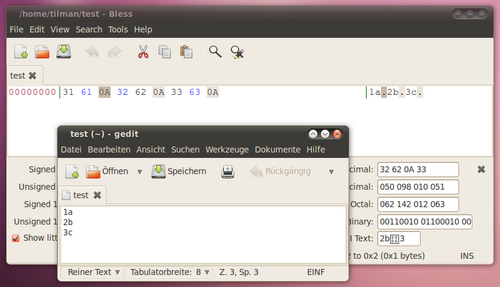
The different newline conventions cause text files that have been transferred between systems of different types to be displayed incorrectly.
Text in files created with programs which are common on Unix-like or classic Mac OS, appear as a single long line on most programs common to MS-DOS and Microsoft Windows because these do not display a single line feed or a single carriage return as a line break.
Conversely, when viewing a file originating from a Windows computer on a Unix-like system, the extra CR may be displayed as a second line break, as ^M, or as <cr> at the end of each line.
Furthermore, programs other than text editors may not accept a file, e.g. some configuration file, encoded using the foreign newline convention, as a valid file.
The problem can be hard to spot because some programs handle the foreign newlines properly while others do not. For example, a compiler may fail with obscure syntax errors even though the source file looks correct when displayed on the console or in an editor. Modern text editors generally recognize all flavours of CR+LF newlines and allow users to convert between the different standards. Web browsers are usually also capable of displaying text files and websites which use different types of newlines.
プログラムがさまざまな改行規則をサポートしている場合でも、これらの機能は十分にラベル付け、説明、または文書化されていないことがよくあります。通常、さまざまな改行規則を列挙したメニューまたはコンボボックスがユーザーに表示されますが、選択によって改行が再解釈されるのか、一時的に変換されるのか、永続的に変換されるのかは示されません。一部のプログラムは、開く、コピーする、貼り付ける、または保存する際に暗黙的に変換しますが、その動作は一貫性に欠けることがよくあります。
ほとんどのテキストベースのインターネットプロトコル(HTTP、SMTP、FTP、IRCなど多数)は、プロトコルレベルでASCII CR + LF(、0x0D 0x0A )の使用を義務付けていますが、寛容なアプリケーションは単独のLF(、0x0A)も認識することを推奨しています。規定された標準にもかかわらず、多くのアプリケーションは、キャリッジリターンエスケープと改行エスケープシーケンスの正しい組み合わせ(CR + LF)の代わりに、誤ってC言語の改行エスケープシーケンス(LF)を使用しています(上記の「プログラミング言語の改行」のセクションを参照)。このような誤ったエスケープシーケンスの偶発的な使用は、推奨されている寛容な解釈ではなく、標準のより厳格な解釈に従うシステムと通信しようとしたときに問題を引き起こします。そのような寛容でないシステムの1つがqmailメール転送エージェントで、必要なCR + LFの代わりにLFのみを送信するシステムからのメッセージの受け入れを積極的に拒否します。[ 25 ]\r\n\n\n\r\n
電子メールの標準インターネットメッセージフォーマット[ 26 ]では、「CRとLFはCRLFとしてのみ一緒に出現しなければならず、本文中に単独で出現してはならない」と規定されています。SMTP実装間で、裸のLFおよび/または裸のCR文字の扱い方が異なるため、「SMTPスマグリング」と呼ばれるSMTPスプーフィング攻撃が発生しています。[ 27 ]
The File Transfer Protocol can automatically convert newlines in files being transferred between systems with different newline representations when the transfer is done in "ASCII mode". However, transferring binary files in this mode usually has disastrous results: any occurrence of the newline byte sequence—which does not have line terminator semantics in this context, but is just part of a normal sequence of bytes—will be translated to whatever newline representation the other system uses, effectively corrupting the file. FTP clients often employ some heuristics (for example, inspection of filename extensions) to automatically select either binary or ASCII mode, but in the end it is up to users to make sure their files are transferred in the correct mode. If there is any doubt as to the correct mode, binary mode should be used, as then no files will be altered by FTP, though they may display incorrectly.[28]
Text editors are often used for converting a text file between different newline formats; most modern editors can read and write files using at least the different ASCII CR/LF conventions.
For example, the editor Vim can make a file compatible with the Windows Notepad text editor. Within vim
:setfileformat=dos :wqEditors can be unsuitable for converting larger files or bulk conversion of many files. For larger files (on Windows NT) the following command is often used:
D:\>TYPE unix_file | FIND /V ""> dos_file Special purpose programs to convert files between different newline conventions include unix2dos and dos2unix, mac2unix and unix2mac, mac2dos and dos2mac, and flip.[29] The tr command is available on virtually every Unix-like system and can be used to perform arbitrary replacement operations on single characters. A DOS/Windows text file can be converted to Unix format by simply removing all ASCII CR characters with
$ tr -d '\r' <inputfile>outputfile
or, if the text has only CR newlines, by converting all CR newlines to LF with
$ tr '\r' '\n' <inputfile>outputfile
The same tasks are sometimes performed with awk, sed, or in Perl if the platform has a Perl interpreter:
$ awk'{sub("$","\r\n"); printf("%s",$0);}'inputfile>outputfile# UNIX to DOS (adding CRs on Linux and BSD based OS that haven't GNU extensions)$ awk'{gsub("\r",""); print;}'inputfile>outputfile# DOS to UNIX (removing CRs on Linux and BSD based OS that haven't GNU extensions)$ sed-e's/$/\r/'inputfile>outputfile# UNIX to DOS (adding CRs on Linux based OS that use GNU extensions)$ sed-e's/\r$//'inputfile>outputfile# DOS to UNIX (removing CRs on Linux based OS that use GNU extensions)$ perl-pe's/\r?\n|\r/\r\n/g'inputfile>outputfile# Convert to DOS$ perl-pe's/\r?\n|\r/\n/g'inputfile>outputfile# Convert to UNIX$ perl-pe's/\r?\n|\r/\r/g'inputfile>outputfile# Convert to old MacThe file command can identify the type of line endings:
$ filemyfile.txt myfile.txt: ASCII English text, with CRLF line terminatorsThe Unix egrep (extended grep) command can be used to print filenames of Unix or DOS files (assuming Unix and DOS-style files only, no classic Mac OS-style files):
$ egrep-L'\r\n'myfile.txt# show UNIX style file (LF terminated)$ egrep-l'\r\n'myfile.txt# show DOS style file (CRLF terminated)Other tools permit the user to visualise the EOL characters:
$ od-amyfile.txt $ cat-emyfile.txt $ cat-vmyfile.txt $ hexdump-cmyfile.txt Two ways to view newlines, both of which are self-consistent, are that newlines either separate lines or that they terminate lines. If a newline is considered a separator, there will be no newline after the last line of a file. Some programs have problems processing the last line of a file if it is not terminated by a newline. On the other hand, programs that expect newline to be used as a separator will interpret a final newline as starting a new (empty) line. Conversely, if a newline is considered a terminator, all text lines including the last are expected to be terminated by a newline. If the final character sequence in a text file is not a newline, the final line of the file may be considered to be an improper or incomplete text line, or the file may be considered to be improperly truncated. The POSIX standard takes the latter position, considering newlines to be line terminators.[30]
In text intended primarily to be read by humans using software which implements the word wrap feature, a newline character typically only needs to be stored if a line break is required independent of whether the next word would fit on the same line, such as between paragraphs and in vertical lists. Therefore, in the logic of word processing and most text editors, newline is used as a paragraph break and is known as a "hard return", in contrast to "soft returns" which are dynamically created to implement word wrapping and are changeable with each display instance. In many applications a separate control character called "manual line break" exists for forcing line breaks inside a single paragraph. The glyph for the control character for a hard return is usually a pilcrow (¶), and for the manual line break is usually a carriage return arrow (↵).
RI (U+008D REVERSE LINE FEED,[31]ISO/IEC 6429 8D, decimal 141) is used to move the printing position back one line (by reverse feeding the paper, or by moving a display cursor up one line) so that other characters may be printed over existing text. This may be done to make them bolder, or to add underlines, strike-throughs or other characters such as diacritics. The reverse line feed was called a line starve – a pun on line feed – in the Hacker's Dictionary.[32]
Similarly, PLD (U+008B PARTIAL LINE FORWARD, decimal 139) and PLU (U+008C PARTIAL LINE BACKWARD, decimal 140) can be used to advance or reverse the text printing position by some fraction of the vertical line spacing (typically, half). These can be used in combination for subscripts (by advancing and then reversing) and superscripts (by reversing and then advancing), and may also be useful for printing diacritics.
<PRE>...</PRE> are honored.[A]fter decades of frustration, and having to download a real text editor to change a single line in a config file from a Linux box, Microsoft has updated Notepad to be able to handle end of line characters used in Unix, Linux, and macOS environments.
As with any change to a long-established tool, there's a chance that this new behavior may not work for your scenarios, or you may prefer to disable this new behavior and return to Notepad's original behavior. To do this, you can change [...registry keys...] to tweak how Notepad handles pasting of text, and which EOL character to use when Enter/Return is hit
Universal newlines - files opened for reading with the special mode "U" (instead of "r") translate all three commonly found line ending conventions (n, r, rn) into Python's standard n convention. Contributed by Jack Jansen. (PEP 278)
When in doubt, transfer in binary mode.
3.185 Line: A sequence of zero or more non-<newline> characters plus a terminating <newline> character.A longer elaboration on the implications of this definition of a line is available at https://stackoverflow.com/a/729795
A few entries are typical computer terminology. .... Line feed is listed to explain the punning entry line starve.