
Loading article…
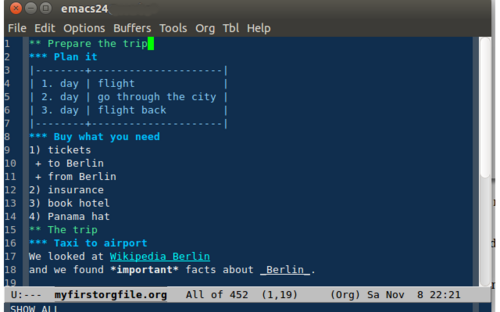
An outliner (or outline processor) is a specialized type of text editor (word processor) used to create and edit outlines, which are text files which have a tree structure or a tree view, for organization. Textual information is contained in discrete sections called "nodes", which are arranged according to their topic–subtopic (parent–child) relationships, like the members of a family tree. When loaded into an outliner, an outline may be collapsed or expanded to display as few or as many levels as desired.
Outliners are used for storing and retrieving textual information, with terms, phrases, sentences, or paragraphs attached to a tree. So rather than being arranged by document, information is arranged by topic or content. An outline in an outliner may contain as many topics as desired. This eliminates the need to have separate documents, as outlines easily include other outlines just by adding to the tree.
The main difference between a hand-written outline and a digital one is that the former is usually limited to a summary or blueprint of a planned document, while the latter may easily include all of the content of the entire document and many more. In other words, as a hand-written work an outline is a writing tool, but on a computer, it is a general purpose format supported by a robust development and display medium capable of handling knowledge from its creation to its end usage.
Outliners may be used in content creation instead of general word processors for capturing, organizing, editing, and displaying knowledge or general textual information. Outliners are ideal for managing lists, organizing facts and ideas, and for writing computer programs. They are also used for goal and task management (including personal information management and project management), and for writing books and movie scripts.
An alternative to outliners are mind mappers, which display a tree structure as a node–link diagram.
The principal attribute of outline editors is that they support or enforce the use of a hierarchy of their items.
アウトライナーには大きく分けて2種類あります。1ペイン型(または内蔵型)と2ペイン型(または外在型)で、それぞれに長所と短所があります。
1 ペインのアウトライナーは、テキスト自体がアウトライン形式に整理されているため、内在的アウトライナーとして知られています。テキストの個々のセクション (段落など) は、他のセクションを表示したまま折りたたんだり展開したりできます。すべてが単一の領域に表示されるため、「1 ペイン」という用語が使われます。1 ペインのアウトライナーの強みの 1 つは、テキスト自体が構造化されており、複数のテキストノードが同時に表示されるため、セクションをまたいで編集しやすいことです。欠点は、構造が常に表示されるわけではないため、2 ペインのアウトライナーほど全体像を把握したり、セクション間を素早く移動したりできないことです。Microsoft Word などの一部のワードプロセッサには、ドキュメントの構造化を支援するアウトライン モードまたはビューがあります。[ 1 ] [ 2 ]
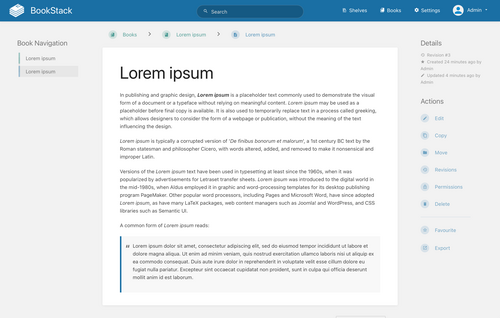
2 ペインのアウトライナーは構造とコンテンツを分離します。構造はテキストとは別個のものです。ノードのタイトルが付いたツリー構造が 1 つのペインに表示され、テキストがもう 1 つのペインに表示されます。構造は常にコンテンツとは別に明確に表示されるため、この形式では構造の概要をすばやく把握でき、ナビゲーションも容易です。欠点は、一度に 1 つのノード分のテキストしか表示されず、ナビゲーションにペインをまたぐという追加の手順があるため、構造がより硬直的になり、ノードをまたいだ編集が難しくなることです。このビューは、多くのファイル ブラウザーや電子メール プログラム (3 ペインのアウトライナーと考えることができます) に似ています。[ 3 ] このタイプの構造は、2 番目のペインがテキスト情報の代わりにドキュメントであるドキュメント管理ツールとしても役立ちます。
1ペインと2ペインのアウトライン機能を組み合わせることで、ハイブリッド型のアウトラインを作成できます。これにより、複数のノートのテキストと図を同時に表示できます。ハイブリッド型のアウトラインの整理機能は、2番目のペインのテキストではなく、親となるアウトライン構造にあるため、トピック別の整理に非常に効果的です。ハイブリッド型のもう1つの利点は、1ペインをアウトライン機能として使用し、2番目のペインをノートや参考文献の追跡に使用できることです。
内在的なアウトラインを作成する3つ目の方法は、複数列のアウトライン機能です。これは、テキスト自体がアウトライン形式に整理されるという点で、単一ペインのアウトライン機能と似ています。ただし、テキストの各セクションは折りたたまれたり展開されたりせず、すべてのセクションが表示されますが、それぞれ別の列(各レベルごとに1列)に表示されます。この方法により、構造とコンテンツを同時に表示できます。
いくつかのファイル形式は、アウトライン構造をネイティブにサポートしているか、アウトライン構造の使用/作成を推奨している。
この表は、ブラウザベースのアウトライナーを、提供する機能別に分類した一覧です(上記の「デザイン」を参照)。ブラウザベースのアウトライナーは、デスクトップまたはモバイルのウェブブラウザ(スマートフォンやタブレット)内で動作し、アウトラインのデータをリモートサーバーと同期したり、ユーザーのデバイスにローカルに保存したりできます。
{{cite web}}: CS1 maint: url-status (リンク)