
Loading article…
Web Authentication (WebAuthn) is a web standard published by the World Wide Web Consortium (W3C).[1][2][3] It defines an API that websites use to authenticate with WebAuthn credentials (passkeys[4][5]) and outlines what WebAuthn authenticators should do. It solves many of the issues of traditional password-based authentication by verifying the user's identity with digital signatures.[6] Although WebAuthn is often touted as a complete replacement for passwords, most websites that implement it continue to use passwords in some capacity.[7]
To use WebAuthn, users require a compatible authenticator. The standard does not specify how to store the keys required for signing, so a variety of authenticator types can be used. The most common authenticator type is a platform authenticator, which is built into the operating system of the device. Common platform authenticators include Android, Apple Keychain and Windows Hello. These make use of hardware security features (such as TEE and TPM), and often sync credentials between devices for ease-of-use. Another common authenticator type is a roaming authenticator, where a separate hardware device authenticates the user by connecting over USB, Bluetooth Low Energy, or near-field communications (NFC). Most smartphones can be used as roaming authenticators, and dedicated physical security keys are also used. WebAuthn is effectively backward compatible with FIDOUniversal 2nd Factor (U2F) as they both use the CTAP protocol.[8]Password managers can also be used as an authenticator, often with cloud sync.[9] Where credentials sync is not viable or possible, WebAuthn Hybrid Transport can be used to access credentials stored on another authenticator such as a smartphone.[10]
Like legacy U2F, WebAuthn is resistant to some phishing attacks[11] as the authenticator only offers credentials that were registered on the same website. However, unlike U2F, WebAuthn can be implemented in a passwordless manner.[12] Moreover, a roaming hardware authenticator resists malware, since the keys are stored on a separate device, which prevents the malware from accessing them directly.
The WebAuthn Level 1 and 2 standards were published as W3C Recommendations on 4 March 2019 and 8 April 2021 respectively.[1][13][14] A Level 3 specification is currently a First Public Working Draft (FPWD).[15] WebAuthn is a core component of the FIDO2 Project under the guidance of the FIDO Alliance.[16]
FIDO2 is the successor to FIDO Universal 2nd Factor (U2F). Whereas U2F only supports multi-factor mode, having been designed to strengthen existing username/password-based login flows, FIDO2 adds support for single-factor mode. In multi-factor mode, the authenticator is activated by a test of user presence, which usually consists of a simple button push; no password is required. In single-factor mode, the authenticator (something you have) performs user verification.[17] Depending on the authenticator capabilities, this can be:[18]
Regardless of mode, the authenticator never shares its secrets or biometric data with the website.[19] Moreover, a single user's secret or biometric works with all websites, as the authenticator selects the correct cryptographic key material to use for the service requesting authentication after user verification was completed successfully.
A secret and biometric on the authenticator can be used together, similarly to how they would be used on a smartphone. For example, a fingerprint provides convenient access to user's smartphone, but occasionally fingerprint access fails, in which case user can use a PIN.
The W3C designed and standardized WebAuthn to solve or mitigate many issues that are inherent to traditional password-based authentication:
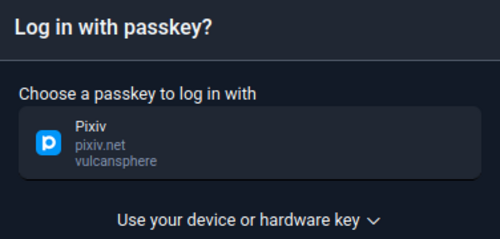
Passkey is the de factonon-technical term for a WebAuthn credential.[5][6] Most user interfaces that support WebAuthn use only passkey to refer to WebAuthn credentials.[7]
Appleが2022年に初めてパスキーを一般に公開したとき、[ 20 ] Appleは自社プラットフォームとの統合を強調しました。これに加えて、他の業界リーダーからの明確なコミュニケーションがなかったため、パスキーはApple独自のものであると推測する人もいましたが、そうではありませんでした。[ 21 ]ブラウザやWebサイトがWebAuthnを実装し始めると、機能セットが不統一だったため、何が正確にパスキーとしてカウントされるかについてさまざまな理解が生じました。パスキーはプラットフォーム認証器による管理が必要である、またはクラウドを使用した同期が必要であると考える人もいました。より適切な定義は、パスキーとは、任意のWebAuthn認証器によって管理されるWebAuthn認証情報であるということです。[ 5 ]この定義は、さまざまなベンダーがパスキーと呼んで受け入れているもののほとんどをカバーしています。
前身のFIDO U2Fと同様に、W3C Web認証(WebAuthn)は、Webサイト、Webブラウザ、および認証装置を必要とします。[ 1 ]
WebAuthnは、申請者がFIDO2認証器の所有権と制御権をWebAuthnリライングパーティと呼ばれる検証者に対してどのように証明するかを規定しています。認証プロセスは、WebAuthnクライアントと呼ばれるエンティティによって仲介されますが、これはWebAuthnに準拠したWebブラウザに過ぎません。
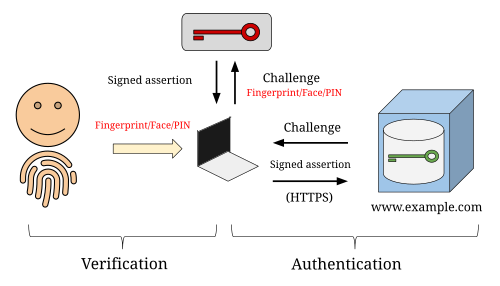

認証器は、公開鍵暗号方式を使用してWebAuthnリライングパーティを対象とした認証アサーションに署名する、多要素暗号認証器です。認証器がユーザー認証に顔認証、指紋認証、またはPINのいずれかを使用すると仮定すると、認証器自体は「あなたが持っているもの」であり、顔認証と指紋認証(生体認証)は「あなた自身」であり、PINは「あなたが知っているもの」です。
WebAuthn認証フローを開始するには、[ 22 ] WebAuthnリライングパーティがJavaScriptを介してWebAuthnクライアント(つまりブラウザ)に意図を示します。WebAuthnクライアントは、ブラウザに実装されたJavaScript APIを使用して認証器と通信します。ローミング認証器はFIDOクライアント認証器プロトコル(CTAP)[ 23 ]に準拠し、 USB、Bluetooth Low Energy、または近距離無線通信(NFC)を介して接続されます。
WebAuthn は、必ずしもローミング ハードウェア認証器を必要としません。代わりに、ソフトウェア認証器 (スマートフォンに実装されているものなど) またはプラットフォーム認証器 (WebAuthn クライアント デバイスに直接実装されている認証器) を使用できます。プラットフォーム認証器の関連例としては、Windows Hello [ 24 ]やAndroid オペレーティングシステム[ 25 ]などがあります。
WebAuthn ハイブリッド トランスポートを使用すると、WebAuthn クライアントはスマートフォンなどの別の認証デバイスに保存されている認証情報にアクセスできるようになります。これは、認証情報の同期が不可能な特定の状況で役立ちます。[ 10 ]
生体認証データはパスワードと同じようにネットワーク経由で送信されるという誤解がユーザーの間で根強く残っているが、実際はそうではない。[ 26 ] [ 27 ]
WebAuthnの依拠当事者がブラウザから署名付き認証アサーションを受信すると、そのアサーションのデジタル署名は、ユーザーの信頼できる公開鍵を使用して検証されます。
ユーザーの公開鍵を取得するために、WebAuthn 依拠当事者は、上記の認証フローと同様の WebAuthn 登録フロー[ 28 ]を開始します。主な違いは、認証者が自身の証明秘密鍵で証明ステートメントに署名することです。署名された証明ステートメントには、WebAuthn 依拠当事者が最終的に署名された認証アサーションを検証するために使用する公開鍵のコピーが含まれています。証明証明書には、認証者自体を説明するメタデータが含まれています。[ 29 ]
証明ステートメントのデジタル署名は、その特定の認証モデルの信頼できる証明公開鍵で検証されます。WebAuthn 依拠当事者が信頼できる証明公開鍵のストアをどのように取得するかは明記されていません。1 つの選択肢は、FIDO メタデータ サービスを使用することです。[ 30 ]
The attestation type specified in the JavaScript determines the trust model. For instance, an attestation type called self-attestation may be desired, for which the trust model is essentially trust on first use.

The WebAuthn Level 1 standard was published as a W3C Recommendation by the Web Authentication Working Group on 4 March 2019.[1][13][31] WebAuthn is supported by Google Chrome, Mozilla Firefox, Microsoft Edge, Apple Safari[13] and Opera.[32]
The desktop version of Google Chrome has supported WebAuthn since version 67.[33] Firefox, which had not fully supported the previous FIDO U2F standard, included and enabled WebAuthn in Firefox version 60, released on 9 May 2018.[34] An early Windows Insider release of Microsoft Edge (Build 17682) implemented a version of WebAuthn that works with both Windows Hello as well as external security keys.[35]
Existing FIDO U2F security keys are largely compatible with the WebAuthn standard, though WebAuthn added the ability to reference a unique per-account "user handle" identifier, which older authenticators are unable to store.[1]
One of the first FIDO2-compatible authenticators was the second-generation Security Key by Yubico, announced on 10 April 2018.[36] The first FIDO2-compatible authenticators with a display was Trezor Model T by SatoshiLabs, announced on 6 November 2019.[37] Trezor Model T was also the first authenticator that allowed users to select which FIDO2 resident credential should be used directly on a device.
The first Security Level 2 certified FIDO2 key, called "Goldengate" was announced one year later by eWBM on 8 April 2019.[38][39]
Dropbox announced support for WebAuthn logins (as a 2nd factor) on 8 May 2018.[40]
Apple announced that Face ID or Touch ID could be used as a WebAuthn platform authenticator with Safari on 24 June 2020.[41]
BitwardenやDashlaneなどのいくつかのパスワードマネージャーはWebAuthnをサポートしています。[ 42 ] [ 43 ]
WebAuthn は、ユーザー認証情報を交換する際にWeb サイトとWeb ブラウザー間のやり取りを形式化しようとするW3C のより一般的な認証情報管理APIの拡張を実装しています。Web 認証 API [ 44 ] [ 45 ]は、認証情報管理とJavaScriptメソッドを拡張してパラメーターを受け入れるようにしています。このメソッドは、公開鍵認証器をユーザー アカウントに関連付ける一環として登録するために使用され(おそらくアカウントの初期作成時ですが、既存のアカウントに新しいセキュリティ デバイスを追加する場合の方が可能性が高いです)、このメソッドは認証 (ログイン時など) に使用されます。navigator.credentials.create()navigator.credentials.get()publicKeycreate()get()
ブラウザが WebAuthn をサポートしているかどうかを確認するには、スクリプトはwindow.PublicKeyCredentialインターフェースが定義されているかどうかを確認する必要があります。 に加えてPublicKeyCredential、標準では、さまざまな辞書やその他のデータ型に加えてAuthenticatorResponse、 、AuthenticatorAttestationResponse、インターフェースも定義されています。AuthenticatorAssertionResponse
APIでは、秘密鍵の初回作成を要求する以外に、秘密鍵への直接アクセスや操作は許可されていません。
2018年8月、Paragon Initiative EnterprisesはWebAuthn標準のセキュリティ監査を実施しました。特定の脆弱性は見つかりませんでしたが、標準で義務付けられている基盤となる暗号化の使用方法に深刻な弱点があることが明らかになりました。[ 46 ]
主な批判点は、過去の他の暗号システムで問題となった2つの潜在的な問題点に集中しており、同様の攻撃の被害に遭わないためには、これらの問題点を避けるべきである。
パラゴン・イニシアティブ・エンタープライズは、この標準規格が当初どのように策定されたかについても批判した。提案が事前に公開されず、経験豊富な暗号学者に意見やフィードバックを求めなかったため、学術界からの幅広い暗号研究の影響を受けなかったというのだ。
こうした欠点があるにもかかわらず、Paragon Initiative Enterprisesは引き続きWebAuthnの利用を推奨していますが、標準規格の最終決定前に実装できることを期待して、潜在的な実装者や開発者向けにいくつかの推奨事項を提示しています。こうしたミスをできるだけ早期に回避することで、標準規格の不備や後方互換性の必要性によって生じるあらゆる課題から業界を守ることができるでしょう。
ECDAA はデバイス認証と組み合わせて使用するためにのみ設計されました。WebAuthn のこの特定の機能は、認証が機能するために必ずしも必要ではありません。現在の実装では、ユーザーが登録手続き中に認証ステートメントを送信するかどうかを決定できます。独立して、依拠当事者は認証を要求するかどうかを選択できます。ECDAA はブラウザや依拠当事者によって実装されなかったため、WebAuthn レベル 2 から削除されました。[ 48 ]
一般的に「パスキー」と呼ばれるWeb認証は、一般の人々から賛否両論の反応を受けている。