
Loading article…
 | |
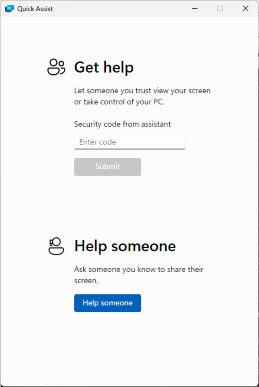 Windows 11のクイック アシスト | |
| 開発者 | マイクロソフト |
|---|---|
| 含まれるもの | Windows 10以降 |
| タイプ | リモートコントロール機能 |
クイックアシストは、ユーザーがネットワークまたはインターネット経由でリモートのWindowsコンピューターを表示または制御し、直接ユニットに触れることなく問題を解決できるようにするMicrosoft Windowsの機能です。 [1] [2] [3]これは、リモートデスクトッププロトコル(RDP)に基づいています。これは、Windows 10で導入されたGet Help機能によって補完されています。この機能を使用すると、ユーザーはMicrosoftに直接問い合わせることができますが、リモートデスクトップや画面共有はできません。
Windows 10 でクイック アシストが導入される前は、Windows XP以降のバージョンの Windows では、 Windows リモート アシスタンスと呼ばれる同様の機能が提供されていました。
概要
リモート アシスタンスを提供するヘルパーは、リモート コンピューターごとに 1 つずつ、複数のセッションを同時に開くことができます。ただし、ヘルパーからのサポートを求めるユーザーが接続を待機できるリモート アシスタンス セッションは 1 つだけです。接続の招待は複数の受信者に送信でき、その中のどの受信者も接続できます。最初のヘルパーが切断されるまで、以降のすべての接続試行はブロックされます。最初のヘルパーが切断されると、別のヘルパーが接続できるようになります。ユーザーがセッションを切断すると、リモート アシスタンス アプリケーションは終了し、それ以上の接続は許可されません。
クイック アシストは Windows クライアントにデフォルトでインストールされますが、 Windows Server 2008 R2サーバーでは使用できません。[4]ツールの名前は Windows の言語によって異なります。スタート メニューで「クイック アシスト」を検索すると、言語設定に関係なくツールが見つかります。
クイック アシストは、ユーザーをセッションに一致させるためにコードを要求します。これにより、提供者は管理者モードで受信者のコンピューターにアクセスでき、受信者は提供者が行った選択を確認できるようになります。
繋がり
クイックアシストはTCP ポート443を使用し、以下のホストと通信します。[5]
Quick Assist バイナリは「C:\Windows\System32\quickassist.exe」にあります。
歴史
The feature was first introduced in Windows XP as Remote Assistance and based on Remote Desktop technologies.[6] Remote Assistance in Windows XP is integrated into the Help and Support Centre UI and allows sending invitations to the support person by email, Windows Messenger or saving the invitation as a file and transferring the file across through other methods.[6] The computer can be controlled by both, the support person connecting remotely as well as the one sending the invitation. Chat, audio-video conversations and file transfer are available.[6]

In Windows Vista, Remote Assistance is upgraded with a standalone user interface and based on RDP 6 and Windows Desktop Sharing API.[7] Two systems administrators can simultaneously connect to a single computer. Remote sessions automatically reconnect after restarting the computer. It also supports session pausing, built-in diagnostics, chat, file transfer and XML-based logging. It reduces bandwidth requirements for low-speed connections. NAT traversal allows a session to be established even if the user is behind a Network Address Translation (NAT) device, for example, a router in a home network. Remote Assistance is configurable using Group Policy and supports command-line switches so that custom shortcuts can be deployed.
In Windows 7, Remote Assistance is based on RDP 7. An extra option to connect using Peer Name Resolution Protocol is added, called Easy Connect if IPv6 connectivity is present.[8] With Easy Connect, only a password needs to be shared instead of an invitation file, and two computers can establish a peer-to-peer connection over the local area network (LAN) or the Internet without a relay server. However, Windows Remote Assistance does not support file transfer and clipboard sharing in Windows 7.[9][10]
Remote Assistance is installed by default on Windows clients, but must be added manually on Windows Server 2008 R2 servers.[11] Remote assistance sessions may be initiated using the Windows Remote Assistance application available on the Start menu under All Apps → Maintenance[12] or by invoking msra.exe from command-line interface.[13]
オリジナルのリモートアシスタンスはWindows 10のすべてのリリースにも含まれていますが、Windows 10 Anniversary Update以降、スタートメニューのショートカットが削除され、ユーザーから事実上見えなくなりました。代わりに、クイックアシストと呼ばれる新しいアプリが追加されました。[14]これは、ほぼ同じ機能と、サポートを受けるとサポートを提供するというボタンを備えた同様のユーザーインターフェイスを備えています。デザインはUWPアプリに似ています。リモートアシスタントとは異なり、クイックアシストでは、サポート担当者がヘルプを提供する前にMicrosoftアカウントを使用してサインインする必要があります。[15] [16]
2021年11月、マイクロソフトは、リモートヘルプと呼ばれる、よりビジネスフレンドリーなバージョンのクイックアシストを発表しました。[17] Windows 10の後のバージョンでは、ユーザーと技術者がAzure Active Directoryに対して認証できるようになりましたが、このバージョンには次のような新しい統合が含まれています。
- UAC 標高
- リモート アシスタンス セッション レポート
- ロールベース認証 (RBAC)
- Intune からの管理 / Intune からの起動機能
- 組織内のセッションを制限する (Azure AD テナント)
- ブランディング
- 条件付きアクセス
- ADFS サポート
リモート アシスタンスはエンド ユーザーのコンピューターへのリモート デスクトップ プロトコル (RDP) 接続を確立しますが (クライアント マシンと、そのマシンの背後にあるファイアウォール/NAT/ルーターで TCP ポート 3389 が開かれている必要があります)、クイック アシストはクラウド ベースであるため、ヘルパーの PC からクラウド サービス/Microsoft サーバーへの送信接続が 1 つと、クラウド サービスから支援を受けるユーザーのマシンへの別の接続が必要です。クライアント デバイスのファイアウォールではポートは開かれません。
機能比較
参照
参考文献
- ^ Windows 10 のクイック アシストでリモートからヘルプを取得する
- ^ Windows XP のリモート アシスタンスの概要
- ^ Windows XP 技術概要
- ^ 「Windows 7 および Windows Server 2008 R2 でのリモート アシスタンスとその結果生じるインターネット通信」。TechNet。Microsoft。
- ^ 「クイックアシストを使用してユーザーを支援する - Windows クライアント管理」。2024 年 6 月 4 日。
- ^ abc Windows XP でリモート アシスタンスを使用する方法
- ^ 「デスクトップ共有アプリケーションの作成」。エンタープライズ モビリティとセキュリティ ブログ。Microsoft。2007年 3 月 23 日。
- ^ 「Win 7 のピアツーピア ベースの機能」。2010 年 1 月 23 日時点のオリジナルよりアーカイブ。
- ^ Windows 7 のリモート アシスタンスの改善
- ^ 「なぜ Windows 7 のリモート アシスタンスはクリップボードの共有とファイル転送をサポートしないのですか? 回避策はありますか? [sic]」。Windows クライアント テックセンター。Microsoft TechNet Social。2010 年 12 月 10 日。2012 年 3 月 23 日のオリジナルからアーカイブ。2011年 11 月 9 日に取得。
- ^ Windows 7 および Windows Server 2008 R2 でのリモート アシスタンスとそれによるインターネット通信
- ^ Windows リモート アシスタンスを使用してコンピューターのヘルプを取得する
- ^ コマンドラインまたはスクリプトからリモートアシスタンスを開始する
- ^ 「クイック アシスタンス: 別の PC/コンピューターをリモートで制御する」。Windows Call。2019年 9 月 9 日閲覧。
- ^ Popa, Bogdan (2016 年 8 月 9 日)。「Microsoft が Windows 10 Anniversary Update の TeamViewer Killer をハイライト」。Softpedia。SoftNews SRL。
- ^ Srinivasan, Ramesh (2016-08-08). 「Windows 10 の新しい「クイック アシスト」アプリの使用 (ウォークスルー)」. Winhelponline .
- ^ 「Re: リモート ヘルプ: Microsoft の新しいリモート アシスタンス ツール」。2021 年 11 月 25 日。
- ^ Microsoft Endpoint Manager によって管理されるモバイル デバイスをリモートで支援する
さらに読む
- 「 Windowsデスクトップ共有 API」。Enterprise Mobility + Security ブログ。Microsoft。2007年 3 月 8 日。
- Torre, Charles (2006 年10月 16 日)。「Windows Vista リモート アシスタンス: 仕組み」。Channel 9。Microsoft。
- Tulloch, Mitch、Northrup, Tony、 Honeycutt , Jerry (2010)。「23: リモート アシスタンスによるユーザー サポート」(PDF)。Windows 7 リソース キット。ワシントン州レドモンド: Microsoft Press。ISBN 9780735627000。