
Loading article…
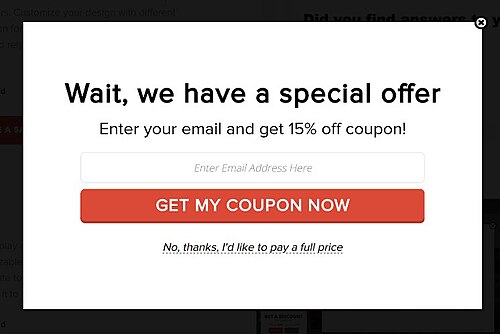
Pop-up ads or pop-ups are forms of online advertising on the World Wide Web. A pop-up is a graphical user interface (GUI) display area, usually a small window, that suddenly appears ("pops up") in the foreground of the visual interface. The pop-up window containing an advertisement is usually generated by JavaScript[1] that uses cross-site scripting (XSS), sometimes with a secondary payload that uses Adobe Flash.[2] They can also be generated by other vulnerabilities/security holes in browser security.
A variation on the pop-up window, the pop-under advertisement, opens a new browser window under the active window. Pop-unders do not interrupt the user immediately but appear when the user closes the covering window, making it more challenging to determine which website created them.
Pop-up ads originated on the Tripod.com webpage hosting site in the late 1990s. JavaScript provided the capability for a web page to open another window. Ethan Zuckerman claims he used that capability to launch advertisements in separate windows as a response to complaints from advertisers about their ads appearing on pages with sexual content.[3] Zuckerman later apologized for the unforeseen nuisance pop-up ads had evolved into.[4]
Web development and design technologies allow an author to associate any item on a pop-up with any action, including with a cancel or innocent-looking button. Because of bad experiences and apprehensive of possible damage that they may cause, some users do not click on or interact with any item inside a pop-up window whatsoever,[5] and may leave the site that generated them or block all pop-ups.
Opera was the first major browser to incorporate tools to block pop-up ads; the Mozilla browser later improved on this by blocking only pop-ups generated as the page loads. In the early 2000s, all major web browsers except Internet Explorer let users block unwanted pop-ups almost completely. In 2004, Microsoft released Windows XP SP2, which added pop-up blocking to Internet Explorer.[6] Most modern browsers provide pop-up blocking tools; third-party tools add other features, such as ad filtering.
Users of websites and web applications continuously experience unwanted pop-up ads throughout the course of their normal interaction with a web browser.[7] Ordinarily, users respond by dismissing the pop-up through the "close" or "cancel" feature of the window hosting the pop-up. Because this is a typical response, some authors of pop-up advertising depend on this and create on-screen buttons or controls that look similar to a "close" or "cancel" option. When the user chooses one of these "simulated cancel" options, the button performs an unexpected or unauthorized action (such as opening a new pop-up or downloading an unwanted file on the user's system).[5]
A hover ad or in-page pop-up uses JavaScript to combine a banner ad, and a pop-up window that appears in front of the browser screen. JavaScript imposes an advertisement over a webpage in a transparent layer. This advertisement can appear in a variety of forms. For example, an advertisement can contain an animation that links to the advertiser's site. An advertisement can also look like a normal window. Pop-up blockers cannot block the ad because it is a part of the webpage, but it can be blocked with third-party ad blockers such as AdBlock and Adblock Plus, or by using custom style sheets.
URLs are sometimes redirected to advertisement pages by URL redirection.
URLs are sometimes opened in a new tab and then the content of the old background tab will be replaced with an advertisement page by URL redirection, other times it switches the tab the user is on to the advertisement tab. Adblock Plus[8] and NoScript[9] cannot block these redirects.
ポップアンダー広告はポップアップ広告に似ていますが、広告ウィンドウがブラウザのメインウィンドウの手前に重ねて表示されるのではなく、背後に隠れて表示されます。ポップアップ広告が普及し、コンピュータ画面全体を占めるほど煩わしくなったため、多くのユーザーはサイト上に表示されたポップアップ広告をすぐに閉じて、内容を確認しませんでした。ポップアンダー広告はコンテンツの表示をすぐに妨げることはなく、ユーザーがブラウザのメインウィンドウを閉じたり最小化したりするまで、気づかれることなく表示されます。
ポップアンダー広告は、1995年にNetscape 2.0b3ブラウザで導入された2つのJavaScript関数を利用したものです。現代のウェブパブリッシャーや広告主は、これを利用してユーザーの画面上にウィンドウを作成し、広告を読み込んでから、画面の背後に表示します。
// 現在のサイトの前面に新しいウィンドウを作成しますwindow.open ( URL , windowName [ , windowFeatures ] ); // 読み込まれた広告をブラウザの背後に押し戻しますwindow.focus ( );ほとんどの最新ブラウザでは、window.openユーザー操作(マウスのクリックなど)イベントハンドラによって呼び出された場合にのみ実行が許可されます。非対話型の呼び出し(タイマーコールバック、ロードイベントなど)は、window.open新しいウィンドウがブロックされる原因となります。
この制限を回避するため、ほとんどのポップアンダー広告は、ドキュメントまたはドキュメント本文に直接アタッチされたマウスクリックイベントリスナーでトリガーされます。これにより、他のクリックイベントハンドラで処理されなかったすべてのマウスクリックイベントを捕捉し、window.openブロックされることなく呼び出しを行うことができます。たとえば、ユーザーがテキストを選択すると、マウスクリックによってドキュメントにアタッチされたマウスクリックハンドラがトリガーされ、上記のコードを使用してポップアンダーが開きます。window.open呼び出し制限を回避する他の手法としては、マウスクリックを「ハイジャック」する方法があります。
ホバー広告(一般的にはページ内ポップアップと呼ばれる)は、ダイナミックHTML、JavaScript、および同様のWebブラウザ技術を使用して作成される特殊なポップアップ広告です。Webページと一緒にスクロールしないため、ページ上に「ホバー」しているように見え、通常はコンテンツを覆い隠します。ホバー広告ウィンドウはWebページのHTMLコンテンツに不可欠な部分であるため、ポップアップブロックソフトウェアでブロックするのは非常に困難です。したがって、コンテンツをフィルタリングするソフトウェアは、ホバー広告ウィンドウを作成、表示、操作する記述的または手続き的なコンテンツ部分を認識して削除するためのアルゴリズム的な手段を持っていません。
ExitExchange.com は 2000 年に、ポップアンダー広告の一種であるエグジットポップに関する特許を出願しました。ポップアンダー特許に関する長年の論争と多数の記事を経て、この特許は2008 年 4 月と 6 月に米国特許商標庁(USPTO)によって付与されました。 [ 14 ] それぞれの特許番号は、米国特許 7,386,555 ('555) と米国特許 7,353,229 ('229) です。'555 は、コンピューティング デバイス上のツールバーまたはソフトウェア アプリケーションからエグジットポップを開く方法に関連しており、'229 は、メディア ファイル内に含まれる埋め込みスクリプト (たとえば、ウェブ ページ上の JavaScript コード) からエグジットポップを開く方法を対象としています。
ポップアップ広告の著作権に関する側面については、ウィキペディアの「二次的著作物」と「変形性」に関する記事で解説されています。どちらの記事にも、ポップアップ広告の例を示す図解とリンクが掲載されています。
{{cite web}}: CS1メンテナンス: アーカイブサービスは非推奨になりました (リンク)