
Loading article…
| 開発者 | マイクロソフト |
|---|---|
| 初回リリース | 2009年9月 |
| フォーマットの種類 | 有向グラフ |
| 延長 | テキスト |
| Webサイト | docs.microsoft.com/en-us/visualstudio/modeling/directed-graph-markup- language-dgml-reference |
有向グラフマークアップ言語(DGML)は、有向グラフ用のXMLベースのファイル形式です。[1]
DGML の紹介
3つのノードとそれらの間に2つのリンクがある単純な有向グラフは次のようになります。
<?xml version="1.0" encoding="utf-8"?>
<DirectedGraph xmlns= "http://schemas.microsoft.com/vs/2009/dgml" > <ノード> <Node Id= "a" Label= "a" Size= "10" /> <Node Id= "b" Background= "#FF008080" Label= "b" /> <Node Id= "c" Label= "c" Start= "2010-06-10" /> </Nodes> <リンク> <Link Source= "a" Target= "b" /> <Link Source= "a" Target= "c" /> </Links> <プロパティ> <Property Id= "Background" Label= "Background" DataType= "Brush" /> <Property Id= "Label" Label= "Label" DataType= "String" /> <Property Id= "Size" DataType= "String" /> <Property Id= "Start" DataType= "DateTime" /> </Properties> </DirectedGraph>
これは次のようになります:
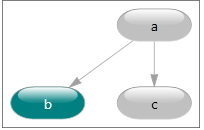
DGMLの完全なXSDスキーマは[1]で入手できます。DGMLではグラフ内のノードとリンクを記述できるだけでなく、それらのノードとリンクにユーザー定義のプロパティやカテゴリを注釈として付けることができます。
参照
外部リンク
- http://msdn.microsoft.com/vstudio Visual Studio のホームページ
- http://schemas.microsoft.com/vs/2009/dgml DGML のXSDスキーマを説明するページ
- http://www.lovettsoftware.com には、Visual Studio で DGML グラフを使用する方法を示すビデオがあります。
- https://msdn.microsoft.com/en-us/library/dd409365.aspx、DGML の使用方法に関するドキュメント
参考文献
- ^ Jacobs, Mike; Hogenson, Gordon; v-alji; jesong (2016 年 11 月 15 日). 「Directed Graph Markup Language (DGML) リファレンス - Visual Studio 2015」. learn.microsoft.com . 2024 年 4 月 22 日時点のオリジナルよりアーカイブ。 2024 年11 月 22 日閲覧。